Class 12 AI (843) Unit 1: Python Programming Practical Notes & Programs

“Looking for CBSE Class 12 AI Unit 1 Python Programming and Practical notes?
Here it is! This Class 12 AI Unit 1 Python Practical Notes covers all practical-oriented topics as per latest CBSE curriculum. It includes NumPy, Pandas (Series & DataFrames), CSV handling, Handlling Missing Values and Linear Regression algorithms. Everything you need for your Class 12 AI Unit-1 Python Practical Notes in one place!
Python Libraries
- Python libraries are collections of pre-written code that help perform common tasks without writing code from scratch.
- They act like toolkits containing predefined functions and methods.
- Libraries make programming faster, easier, and more efficient.
- In the field of data science and analytics, Python provides two highly versatile and powerful libraries
- NumPy
- Pandas
- These libraries help in handling, manipulating, and analysing large datasets with ease and accuracy.
NumPy Library
- NumPy stands for Numerical Python.
- It is a general-purpose library used for numerical computing in Python.
- It supports mathematical, statistical, and logical operations.
- NumPy provides support for arrays (especially multi-dimensional arrays) and mathematical operations on them.
What is Pandas in Python?
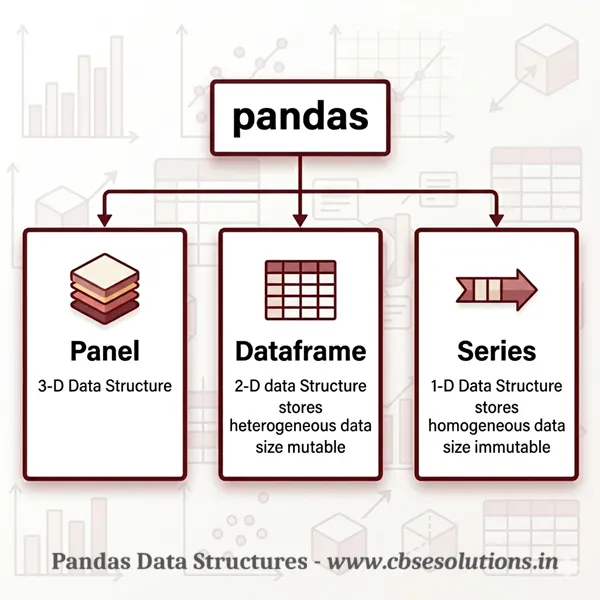
Pandas is one of the most important and useful open-source Python’s libraries for Data Science. It is basically used for handling complex and large amount of data efficiently and easily. Pandas has derived it’s name from Panel Data System where panel represent a 3D data structure. It was mainly develop by Wes Mckinney.
Pandas Data Structure
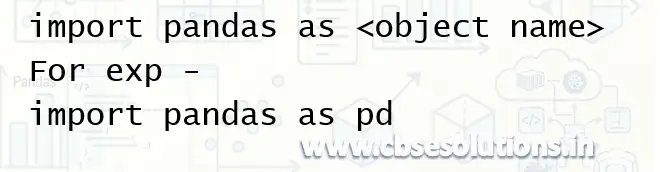
How to import pandas library
Create or Declare Series object
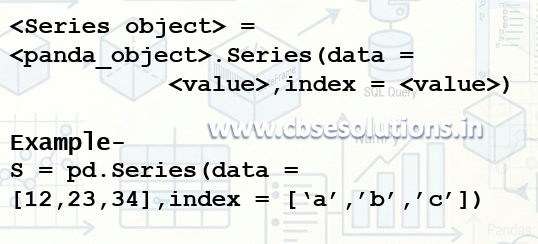
Creating Series object using List
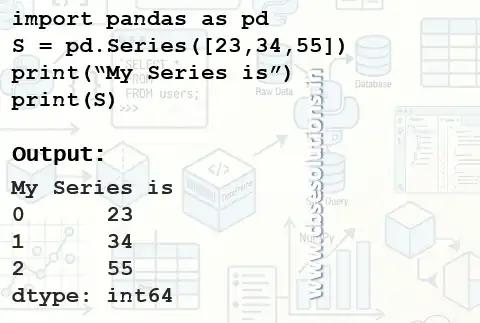
Creating Series object using List (Without Labelled Index)
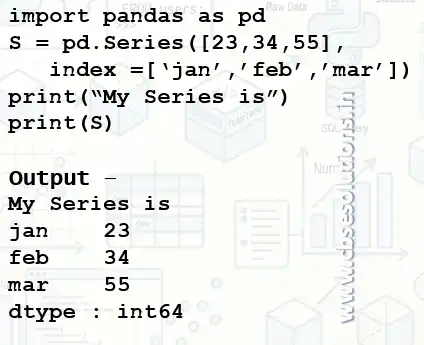
Creating Series object using List (With Labelled Index)
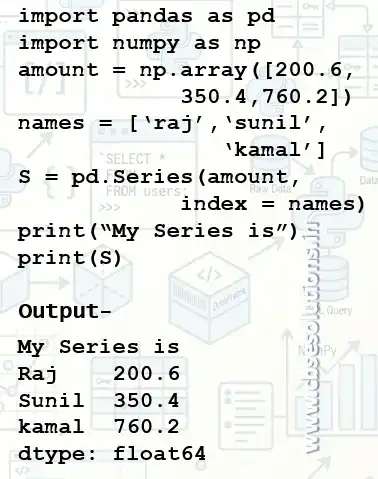
Creating Series object Numpy Array
To use Numpy array as data for Series object make sure Numpy library is imported as per syntax given below:
import numpy as np
<Series object> = <panda_object>.Series(data = <nparray>, index = <sequence>)
Example: Create a Series object that stores amount paid as values and name of customer as index. Amount paid is taken as nparray.
Creating Series object using Scalar value
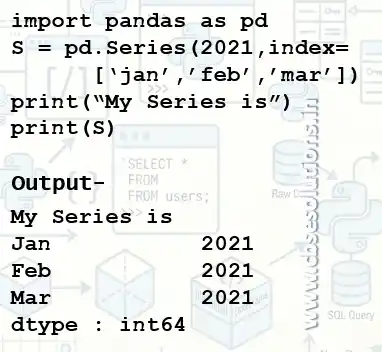
- Scalar value refers to single value passed for creating series object.
- Index argument must be passed while creating series object using scalar value.
- Syntax:
<Series object> = <panda_object>.Series(scalar value, index = <sequence>)
What dataframe?
- It is 2D (Two Dimensional) data structure similar to spreadsheet.
- Used to manage large and complex data in tabular format
- It contains both rows and columns and hence have both row and column indexes
Creating dataframe
Syntax:
import pandas as <pandas object>
<dataframe object> = <pandas object>.DataFrame(data, index, columns)
In the above syntax, arguments we used are-
- Data – Values to be passed in dataframe. It can be any collection such as list, nparray, dictionary, series etc.
- Index – Used to label index for rows. It is optional, and if not passed than numbers from 0 to n-1 is assigned to rows
- Columns – Used to label index for columns. It is optional, and if not passed than numbers from 0 to n-1 is assigned to each column.
Create Dataframe without Labelled Index
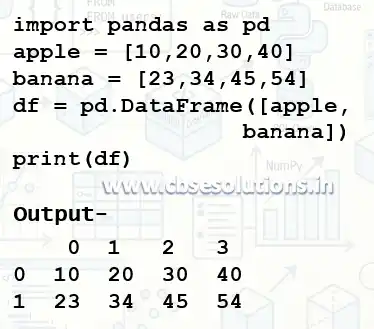
Note- Index values will be generated automatically
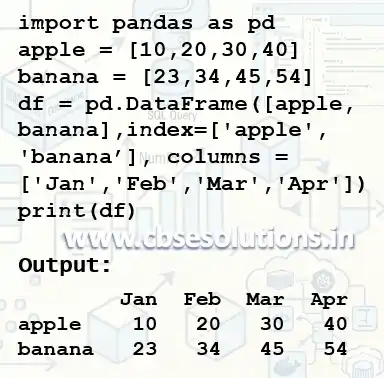
Create Dataframe with Labelled Indexes
Creating dataframe using Dictionary
- Dictionary can also be passed as data to create dataframe
- By default, keys of dictionary are taken as column labels of dataframe
- Values of dictionary are taken as input data of dataframe
Create dataframe from List of Dictionaries
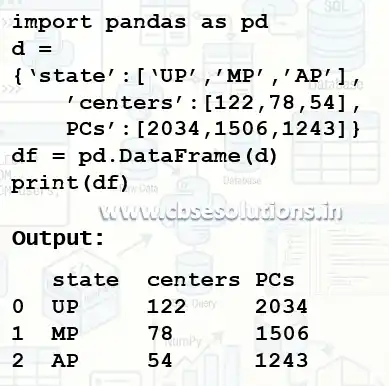
Note: Values of all the keys must be of same structure and length.
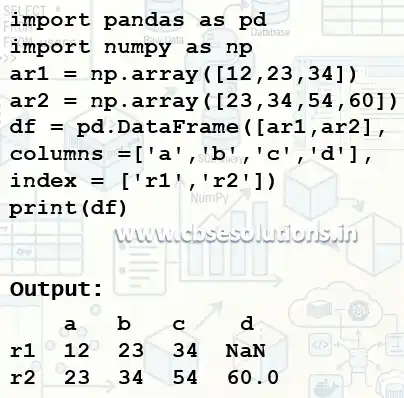
Creating dataframe using Numpy array
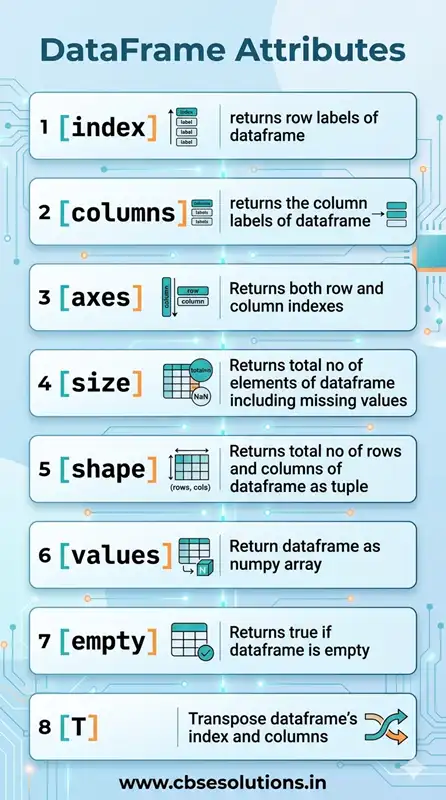
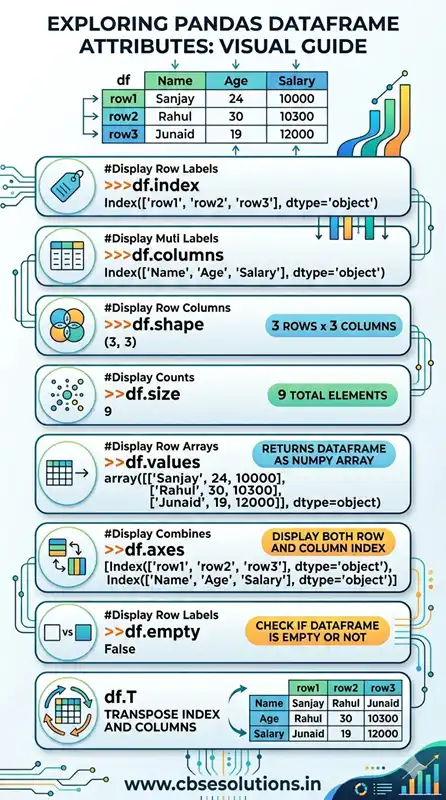
Dataframe Attributes
Attribute refers to properties of dataframe. Using dataframe attribute we can get all kind of information related to it. Following table list all dataframe attributes:
Operations on rows and columns in DataFrame
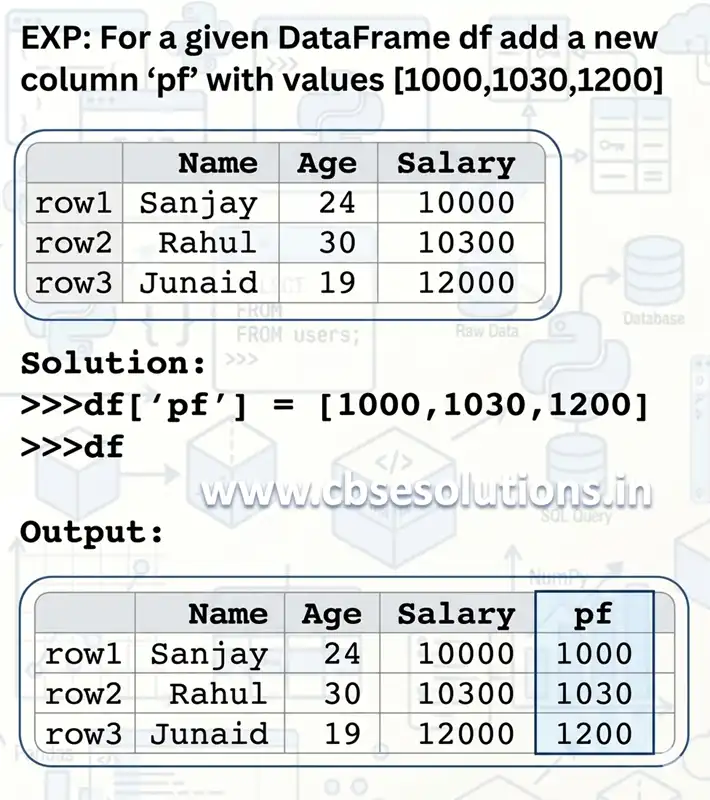
Adding a New Column to a DataFrame:
Syntax:
<DFobject>[<Columnname>] = [List of Values]
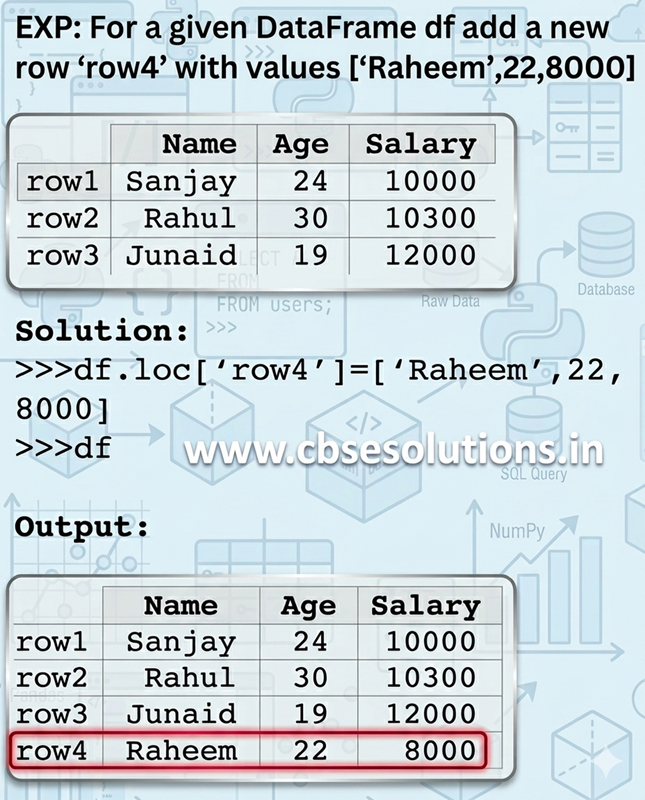
Adding an New Row to a DataFrame
Syntax:
<DFobject>.loc[<Columnname>] = [List of Values]
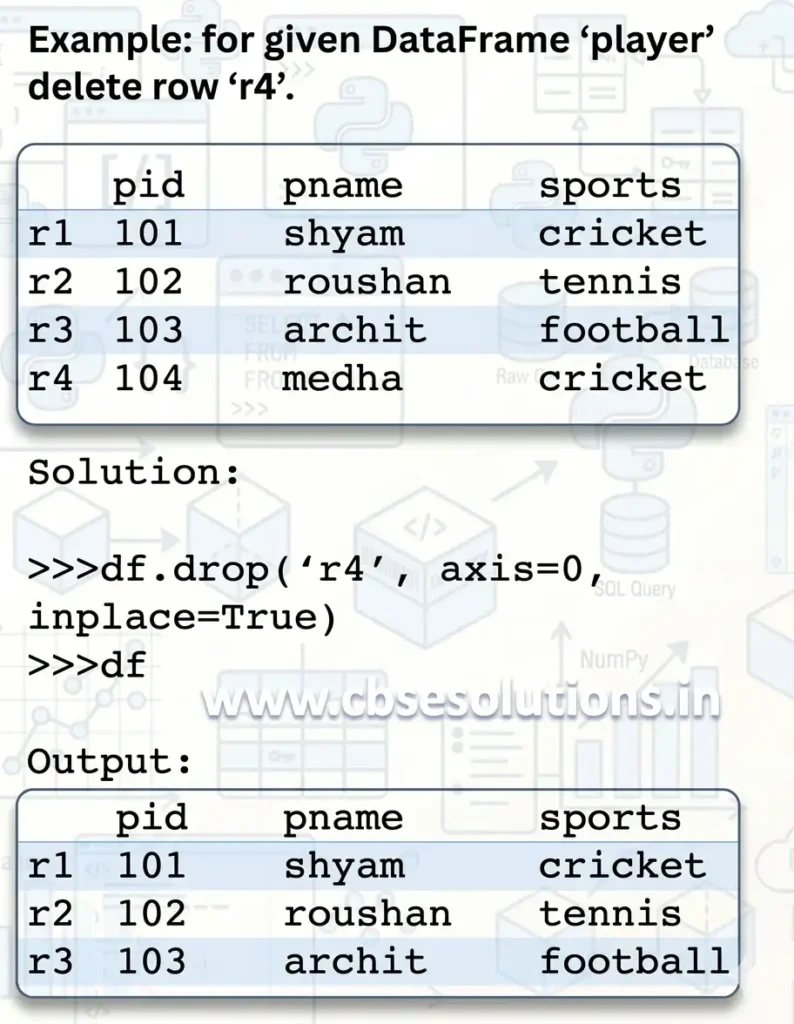
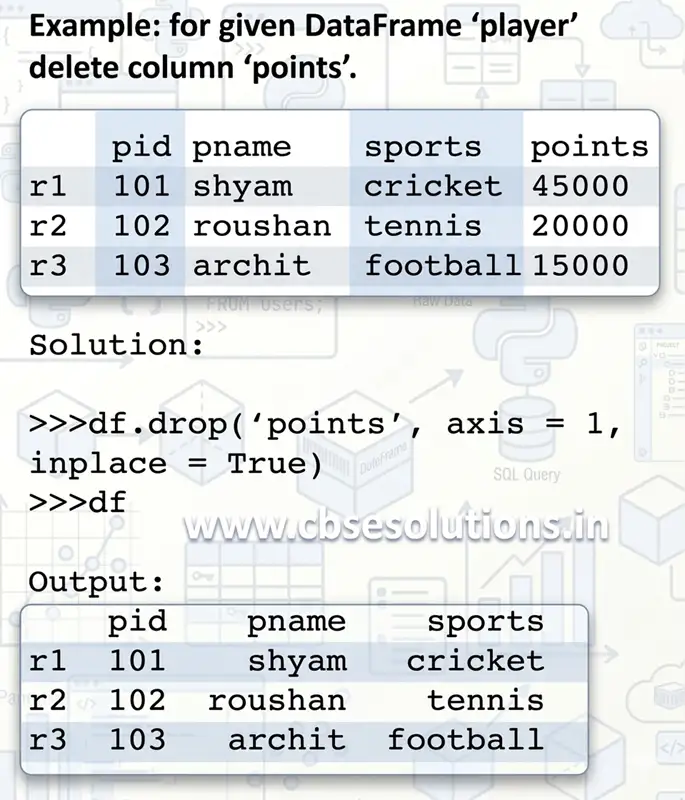
Deleting Row(s)/Column(s) from DataFrame
We can delete Row(s)/Column(s) using DataFrame.drop() method.
Syntax:
df.drop(label(s), axis=0/1, inplace=True)
- label → row name or column name
- axis=0 → delete row, axis=1 → delete column
- inplace=True → makes changes permanent
Import and Export Data between CSV Files and DataFrames
CSV Files
- CSV File refers to Comma Separated Files.
- CSV files are Simple text files that stores data in tabular format separated by comma.
- CSV Files can be easily read by humans and any applications.
- Each line in CSV file represents a row in a table.
- Pandas provides two main methods to work with CSV files:
- read_csv(): to import data into a DataFrame.
- to_csv(): to save data from a DataFrame back into a CSV file.
Importing CSV files into DataFrame
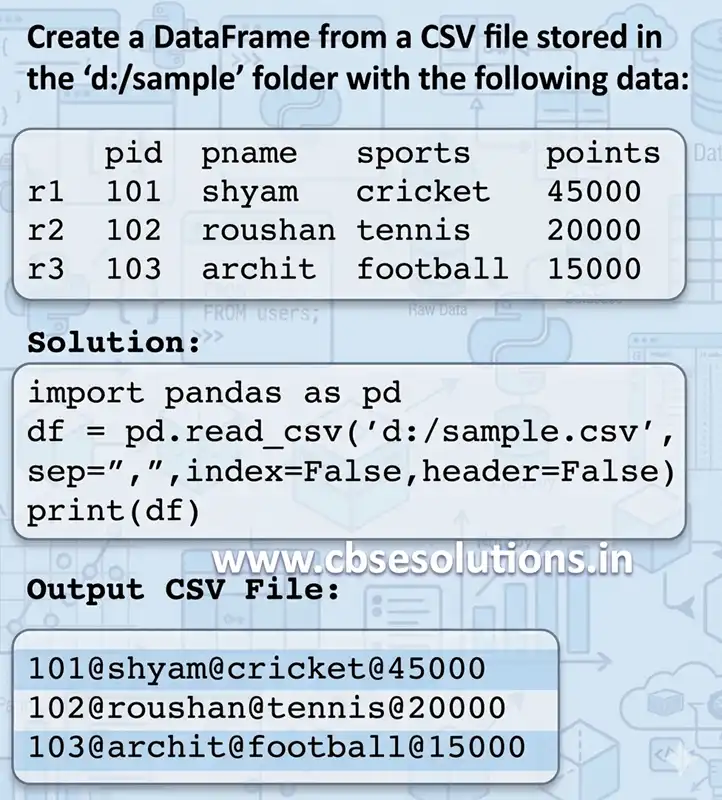
We can load data from csv file intro dataframe using read_csv().
Syntax:
dataframe_object = pandas_object.read_csv(“csv file path”,sep, header,name)
- First parameter is name of csv file to be imported with its path
- Second parameter ‘sep’ specifies how values are separated such as comma, tab, semicolon etc.
- Third parameter ‘header’ specifies’ the no of rows whose values are to be used as column names.
- By default, header = 0, which implies that column names are inferred from first line of the file.
- Using ‘names’ parameter we can specify labels for the columns to be imported.
Export Dataframe to CSV File
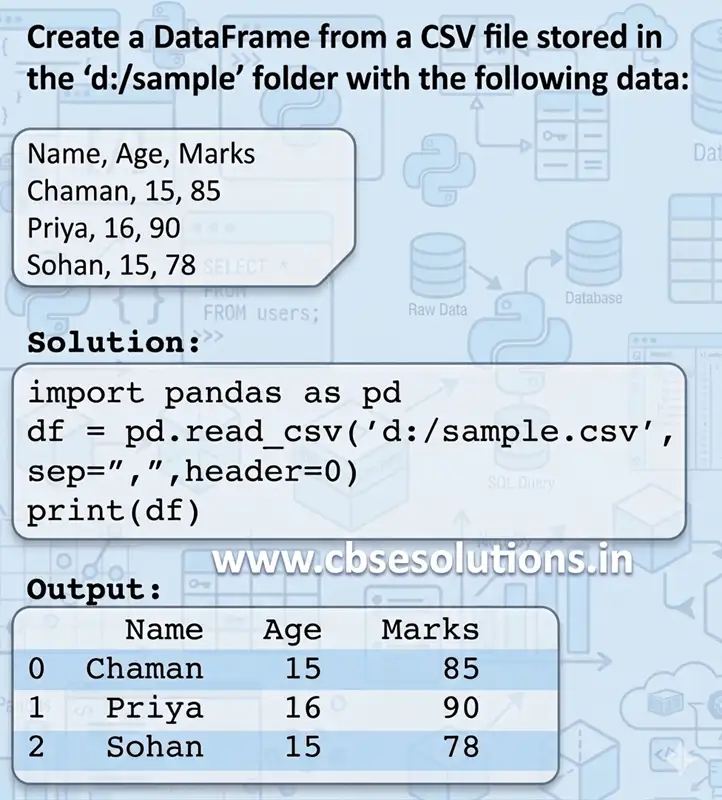
We can use to_csv() to save a dataframe to a csv file.
Syntax:
dataframe_object.to_csv(‘csv file path’, sep, header, index)
- First parameter is name and path of csv file to be created from dataframe
- Second parameter ‘sep’ specifies how values are separated such as comma, tab, semicolon etc.
- Third parameter ‘header’ specifies whether column names to be saved in csv file or not. header = False will not save column names
- Fourth parameter ‘index’ specifies whether row labels to be saved in csv file or not. index = False will not save row labels.
Handling Missing values
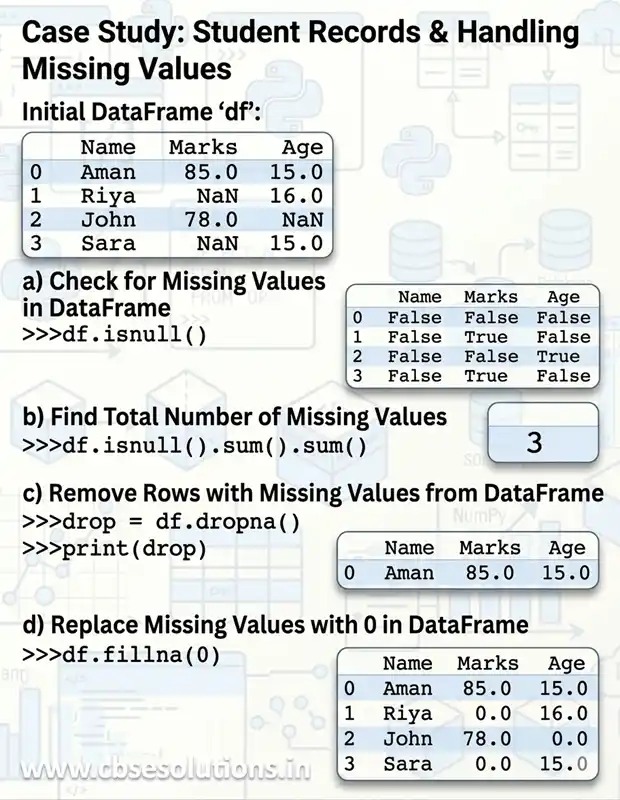
There are two main strategies to handle missing values:
- Drop the rows having missing values
- Estimate (fill) the missing values
Checking Missing Values:
- Use isnull() function
- Returns True for missing values and False otherwise
Dropping Missing Values:
- Removes the entire row containing missing data
- Use dropna() function
- Reduces dataset size, so use only when missing values are few
Estimating Missing Values:
- Replace missing values using:
- Previous or next value
- Mean, minimum, or maximum
- Constant values like 0 or 1
- Use fillna() function
- Example: fillna(0), fillna(1)
Linear Regression algorithm – Practical activity
Linear Regression is a machine learning algorithm used to predict a value based on a linear relationship between input and output data. It finds a best-fit straight line to predict outputs.
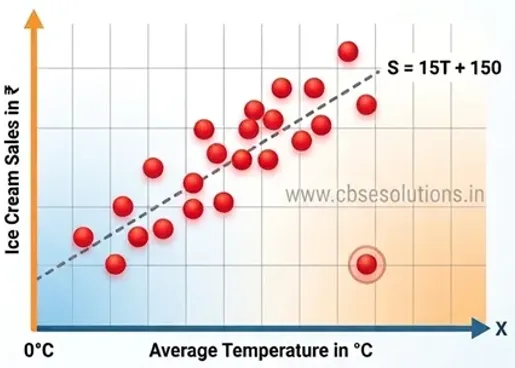
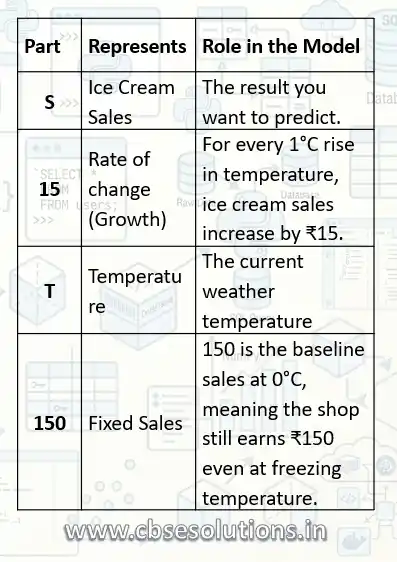
The equation S = 15T + 150 is the mathematical formula for the linear regression model shown in your graph. It describes the relationship between the temperature and ice cream sales.