Introduction to Problem Solving Notes – Class 11 CS (083) | Chapter-4 NCERT
In this Introduction to Problem Solving Notes, all concepts have been explained in a simple, easy-to-understand, and well-organized sequence, making learning smooth and effective for every student. The notes of problem solving class 11 CS are prepared according to the latest CBSE syllabus and focus on both conceptual clarity and exam preparation.
With clear explanations, examples, diagrams, and step-by-step illustrations, these Problem Solving notes of Class 11 Computer Science will help you understand each topic quickly, strengthen your problem-solving abilities, and confidently answer examination questions. Whether you are studying the chapter for the first time or revising before exams, these notes will make learning easier and help you score high marks.
Problem Solving
problem solving is the process of identifying a problem, developing an algorithm for the identified problem and finally implementing the algorithm to develop a computer program.
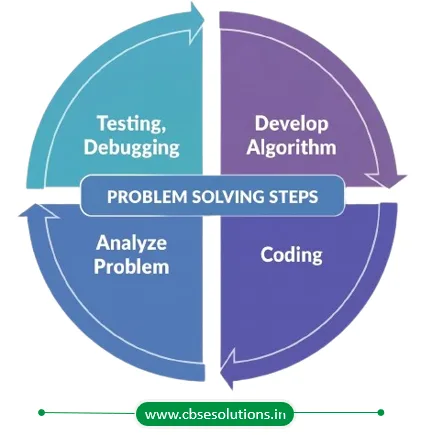
Steps for Problem Solving
- Analyzing the problem
- Developing an Algorithm
- Coding
- Testing and Debugging
Analysing the Problem
- Analysing the problem means clearly understanding what needs to be solved before starting to design a solution.
- It is essential because without proper understanding, the developed program may fail to meet the actual requirement or purpose.
- During analysis, the problem statement is carefully studied to identify its key components and required functionalities.
- It helps in clearly determining the inputs the program should accept and the outputs it should generate.
Developing an Algorithm
- It is essential to design a proper solution for the given problem before writing a program.
- The solution written in natural language is called an algorithm.
- An algorithm is like a well-written recipe that gives clear step-by-step instructions to solve a problem.
- For a single problem, multiple algorithms may be possible, and the most suitable one is selected.
Coding
- After finalising the algorithm, it is converted into a format that can be understood by the computer to produce the required solution.
- This conversion is done using high-level programming languages to write the program.
- It is also important to properly document the coding process and record the solution details.
- Proper documentation helps when the program needs to be reviewed or modified later.
Testing and Debugging
- The program should be tested using different inputs to ensure it meets user requirements and produces correct output in all cases.
- It should respond within the expected time and work without errors for valid inputs.
- If syntactical errors are present, the program will not execute, while logical errors lead to incorrect output.
- Detected errors or defects are corrected through debugging, and the program is tested again until all issues are resolved.
- Even after deployment, the software may require maintenance such as fixing issues, resolving user queries, and adding or modifying features.
Algorithm
- To complete a task successfully, the steps must be followed in a proper order.
- An algorithm is a finite sequence of steps used to achieve the desired output.
- It has a definite beginning and a definite end.
- If followed correctly, an algorithm produces the required result in a finite amount of time.
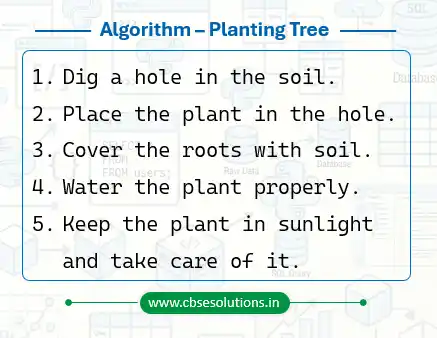
Example of Algorithm: Planting a Tree
The origin of the term Algorithm is traced to Persian astronomer and mathematician, Abu Abdullah Muhammad ibn Musa Al-Khwarizmi (c. 850 AD) as the Latin translation of Al Khwarizmi was called ‘Algorithmi’.
Why do we need an Algorithm?
- An algorithm acts as a roadmap for the programmer before writing the actual program code.
- It helps the programmer clearly visualise the sequence of instructions required to solve a problem.
- A correct algorithm helps in increasing the reliability, accuracy, and efficiency of the solution.
Representation of Algorithms
- Algorithms are commonly represented using two methods: Flowchart and Pseudocode.
- The representation of an algorithm should show the logic of the solution without implementation details.
- It should also clearly show the flow of control during program execution.
Flowchart — Visual Representation of Algorithms
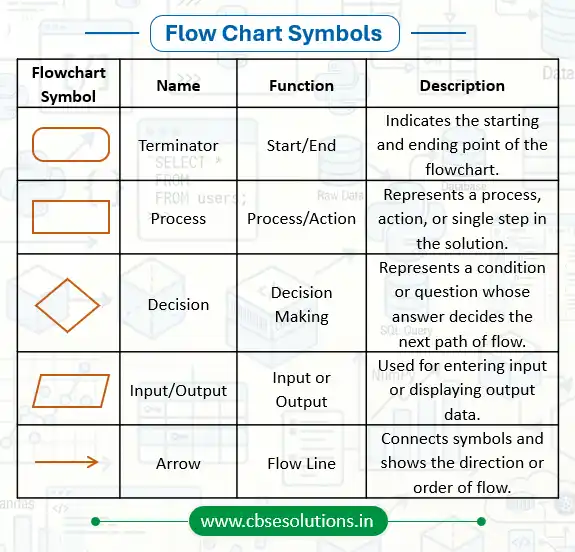
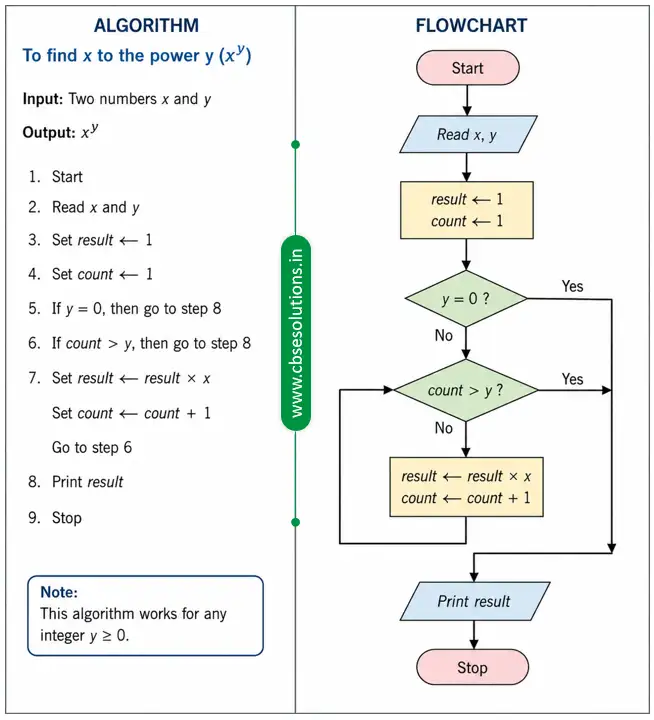
- A flowchart is a graphical or visual representation of an algorithm.
- It uses different standard symbols such as boxes and diamonds to represent various steps of the solution process.
- The symbols in a flowchart are connected using arrows to show the sequence and flow of steps.
- Each symbol has a specific meaning and helps in understanding the logic of the solution clearly.
Pseudocode (Pointers)
- Pseudocode is another method of representing an algorithm.
- It is a non-formal language used by programmers to write algorithms in a simple and understandable form.
- It provides a detailed description of the steps that a computer should follow in a specific order.
- Pseudocode is meant for human understanding and cannot be directly executed by a computer.
- There is no fixed standard or rule for writing pseudocode.
- The term “pseudo” means “not real,” therefore pseudocode means “not real code.”
Commonly Used Keywords in Pseudocode
- INPUT
- COMPUTE
- INCREMENT
- DECREMENT
- IF/ELSE
- WHILE
- TRUE/FALSE
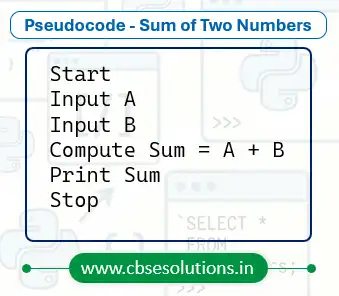
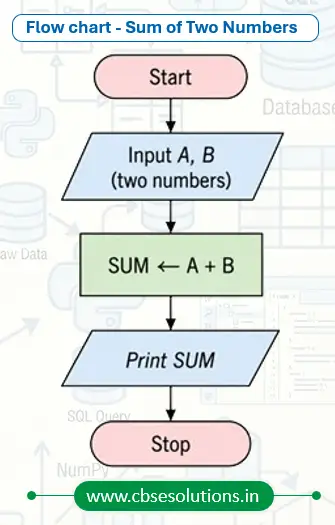
Write an algorithm to display the sum of two numbers entered by user, using pseudocode and flow chart.
Benefits of Pseudocode
- Pseudocode helps in understanding and representing the basic logic and functionality of a program before actual coding begins.
- Since it is written in a simple human-readable language, it becomes easier for programmers to plan the solution clearly.
- It helps programmers ensure that no important step is missed while developing the program.
- Pseudocode makes the program logic easier to read, analyse, and modify before implementation.
- It also helps non-programmers understand and review the solution to check whether the desired output will be achieved.
Flow of Control
- An algorithm is a finite set of steps executed in a sequence.
- Sometimes, certain steps in an algorithm need to be executed conditionally or repeatedly.
- In such cases, the algorithm uses different flow of control structures.
- The main types of flow of control are:
- Sequence
- Selection
- Repetition
Sequence – Flow of Control
- In sequence flow of control, all the steps of an algorithm are executed one after another in order.
- Such algorithms are said to execute in sequence.
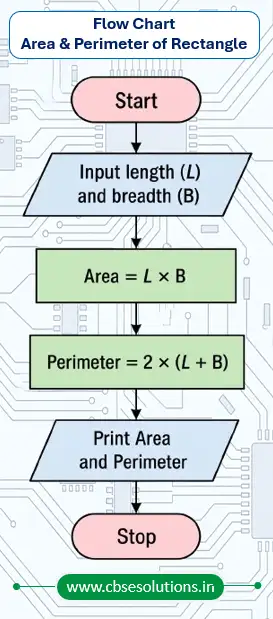
Example: Write an algorithm to calculate area and perimeter of a rectangle, using both pseudocode and flowchart.
Algorithm
- Start
- Input length (L) and breadth (B)
- Compute Area = L × B
- Compute Perimeter = 2 × (L + B)
- Print Area and Perimeter
- Stop
Pseudocode
START
INPUT L, B
COMPUTE Area = L * B
COMPUTE Perimeter = 2 * (L + B)
PRINT Area
PRINT Perimeter
STOP
Selection – Flow of Control
- Selection is a flow of control where decisions are taken based on certain conditions, allowing the program to choose different actions or paths.
- The condition is evaluated as either True or False (binary values), and the program performs actions accordingly.
- In algorithms and programs, selection is represented using If and If-Else statements, where one set of steps is executed if the condition is true and another set is executed if it is false.
General Form of Selection
IF <condition> THEN
Steps when condition is true
ELSE
Steps when condition is false
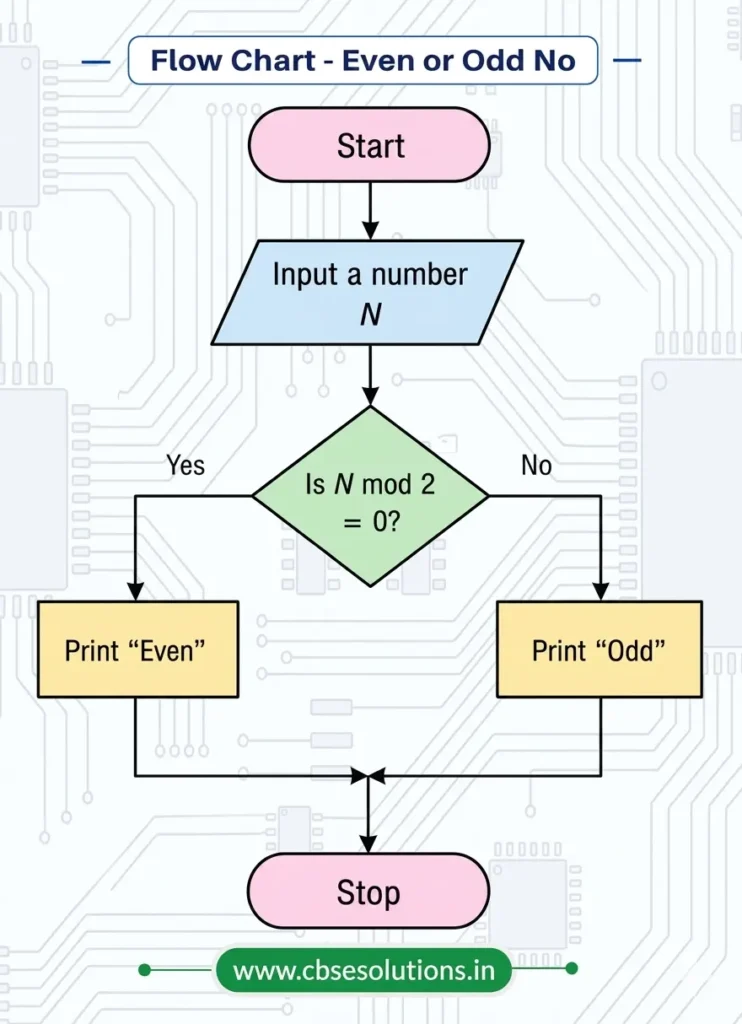
Example: Write an algorithm to check a number is even or odd, using both pseudocode and flowchart
Algorithm
- Start
- Input a number
- Check whether the number is divisible by 2
- If divisible by 2, print “Even”
- Otherwise, print “Odd”
- Stop
Pseudocode
START
INPUT number
IF number MOD 2 == 0 THEN
PRINT “Even”
ELSE
PRINT “Odd”
STOP
Repetition – Flow of Control
- Repetition is a flow of control in which a set of instructions is executed repeatedly either for a fixed number of times or until a given condition is satisfied. It is also known as Iteration or Looping in programming.
- Repetition helps in performing repetitive tasks efficiently by avoiding the need to write the same statements again and again, making the algorithm simpler and shorter.
- A loop continues executing the statements until the specified condition becomes false or the required repetitions are completed.
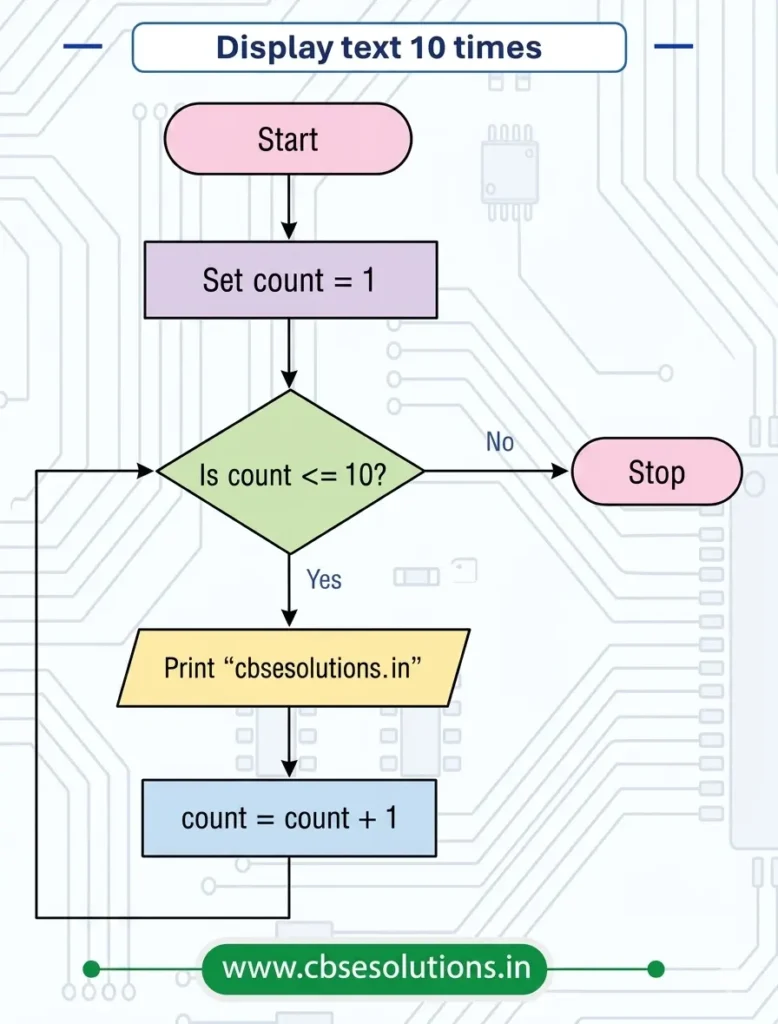
Example: write an algorithm, pseudocode and flow chart to display “cbsesolutions.in” 10 times
Algorithm
- Start
- Set count = 1
- Print “cbsesolutions.in”
- Increase count by 1
- Repeat steps 3 and 4 until count is greater than 10
- Stop
Pseudocode
START
SET count = 1
WHILE count <= 10
PRINT “cbsesolutions.in”
count = count + 1
STOP
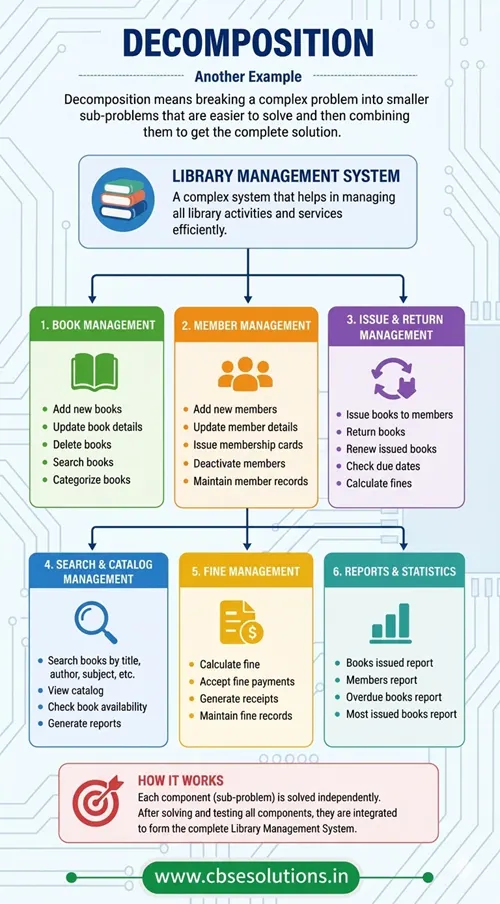
Decomposition (Pointers)
- Decomposition is a problem-solving technique in which a complex problem is divided into smaller and simpler sub-problems to make it easier to understand and solve.
- Solving smaller sub-problems is easier and more manageable than solving the complete problem at once.
- Each sub-problem can be analysed, solved, and tested independently before combining all parts to form the final solution.
- Different people or teams can work on different sub-problems simultaneously, which saves time and improves efficiency.
- Decomposition helps in organising the solution in a systematic way and is widely used in solving large real-life problems such as railway reservation systems, weather forecasting, and management systems.