Getting Started with Python Notes – Class 11 CS (083) | CBSE Aligned
Looking for Python notes that are easy to understand and exam-ready? You’ve come to the right place!
These Getting Started with Python Notes for Class 11 Computer Science are designed to help you build a strong foundation in Python, master concepts with clarity, and excel in your exams.
Prepared by an exam expert, these notes are written in simple language and presented in a logical, step-by-step sequence so that every topic becomes easy to learn and remember. To make learning more effective, the notes include numerous examples, tables, illustrations, and important exam-focused points that simplify even the most challenging concepts. Most importantly, these notes are fully aligned with the latest CBSE Class 11 Computer Science syllabus.
So why to wait, scroll the page and let’s begin learning Python step by step!
Introduction to Python
Python is a popular and easy-to-learn programming language created by Guido van Rossum in 1991.
It is widely used in software development, web development, scientific computing, big data, and Artificial Intelligence.
Features of Python
- Python is a high-level programming language. It is free and open-source, which means anyone can use and modify it.
- Python is an interpreted language, meaning Python programs are executed line by line by an interpreter instead of being compiled all at once.
- Python programs are easy to understand and write because they follow a simple syntax and clear structure.
- Python is a case-sensitive language. For example, NUMBER and number are treated as different identifiers.
- Python is portable and platform-independent, which means the same Python program can run on different operating systems such as Windows, Linux, and macOS.
- Python provides a rich library of predefined functions and modules, which makes programming faster and easier.
- Python is widely used in web development. Many popular websites, web applications, and online services are developed using Python.
- Python uses indentation (spaces or tabs) to define blocks of code and nested blocks, making the code more readable and organized.
Important Programming Terminologies
- Instruction: A single command or step written to perform a specific action.
- Program: A collection of instructions written to complete a particular task.
- Software: A collection of programs designed to perform different functions on a computer.
- Source Code: A program written by a programmer using a high-level programming language such as Python, Java, or C++.
- Machine Code: A set of instructions written in binary form (0 and 1) that can be directly understood and executed by the computer.
- Compiler: A software program that converts the entire source code written in a high-level language into machine code at once.
- Interpreter: A software program that converts and executes high-level language instructions one by one into machine language.
Working with Python
- To write and execute a Python program, a Python interpreter must be installed on the computer, or an online Python interpreter can be used.
- The Python interpreter is also called the Python shell.
- The symbol >>> is called the Python prompt, which indicates that the interpreter is ready to receive instructions.
- Commands or statements can be typed at the Python prompt for execution.
Execution Modes in Python
- There are two ways to execute a Python program:
- Interactive Mode
- Script Mode
Interactive Mode
- In Interactive Mode, Python statements are typed directly at the >>> prompt.
- The Python interpreter executes each statement immediately after the Enter key is pressed and displays the output instantly.
- This mode is useful for quick testing, performing calculations, and checking single-line statements.
- Interactive mode is mainly used by beginners for learning and experimenting with Python commands.
- Programs written in interactive mode are not saved automatically and cannot be reused later unless copied manually.
Script Mode
- In Script Mode, Python programs are written in a file and saved with the .py extension.
- These saved files are known as Python scripts.
- Script mode is suitable for writing large and complex programs that can be edited and executed multiple times.
- Programs created in script mode can be saved for future use, modified easily, and shared with others.
- Python provides a built-in editor called IDLE (Integrated Development and Learning Environment) to create, edit, save, and run Python scripts.
How to Write and Execute Program in Script Mode
- Open IDLE.
- Create a new file using File > New File.
- Type the Python source code in the editor window.
- Save the program using File > Save with .py extension.
- (By default, Python scripts are saved in the Python installation folder)
- Execute the program using Run > Run Module.
- The output is displayed on the Python shell.
Python Character Set
- A character set is the collection of valid characters that can be used in a programming language.
- Python supports both ASCII and Unicode characters, allowing programmers to use a wide range of symbols and languages.
- The Python character set includes the following:
- Alphabets – All uppercase letters (A–Z) and lowercase letters (a–z).
- Digits – Numbers from 0 to 9.
- Special Symbols – Symbols like +, -, *, /, @, #, $, %, &, etc.
- White Spaces – Blank space, tab space, newline, and carriage return.
- Other Characters – All other ASCII and Unicode characters supported by Python.
Python Tokens
- The smallest individual unit in a Python program is called a token.
- Tokens are also known as lexical units.
- Every statement and instruction in a Python program is formed using tokens.
- Keyword,
- Identifier
- literal
- Operator
- Punctuator
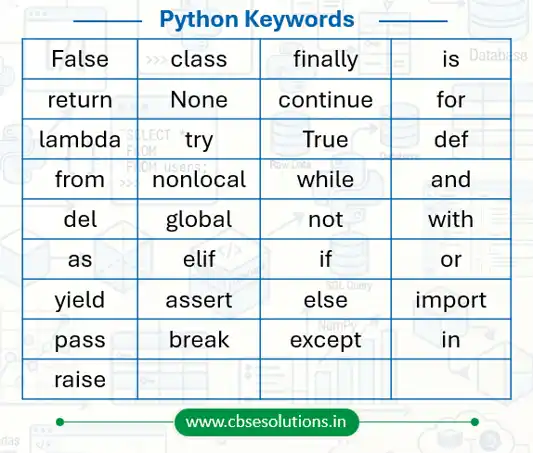
Python Keywords
- Keywords are reserved words in Python.
- Each keyword has a special meaning for the Python interpreter.
- Keywords cannot be used as variable names or identifiers.
- Python is case-sensitive, so keywords must be written exactly as defined.
Common Python Keywords
Identifiers in Python
- Identifiers are names used to identify variables, functions, and other entities in a program.
Rules for Naming Identifiers
- An identifier must begin with an alphabet or underscore (_).
- It can contain alphabets, digits (0–9), and underscores.
- An identifier cannot start with a digit.
- It can be of any length, but meaningful names are preferred.
- Keywords or reserved words cannot be used as identifiers.
- Special symbols like !, @, #, $, %, etc. are not allowed in identifiers.
| Identifier | Valid / Invalid | Reason |
| student_name | Valid | Uses letters and underscore correctly |
| marks123 | Valid | Identifier can contain digits after letters |
| _total | Valid | Identifier can start with underscore |
| priceAmount | Valid | Uses alphabets only |
| EMPLOYEE1 | Valid | Capital letters and digits are allowed |
| 2value | Invalid | Identifier cannot start with a digit |
| student-name | Invalid | Hyphen (-) is not allowed |
| class | Invalid | class is a Python keyword |
| total marks | Invalid | Spaces are not allowed |
| @price | Invalid | Special symbols like @ are not allowed |
Python Literals
- Literals are fixed values that are directly used in a program and stored in memory.
- These values are commonly assigned to variables using identifiers.
Types of Literals in Python
String Literals
- String literals are sequences of characters written inside:
- Single quotes ‘ ‘
- Double quotes ” “
- Triple quotes ”’ ”’ or “”” “””
- A string may also contain non-graphic characters such as tabs and backspaces.
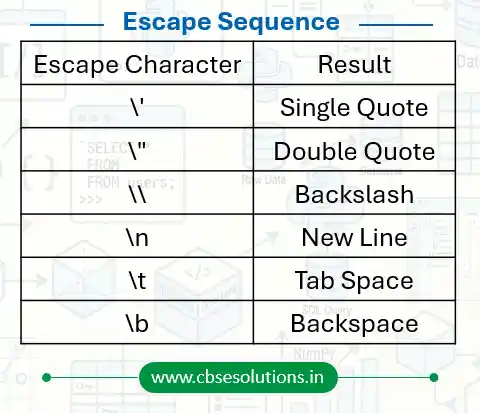
Escape Characters
- Escape characters are used to insert special characters inside a string.
- An escape sequence is written using a backslash (\) followed by another character.
- Escape sequences help represent characters that have special meanings in Python, such as quotation marks, new lines, and tabs.
Numeric Literals – Represent numbers in different forms.
- Integer Literal – whole numbers without decimal points: 25, -10, 0, 0b1010, 0o17, 0x1F
- Float Literal – real numbers containing decimal points: 99.62, -45.8, 0.35E-7
- Complex Literal – numbers written in the form a + bj, where: a = real part,b = imaginary part
- Examples: 3+5j, 7j, 2-4j
- Boolean Literal – represent logical values i.e. True or False
Special (None) Literal – is a special literal used to represent: No value, Empty value, Absence of value
Collection Literals
Collection literals are used to store multiple values together.
| Collection Type | Example |
| List | [1, 2, 3] |
| Tuple | (10, 20, 30) |
| Dictionary | {“A”: 1, “B”: 2} |
| Set | {5, 6, 7} |
Operators in Python
- Operators are special symbols used to perform operations on values and variables.
- Python supports different types of operators: Arithmetic, Relational, Logical, Identity, and Membership Operators. (Operators are explained in detail in a later part of these notes)
Punctuators
- Punctuators are tokens used to organize program structure, program statements, and expressions.
- They help in making the code structured, readable, and properly formatted.
| Punctuator | Name / Use |
| [] | Square brackets – used for lists, indexing, slicing |
| {} | Curly brackets – used for dictionaries and sets |
| () | Parentheses – used in functions, expressions, and grouping |
| , | Comma – used to separate items |
| ‘ ‘ | Single quotes – used for string literals |
| ” “ | Double quotes – used for string literals |
| # | Hash – used for single-line comments |
| @ | At symbol – used in decorators |
| : | Colon – used in loops, conditions, and function definitions |
Understanding First Python Program
# my first program
print(“hello world”)
- # my first program is a comment used to explain code and is ignored by Python.
- print(“hello world”) is used to display output on the screen.
- print() is a built-in function in Python for showing output.
- A Python file or script is called a Python module, saved with the .py extension.
- Strings in print() can be written using: Double quotes ” ” or Single quotes ‘ ‘
Variables in Python
- A variable is an identifier used to store a value that can change during program execution.
- Variable names must be unique within a program.
- A variable can store different types of values such as: Strings, Numbers, or Alphanumeric values
- A variable must be assigned a value before use, otherwise Python gives an error.
Examples of Variables
name = “Rahul Sharma”
age = 17
city = “Gwalior”
percentage = 89.5
Example Program
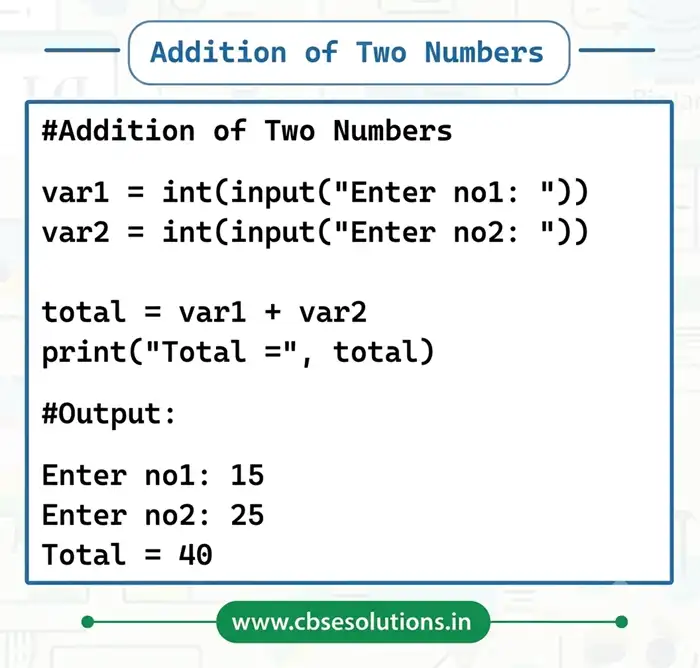
Concept of L-value and R-value in Python
In Python, every assignment statement has two sides: Left side (L-value) and Right side (R-value).
L-value (Left Value)
- Refers to the variable on the left side of the assignment operator (=).
- It represents the memory location (address) where the value will be stored.
- L-value must always be a valid variable name.
- Example:
x = 10 #Here, x is the L-value
R-value (Right Value)
- R-value refers to the value or expression on the right side of the assignment operator (=).
- It represents the actual data/value to be stored in the variable.
- R-value can be a constant, variable, or expression.
- Example:
x = 10 #Here, 10 is the Rvalue
Comments in Python
- Comments are notes or remarks added to the source code to make it easier for humans to understand.
- Comments are not executed by the Python interpreter.
- In Python, a single-line comment starts with the # (hash) symbol.
Data Types in Python
- Every value in Python belongs to a specific data type.
- Data type defines what kind of data a variable can store and what operations can be performed on it.
| Data Types in Python | |||
| Type | Data Type | Description | Example |
| Number | Int | Integer numbers | -10, -4, 0, 120, 1034 |
| Float | Floating point number | -3.08, 7.0, 23.41 | |
| Complex | Complex numbers | 3 + 4i, 2 – 2i | |
| Boolean | Bool | Boolean number | 0, 1 |
| Sequence | String | Set of characters | ‘hello’ |
| List | Set of items separated by comma | [1,2.3,’a’] | |
| Tuple | Set of items separated by comma enclosed in (). It is not editable | (2,’b’,3.4) | |
| Missing value | None | Signifies absence of value in a situation | None |
| Mapping | Dictionary | Holds data items in key-value pairs | {‘a’:1,’b’:2} |
Operators in Python
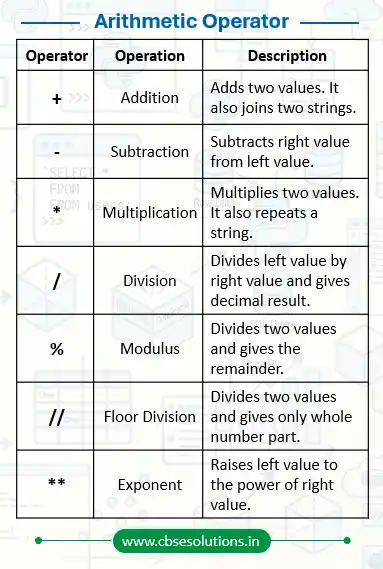
- An operator is a symbol used to perform mathematical or logical operations on values.
- The values on which an operator works are called operands.
- For example, in 10 + num, 10 and num are operands and + is an operator.
Types of Operators
- Arithmetic operator
- Relational operator
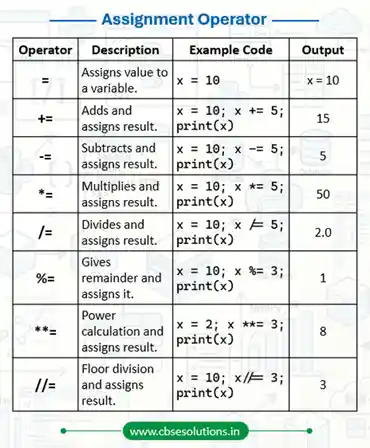
- Assignment operator
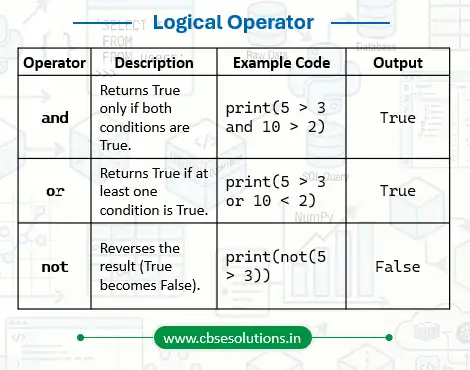
- Logical operator
- Identity operator
- Membership operator
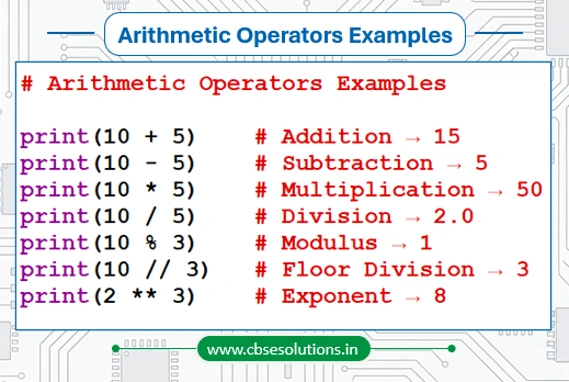
Arithmetic Operator
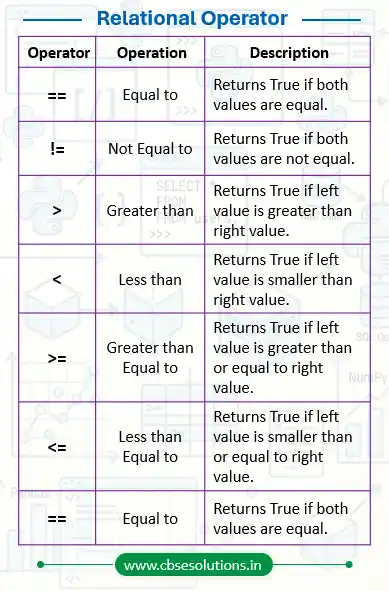
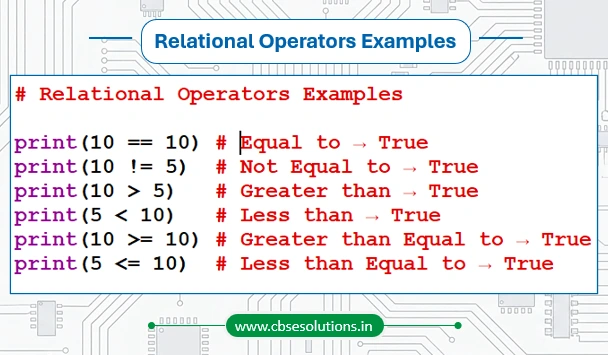
Relational Operators
Logical Operators
Assignment Operators
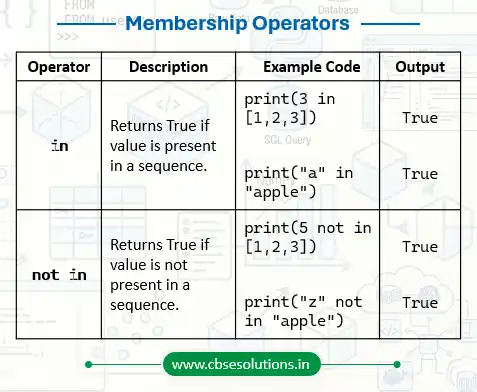
Membership Operator
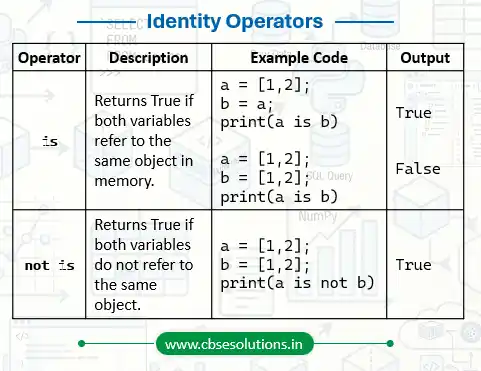
Identity Operator
Operator Precedence
- In a mathematical or logical expression, operator precedence decides which operator will be executed first.
- Operators with higher precedence are evaluated before operators with lower precedence.
- It helps Python to perform calculations in the correct order.
- The following table shows the precedence of different operators.
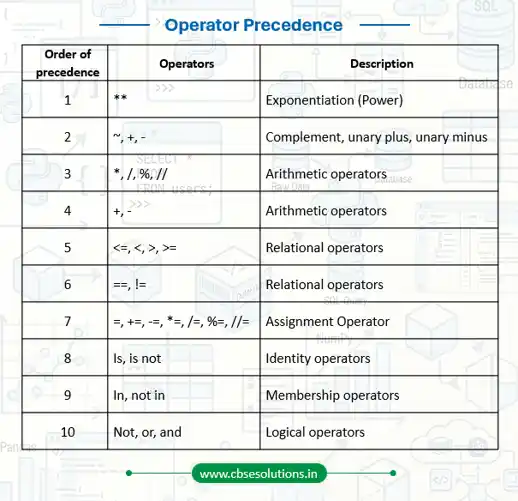
- Parenthesis can be used to override the precedence of operators. The expression within () is evaluated first.
- For operators with equal precedence, the expression is evaluated from left to right.
Expressions in Python
- An expression is a combination of constants, variables, and operators. It is evaluated to produce a single value.
- A single value or a standalone variable is also considered an expression. However, a standalone operator is not an expression because it cannot produce any value on its own.
Examples of Valid Expressions
(i) 250 → A constant value
(ii) marks → A variable
(iii) marks + 15 → Arithmetic expression
(iv) 8 * 12 → Multiplication expression
(v) 100 / 4 + 6 * (3 + 2) → Complex arithmetic expression
(vi) “Hello” + “World” → String concatenation expression
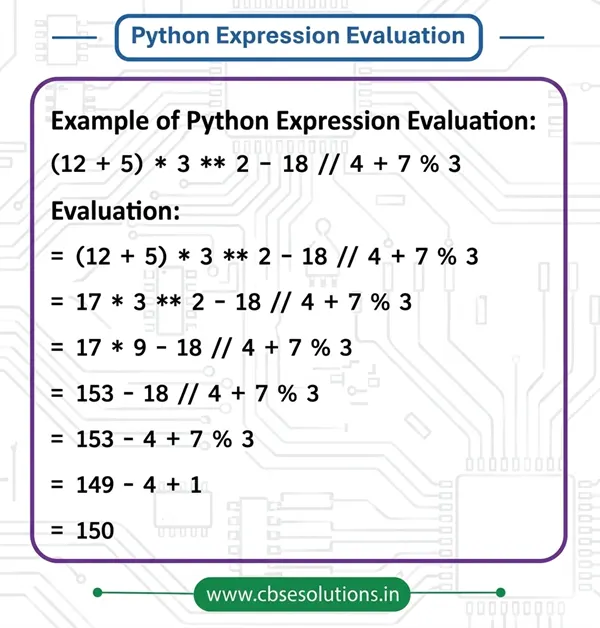
Expression Evaluation
Statement
- In Python, a statement is a single unit of code that the interpreter can execute.
- It tells the computer to perform a specific task such as assigning a value, taking input, or displaying output.
Examples of Statements
>>> num = 8 # assignment statement
>>> double = num * 2 # assignment statement
>>> print(double) # print statement
Input in Python
- In Python, the input() function is used to take input from the user through devices like a keyboard.
- By default, all input values are treated as strings (text).
- If required, we can convert the input into other data types like int, float, etc., using type conversion functions.
Syntax
variable = input([prompt])
Examples
name = input(“Enter your full name: “)
marks = input(“Enter your marks: “) # stored as string
marks = float(input(“Enter your marks: “)) # converted to float
Output in Python
- Python uses the print() function to display output on the screen.
- It can display text, variables, or the result of expressions.
- The expression is evaluated first, and then the result is shown as output.
Examples
print(“Welcome to Python Programming!”)
a = 10
b = 20
print(“Sum of numbers is:”, a + b)
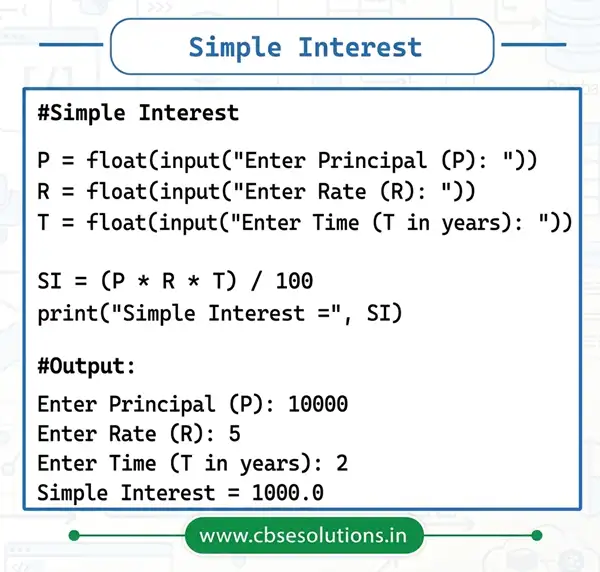
Examples of Input and Output
Type Conversion
- Type conversion refers to converting one type of data to another type.
- Type conversion can happen in two ways:
- Explicit conversion
- Implicit conversion
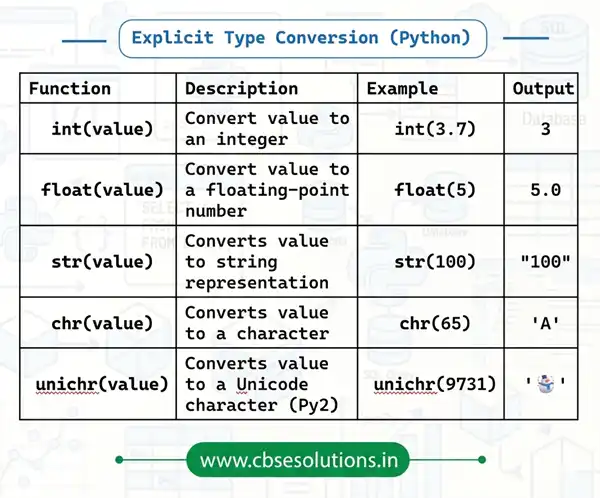
Explicit Conversion
- Explicit conversion also refers to type casting.
- In explicit conversion, data type conversion is forced by programmer in program
Implicit conversion
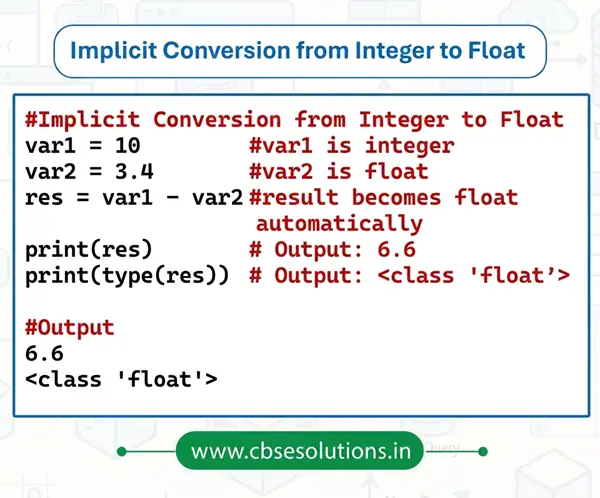
- Implicit type conversion means Python automatically converts one data type into another without using any special function
Errors in Python
- Mistakes in a program are called bugs/errors
- Due to Errors:
- The program may not run successfully
- The program may produce incorrect output
- The process of fixing these errors is called debugging
- Errors in programs are mainly of three types:
- Syntax errors
- Logical errors
- Runtime errors
Types of Errors in Python
Syntax Errors
- Syntax refers to the rules of writing a program.
- A syntax error occurs when these rules are not followed.
- The Python interpreter cannot run the program if syntax errors are present.
- These errors must be corrected before execution.
Example:
print(“Hello World” # missing closing bracket
Correct version:
print(“Hello World”)
Logical Errors
- A logical error happens when the program runs but gives wrong output.
- The program does not crash, but the logic is incorrect.
- These errors are hard to detect because no error message is shown.
Example:
# Incorrect logic
length = 10
breadth = 5
area = length + breadth # wrong formula
print(area)
Correct logic:
area = length * breadth
print(area)
Runtime Errors
- A runtime error occurs while the program is running.
- The program starts correctly but stops due to an error.
- These errors cause abnormal termination.
Example:
a = 20
b = 0
print(a / b) # division by zero error