Python Programming Notes – Class 11 AI | Complete Revision

Explore Python Programming Notes — 100% Free and CBSE-Aligned! Cover both theory and practical concepts with clear explanations, hands-on coding examples.
What You Need to Learn in Python for Class 11 AI
Python in Class 11 AI is assessed through both Theory and Practical exams. Apart from the theory exam, according to the new CBSE syllabus, you are required to prepare a practical file containing a minimum of 10 Python programs. Therefore, learning Python is an essential part of your preparation.
If you look at the Class 11 AI Handbook provided by CBSE, you will find that the course is divided into two parts:-
- Level-1 (Python Fundamentals)
- Level-2 (Python Libraries)
Most of the Level-1 syllabus is common to both Class 9 and Class 10 AI. The common topics include:
- Introduction to Python
- Features of Python
- Why Python for AI?
- Applications of Python
- Python Working Modes
- Python Statements
- Python Comments
- Identifiers and Keywords
- Variables in Python
- Data Types in Python
- Operators in Python
- Input and Output in Python
- Type conversion in Python
- Python Control Statements
- if Statements in Python
- for Loop in Python
- while Loop in Python
- Introduction to List in Python
So, if you have already learned these topics in previous classes, you will find much of the Class 11 Python Programming syllabus familiar. However, Class 11 also included Level-2 with following additional topics:
- CSV Files
- Numpy
- Pandas
- Scikit-learn
Since you are now in Class 11 AI, it is expected that you have already learned the basics of Python in Class 10. But if you are still struggling with Python or want to learn it from the beginning, don’t worry!
👉 Click on the link below to strengthen your Python basics completely. Once you are comfortable with the basics, you can move ahead with Python Built-in Functions and Modules.
Level-1: Basics of Python
🔗Introduction to Python – Class 10 AI (417)
Alright..Done with the basics! 🎉 I hope you have gone through the Python fundamentals mentioned above👆and are now ready to learn the Level-2 Python of Class 11 AI as per the CBSE curriculum. So, why wait? Let’s dive into advanced Python Programming! 🚀
CSV Files
- CSV (Comma-Separated Values) is a file format used to store tabular data in rows and columns.
- CSV files look similar to spreadsheets, but their internal storage format is different.
- In a CSV file, values are separated by commas.
- Each line in a CSV file represents a data record, and each record consists of multiple fields (columns).
- CSV format is commonly used to store datasets for AI programming.
- Python provides the
csvmodule to read and write tabular data in CSV format. - CSV files can be easily created using spreadsheet applications and saved with the
.csvextension.
Python CSV File Operations
The following example demonstrates how to perform different operations on a file named student.csv, which contains three columns: rollno, name, and mark.
| Operation | Python Statement |
|---|---|
| Importing the CSV module | import csv |
| Opening a file in reading mode | file = open("student.csv", "r") |
| Opening a file in writing mode | file = open("student.csv", "w") |
| Closing a file | file.close() |
| Creating a CSV writer | wr = csv.writer(file) |
| Writing a row | wr.writerow([12, "Kalesh", 480]) |
| Reading CSV data | details = csv.reader(file) |
| Accessing records | for rec in details: print(rec) |
Note: Opening a file in write mode ("w") overwrites its existing contents. A file should be opened before reading or writing and closed after the operation.
Example Programs of CSV Files
Program: Open a CSV file employee.csv and display its details.
import csv
file = open(“employee.csv”, “r”)
details = csv.reader(file)
for rec in details:
print(rec)
file.close()
Output:
[‘EmpID’, ‘Name’, ‘Department’, ‘Manager’]
[’11’, ‘Abhay’, ‘HR’, ‘Pawan’]
[’12’, ‘Savita’, ‘IT’, ‘Dia’]
Program: Writing and Reading Rows in a CSV File in books.csv
import csv
#Writing rows
file = open(“books.csv”, “w”, newline=””)
wr = csv.writer(file)
wr.writerow([“BookID”, “Title”, “Price”])
wr.writerow([101, “Python Basics”, 350])
wr.writerow([102, “AI Fundamentals”, 450])
file.close()
#Reading rows
file = open(“books.csv”, “r”)
details = csv.reader(file)
for rec in details:
print(rec)
file.close()
Output:
[‘BookID’, ‘Title’, ‘Price’]
[‘101’, ‘Python Basics’, ‘350’]
[‘102’, ‘AI Fundamentals’, ‘450’]
Level-2: Libraries in Python
- A library in Python is a collection of reusable modules and functions that provide specific functionalities.
- They simplify program development by reducing the need to write code from scratch.
- Python libraries organize functions based on their purposes.
- For example, the
mathlibrary provides mathematical functions such assqrt(),pow(),abs(), andsin().
- For example, the
- Python offers a wide range of libraries for various applications, including:
- Artificial Intelligence (AI)
- Web Development
- Data Analysis
- Machine Learning
- Scientific Computing
How to Install Python Libraries
We can install Python Libraries using command pip. for example:
pip install pandas
During installation, press Y to continue when prompted.
How to import Libraries
- After installation, To use a library in a Python program, it must be imported using the
importstatement. - for example:
import numpy as np
NumPy
- NumPy stands for Numerical Python. It is a powerful Python library used for numerical computing.
- NumPy provides a data structure called ndarray (N-dimensional array).
- NumPy arrays are homogeneous, meaning their elements generally have the same data type.
- They can store numerical values such as integers and floating-point numbers.
NumPy in Artificial Intelligence
- NumPy is widely used in Artificial Intelligence, Data Science, and Machine Learning.
- It is useful for storing and processing numerical data efficiently.
- Example: Student exam scores can be stored in NumPy arrays.
- It is an important tool for data manipulation and numerical analysis in AI and Data Science.
Creating Numpy Arrays
Using List of Tuples
import numpy as np

ar = np.array([(10, 20, 30), (40, 50, 60)])
print("Numpy Array:\n", ar)
Output:
Numpy Array:
 [[10 20 30]
  [40 50 60]]
Using values from the user (using empty())
The empty() function in Python is used to return a new array of a given size)
import numpy as np

n = int(input("Enter the size of an array"))
ar = np.empty(n)
for i in range(n):
    ar[i] = int(input("Enter a number"))
print("Array\n", ar)
Output:
Enter the size of an array 3
Enter a number12
Enter a number45
Enter a number78
Array
 [12. 45. 78.]
Pandas
- Pandas refers to “Panel Data” and “Python Data Analysis”.
- It is a powerful and versatile Python library used for data manipulation and analysis.
- It is particularly useful for working with tabular data, such as: Spreadsheets, SQL tables.
- It can work with Matplotlib to visualize data, such as sales performance and average engagement.
Pandas in Artificial Intelligence
- Pandas is used in AI and Data Science for data manipulation, analysis, and preparation.
- It can be used to:
- Load datasets
- Display summary statistics
- Perform group-wise analysis
- Prepare data for further analysis and visualization
Installing Pandas
pip install pandasData Structures in Pandas
Pandas mainly provides two data structures:
- Series – A one-dimensional data structure.
- DataFrame – A two-dimensional, tabular data structure.
Pandas Series
- Series is a one-dimensional data structure in Pandas which contains a sequence of values.
- A Series can contain values of different types, such as: Integer, Float, String, List etc.
- By default, a Series has numeric data labels starting from 0.
- The data label associated with a particular value is called its index.
Pandas DataFrame
- A DataFrame is a two-dimensional labeled data structure in Pandas.
- It is similar to a table in MySQL or a spreadsheet which consist of both rows and columns.
- A DataFrame has both:
- Row index
- Column index
- Different columns can contain different types of data.
- It is useful for storing and manipulating structured/tabular data.
Creation of DataFrame
There are several methods to create a DataFrame in Pandas, but here we will discuss two common approaches:
Using NumPy ndarrays
import numpy as np
import pandas as pd

array1 = np.array([15, 25, 35])
array2 = np.array([150, 250, 350])
array3 = np.array([-5, -15, -25])
dFrame = pd.DataFrame([array1, array2, array3], columns=['col1', 'col2', 'col3'])
print(dFrame)
Output:
   col1  col2  col3
0    15    25    35
1   150   250   350
2    -5   -15   -25
Using List of Dictionaries
import pandas as pd

listDict = [{'Maths': 85, 'Science': 90}, {'Maths': 78, 'Science': 88, 'English': 92}, {'English': 80}]
a = pd.DataFrame(listDict, index=['Section A', 'Section B', 'Section C'])
print(a)
Output:
           Maths  Science  English
Section A   85.0     90.0      NaN
Section B   78.0     88.0     92.0
Section C    NaN      NaN     80.0
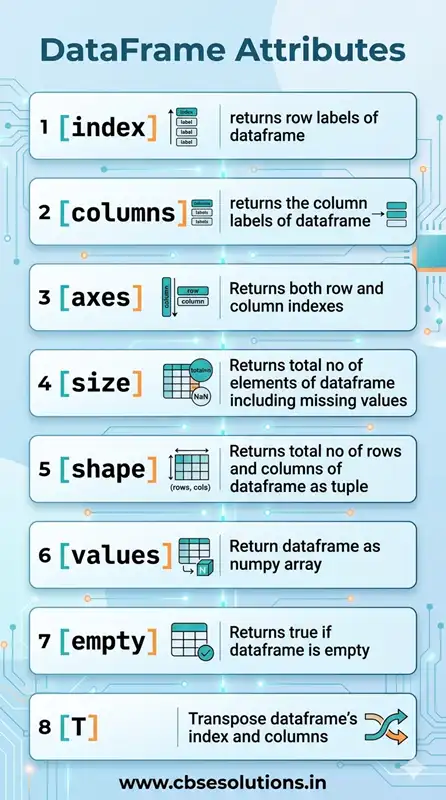
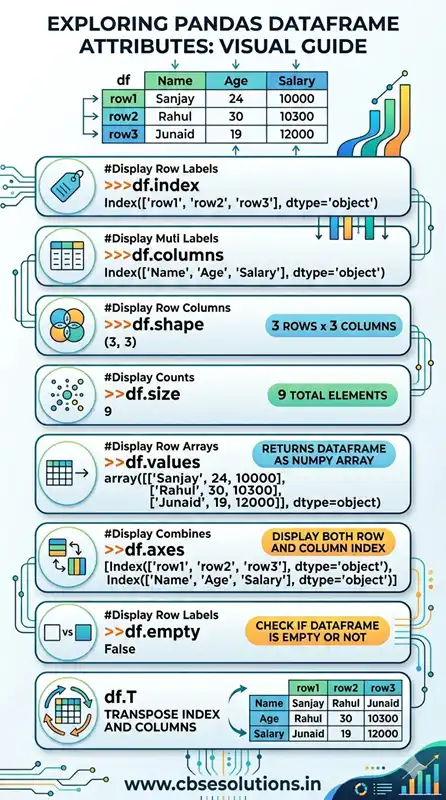
Dataframe Attributes
Attribute refers to properties of dataframe. Using dataframe attribute we can get all kind of information related to it. Following table list all dataframe attributes:
Operations on rows and columns in DataFrame
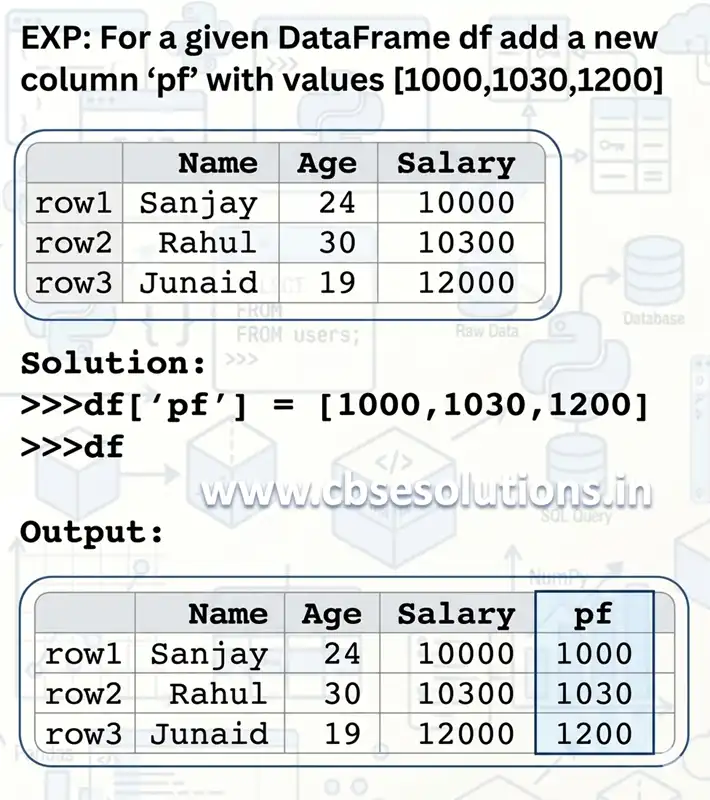
Adding a New Column to a DataFrame:
Syntax:
<DFobject>[<Columnname>] = [List of Values]
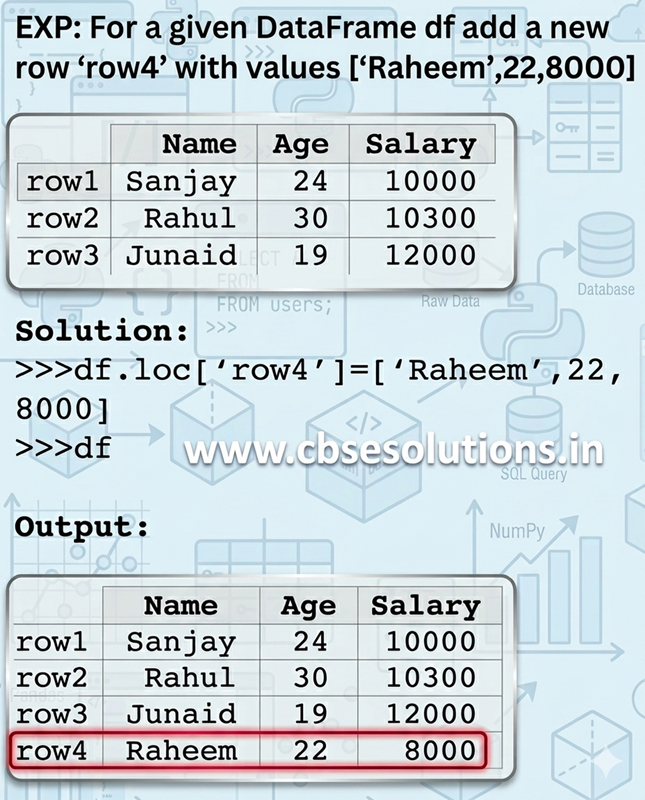
Adding an New Row to a DataFrame
Syntax:
<DFobject>.loc[<Columnname>] = [List of Values]
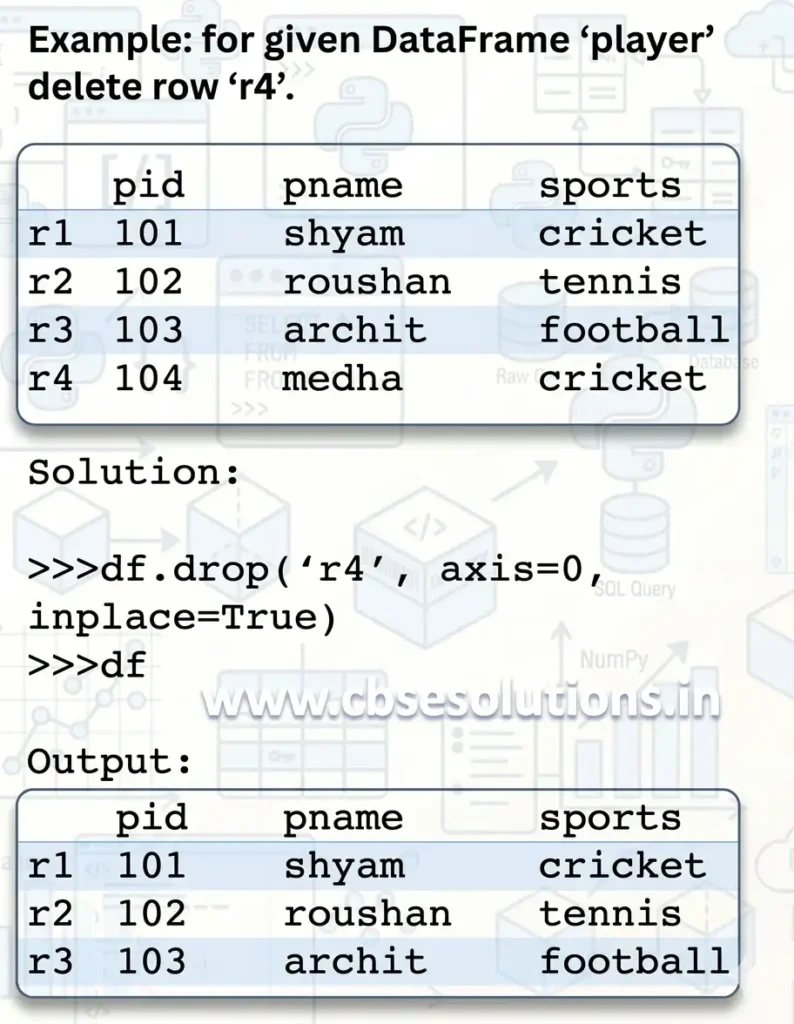
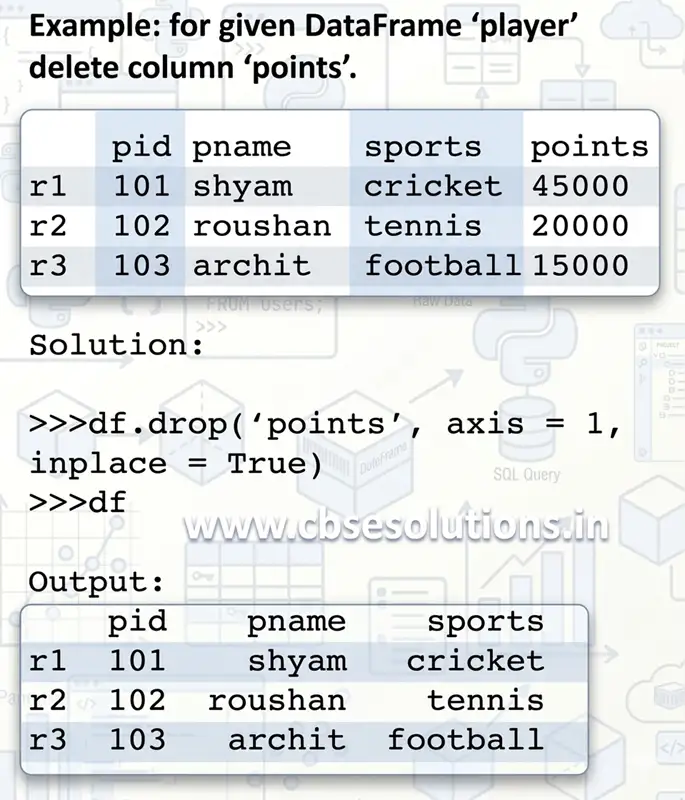
Deleting Row(s)/Column(s) from DataFrame
We can delete Row(s)/Column(s) using DataFrame.drop() method.
Syntax:
df.drop(label(s), axis=0/1, inplace=True)
- label → row name or column name
- axis=0 → delete row, axis=1 → delete column
- inplace=True → makes changes permanent
Importing and Exporting Data between CSV Files and DataFrames
- Pandas provides two main methods to work with CSV files:
- read_csv(): to import data into a DataFrame.
- to_csv(): to save data from a DataFrame back into a CSV file.
Importing CSV files into DataFrame
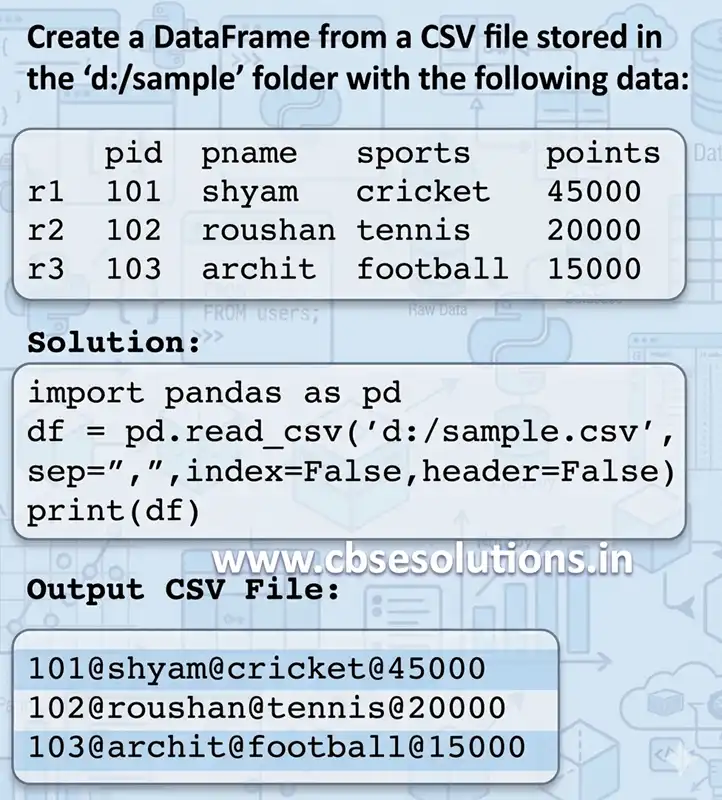
We can load data from csv file intro dataframe using read_csv().
Syntax:
dataframe_object = pandas_object.read_csv(“csv file path”,sep, header,name)
- First parameter is name of csv file to be imported with its path
- Second parameter ‘sep’ specifies how values are separated such as comma, tab, semicolon etc.
- Third parameter ‘header’ specifies’ the no of rows whose values are to be used as column names.
- By default, header = 0, which implies that column names are inferred from first line of the file.
- Using ‘names’ parameter we can specify labels for the columns to be imported.
Export Dataframe to CSV File
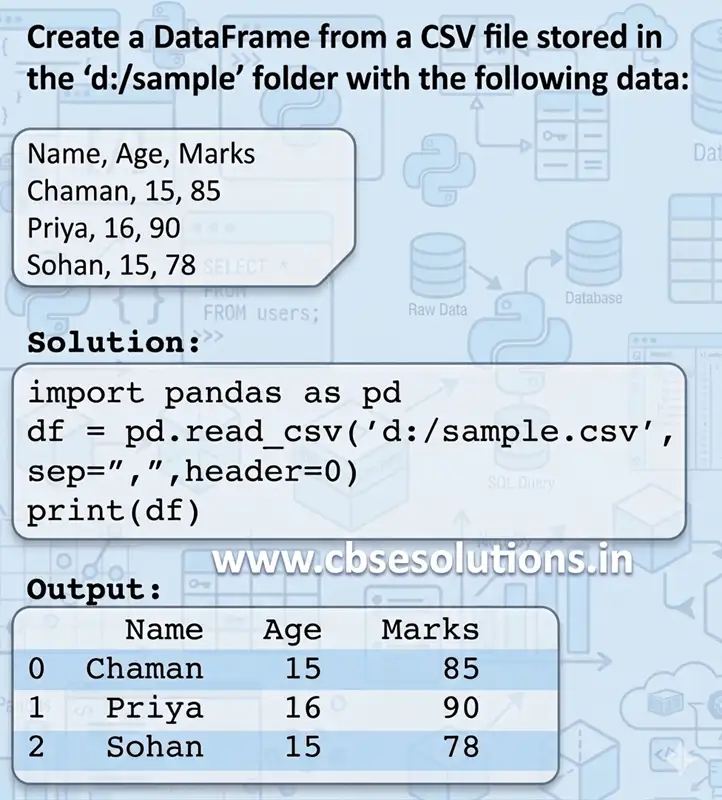
We can use to_csv() to save a dataframe to a csv file.
Syntax:
dataframe_object.to_csv(‘csv file path’, sep, header, index)
- First parameter is name and path of csv file to be created from dataframe
- Second parameter ‘sep’ specifies how values are separated such as comma, tab, semicolon etc.
- Third parameter ‘header’ specifies whether column names to be saved in csv file or not. header = False will not save column names
- Fourth parameter ‘index’ specifies whether row labels to be saved in csv file or not. index = False will not save row labels.
Understanding Missing Values
- Missing data means information is not available for one or more items.
- Missing values can occur when:
- Data is not collected properly.
- A person does not fill all the fields in a survey.
- A particular attribute is not relevant to everyone.
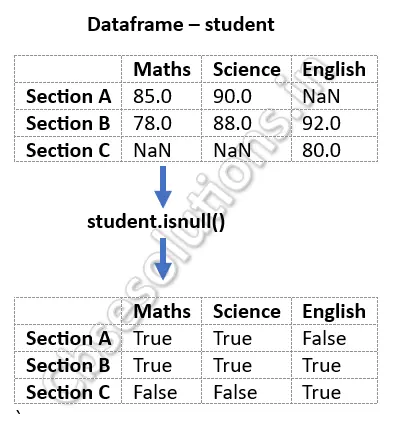
- In a Pandas DataFrame, missing numerical values are commonly represented as NaN (Not a Number).
Checking Missing Values
- Pandas provides the isnull() function to check for missing values.
- It returns:
- True → value is missing.
- False → value is not missing.
Example:
Important Operations on Missing Values
| Operation | Pandas Code | Purpose / Result |
|---|---|---|
| Check for missing values in a column | df['Music'].isnull().any() | Returns True if the column contains any missing value; otherwise False. |
| Find total number of missing values | df.isnull().sum() | Counts the total number of NaN values. |
| Delete rows containing missing values | df.dropna() | Removes rows containing NaN values. |
| Replace missing values | df.fillna(0) | Replaces NaN values with 0. |