Computer Networks Notes – Class 12 CS (083) | CBSE Exam Ready Notes
Want to score easy marks in Class 12 Computer Science (083)? Then Computer Networks should be one of the first chapters on your revision list!
Computer Networks is one of the most scoring and student-friendly unit in the CBSE Class 12 Computer Science syllabus. With significant weightage in board examinations and a fairly predictable question pattern, this chapter offers an excellent opportunity to boost your overall score with relatively less effort.
These Computer Networks Notes for Class 12 Computer Science (083) are designed to help you make the most of this opportunity. Every topic is summarized in a well-structured, point-to-point format using simple and easy-to-understand language. Important concepts are supported with diagrams wherever required, making learning more visual, engaging, and effective.
For better learning, as per the latest CBSE syllabus, Unit 3: Computer Networks of Class 12 CS is divided into two chapters in the NCERT textbook:
- Chapter 10 – Computer Networks
- Chapter 11 – Data Communication
Both sections are explained in a logical sequence, helping students build a strong understanding of the chapter from basic concepts to important exam-oriented topics. So, let’s get started!
Introduction to Computer Network
A computer network is a system in which two or more computers or computing devices are connected to each other so that they can communicate and share data, information, and resources such as files, printers, and internet access.
A computer network includes different types of devices, also known as nodes, such as servers, desktops, laptops, and cellular phones.
Benefits of Computer Network
- Resource Sharing: Computer networks allow sharing of resources such as software, data files, printers, and other devices among multiple users, regardless of their physical location.
- Fast Communication: Computer networks allow users to share messages, emails, and data quickly over long distances.
- Easy Data Sharing: Files, documents, images, and videos can be easily shared between connected users.
- Centralized Storage: Data can be stored at a central location (server), making it easier to manage and access.
- Cost Factor: Computer networks reduce cost because resources like printers, scanners, and internet connections can be shared among many users instead of buying separate ones.
Evolution of networking
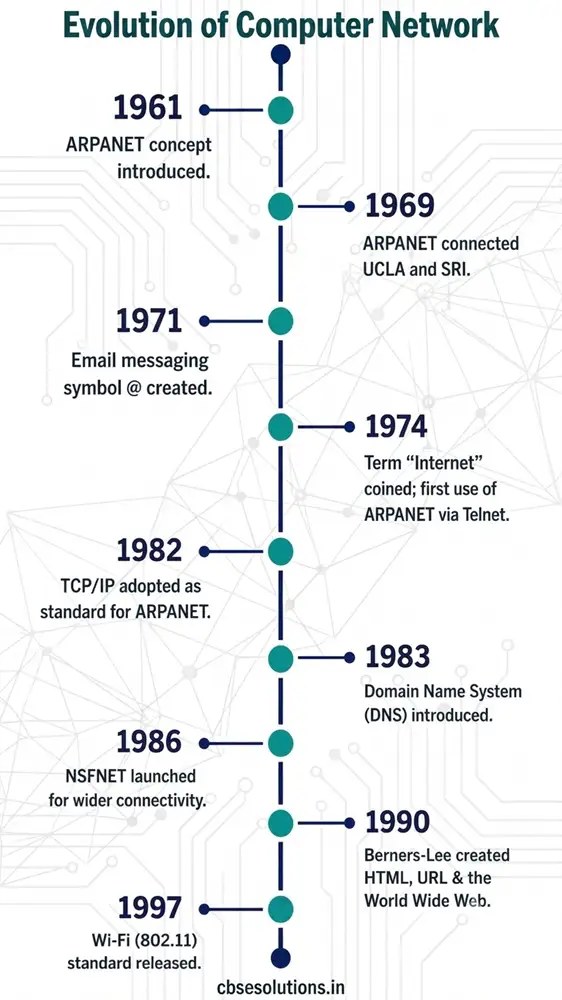
Key Terms in Evolution of Computer Network
ARPANET (1969):
The US government created ARPANET (Advanced Research Project Agency Network) to connect computers at various universities and defence agencies so they could share data and information efficiently.
NSFNET (1986):
NSFNET (National Science Foundation Network) was a program (1985–1995) that promoted research and education networking in the United States. It initially connected supercomputing centres and later became a major part of the Internet backbone.
TCP/IP (1982):
TCP/IP (Transmission Control Protocol/Internet Protocol) is a set of communication rules that allows different networks to connect and communicate with each other. It became the standard protocol for the Internet.
Email (1971):
Email (Electronic Mail) is a system for sending and receiving digital messages over a network, making communication faster and easier.
DNS (1983):
DNS (Domain Name System) is a system that converts website names (like google.com) into IP addresses so computers can understand and connect easily.
WWW (1989–1991):
The World Wide Web (WWW), developed by Tim Berners-Lee, is a system of interlinked web pages accessed through the Internet using browsers.
Internet (1990):
Internet is the Inter-connection Network, a worldwide network of networks that connects computers globally for communication and information sharing.
Wi-Fi (IEEE 802.11, 1997):
Wi-Fi (Wireless Fidelity) based on IEEE 802.11 standards is a technology that allows devices to connect to a network wirelessly using radio signals.
Types of Networks
Based on the geographical area covered and data transfer rate, computer networks are broadly categorized into:
- PAN (Personal Area Network)
- LAN (Local Area Network)
- MAN (Metropolitan Area Network)
- WAN (Wide Area Network)
Personal Area Network (PAN)
- A Personal Area Network (PAN) is a network that connects a small number of personal devices such as computers, laptops, mobile phones, smartphones, printers, etc., for personal use.
- All devices in a PAN operate within a short range of approximately 10 meters.
Local Area Network
- A Local Area Network (LAN) is a network that connects devices such as computers, mobile phones, tablets, printers, and other peripherals within a limited area.
- The geographical area covered by a LAN can include a single room, a floor, an office building, a laboratory, or an entire school, college, or university campus.
- A LAN can extend up to approximately 1 km.
- Example of LAN include College campus network, School computer lab, Office network etc.
Metropolitan Area Network (MAN)
- A Metropolitan Area Network (MAN) is an extended form of LAN that covers a larger geographical area such as a city or a town.
- A MAN can cover a distance of up to approximately 30–40 km.
- Examples of MAN include cable TV networks and cable-based broadband internet services.
Wide Area Network (WAN)
- A Wide Area Network (WAN) connects computers as well as multiple LANs and MANs that are spread across different geographical locations within a country or even across different countries and continents.
- The Internet is the largest example of a WAN, which connects billions of computers, smartphones, and millions of LANs across the globe.
- Example of WAN includes Airline Reservation System, Banking Network, Government Network etc.
| PAN | LAN | MAN | WAN |
| Covers a very small area (up to ~10 meters) | Covers a small area (up to ~1 km) | Covers a city or town (about 30–40 km) | Covers a very large area (hundreds to thousands of km) |
| Connects personal devices | Connects devices in a limited area | Connects multiple LANs in a city | Connects LANs and MANs over large distances |
| Example: Bluetooth between phones | Example: School or office network | Example: Cable TV network | Example: Internet |
Network Devices
To transmit data through different communication media and to configure networks with various functionalities, different networking devices are used. These are:
- Modem
- Ethernet Card
- RJ45
- Hub
- Switch
- Repeater
- Router
- Gateway
- WiFi Card
Modem
- Modem stands for MOdulator DEModulator.
- It is a device used to convert digital signals into analog signals and vice versa.
- Modems are installed at both the sender and receiver ends of a network connection.
- At the sender’s end, the modem acts as a modulator and converts digital data into analog signals, and at the receiver’s end, it acts as a demodulator and converts analog signals back into digital data.
Ethernet Card
- An Ethernet card, also called a Network Interface Card (NIC), is a hardware device used to connect a computer to a wired network.
- A computer is connected to the network using an Ethernet cable through the NIC.
- It supports data transfer speeds from 10 Mbps up to 1 Gbps (1000 Mbps).
- Every NIC has a unique MAC address that helps in identifying each computer separately on a network.
Wi-Fi Card
RJ45
- RJ45 (Registered Jack-45) is an eight-pin connector used mainly with Ethernet cables for networking.
- It is a standard interface used to connect network cables in computer networks.
- RJ45 connectors are commonly found at the end of Ethernet cables.
Repeater
- Data signals transmitted through cables become weak over long distances (about 100 meters) and need to be regenerated to maintain quality.
- A repeater is a networking device used to regenerate and strengthen weak signals in a network.
- It receives the weak signal, amplifies it, and transmits it again so that data can travel longer distances without loss or distortion.
Hub
- A hub is a network device used to connect multiple devices in a network using cables.
- It works by receiving data from one device and broadcasting it to all connected devices in the network.
- A major limitation of a hub is that if two devices send data at the same time, a data collision occurs, which can reduce network efficiency.
Switch
- A switch is an important networking device similar to a hub, which is used to connect multiple computers and other devices in a network.
- When data arrives, the switch reads the destination address from the data packet and sends it only to the intended device.
- Unlike a hub, it does not broadcast data to all devices, which makes the network faster and more efficient.
Difference between switch and hub
| Hub | Switch |
| It broadcasts data to all connected devices | It sends data only to the intended device |
| It does not read the destination address of data | It reads the destination address before sending data |
| Slower and less efficient | Faster and more efficient |
Router
- A router is a networking device that receives data, analyzes it, and forwards it to the appropriate destination network.
- It connects a Local Area Network (LAN) to the Internet.
- Unlike a hub or switch, a router has advanced capabilities to inspect data, decide the best path, and transfer it between different types of networks.
- A router can be either wired or wireless.
Gateway
- A gateway is a key network device that acts as a “gate” between an organisation’s internal network and the external Internet or other networks.
- It works as the entry and exit point of a network, meaning all incoming and outgoing data must pass through it.
- A gateway can be implemented using hardware, software, or a combination of both, depending on the network setup.
Difference between gateway and router
| Router | Gateway |
| Sends data between networks by finding the best path | Connects two different types of networks and allows communication between them |
| Works between similar networks (LAN to LAN, LAN to WAN) | Works between different networks and protocols |
| Finds the best path for data transfer | Acts as entry and exit point of a network |
Networking Topologies
The physical or logical arrangement of computers and other devices in a network is called network topology. Common types of network topologies include:
- Mesh
- Ring
- Bus
- Star
- Tree
Mesh Topology
- In a mesh topology, every device is connected to every other device in the network.
- It can handle heavy traffic because multiple devices can send data at the same time.
- It is highly reliable, as failure of one device does not affect communication between others.
- It is more secure because each connection carries its own data.
- However, it requires complex wiring, high cost, and has many unused (redundant) connections.
Ring Topology
• In a ring topology, each device is connected to two other devices, forming a circular structure.
• Data travels in only one direction (either clockwise or anticlockwise).
• Each device passes the data to the next device until it reaches the destination.
Bus Topology
• In a bus topology, all devices are connected to a single main cable called a bus.
• Data sent by a device travels along the bus in both directions.
• All connected devices can receive the data.
• It is simple and cost-effective as it uses a single backbone cable.
• However, it is less secure and less reliable compared to other topologies.
Star Topology
• In a star topology, all devices are connected to a central device like a hub or switch.
• It is fast, efficient, and easy to manage as each device has a direct connection.
• Failure of one device does not affect others.
• However, failure of the central device can stop the entire network.
• The central device can either broadcast data to all devices or send it only to the intended device.
Tree (Hybrid) Topology
• It is a hierarchical structure that combines multiple topologies like star, bus, and ring.
• It is commonly used in large networks like WANs to connect multiple LANs.
• Data first reaches a central device and then travels through different branches.
• Each branch can further connect to multiple devices or networks.
Introduction to Web Services
The World Wide Web (WWW)
- The World Wide Web (WWW), or simply the web, is a system of interlinked web pages and resources that can be accessed through the Internet.
- It allows users to easily access, share, and view information from anywhere in the world.
- The WWW was invented by Tim Berners-Lee to make information sharing simple and organised.
- It works using three main technologies that make accessing and displaying web content possible.
- HTML
- URL
- HTTP
HTML (HyperText Markup Language)
It is the standard markup and formatting language used to create and design web pages. It defines the basic structure of a webpage so that content can be displayed and understood on any computer.
XML
URI/URL (Uniform Resource Identifier / Locator)
It is the unique address used to identify and locate a resource on the web. Every webpage has its own URL (web address), such as https://www.ncert.nic.in. A URL includes more than just the domain name; it provides the complete path to access a resource.
HTTP (HyperText Transfer Protocol): It is a set of rules used to transfer web pages from a server to a web browser. The secure version of HTTP is called HTTPS.
Domain Name System (DNS)
• To access a website, its IP address is required, but these numeric addresses are difficult to remember.
• To make this easier, each website is given a domain name (hostname), which is linked to its IP address.
• A domain name is a human-friendly name of a website, such as ncert.nic.in.
• The Domain Name System (DNS) works like a phonebook, where domain names are mapped to their corresponding IP addresses.
• Examples of domain names and IP addresses:
• ncert.nic.in → 164.100.60.233
• cbse.nic.in → 164.100.107.32
• mhrd.gov.in → 164.100.163.45
• wikipedia.org → 198.35.26.96
Website
• A website is a collection of related web pages that are linked to each other, stored on a web server, and usually created using HTML.
Content of a Website
• Web Page
• Home Page
• Hyperlink
• Hypertext
• Web Address (URL)
• Content
• Design
Web Page
• A web page is an individual document on the World Wide Web, created using HTML, and viewed through a web browser.
• It can contain different types of content such as text, images, audio, video, etc.
• Web pages are connected to each other through hyperlinks for easy navigation.
Web Server
• A web server is a computer system that stores websites and responds to requests from web browsers using HTTP, delivering web pages to users.
• It is used for web hosting and may include both hardware (a computer storing website data like HTML, images, videos, etc.) and software (programs that handle requests and send responses).
• Web servers can also support other services like FTP and SMTP.
Web Hosting
• Web hosting is a service that provides resources such as storage, memory, processing power, and Internet connectivity to store and run a website or web application.
• Once a website is hosted, it becomes accessible to users from anywhere in the world through the Internet.
Web Browser
• A web browser is application software used to access, retrieve, and display information from the Internet in the form of web pages.
• It communicates with web servers and displays content (HTML, images, videos, etc.) in a user-friendly format.
• Examples: Google Chrome, Mozilla Firefox, Internet Explorer, Opera.