Strings in Python Notes – Class 11 CS (083)
Strings in Python Notes Class 11 CS Notes covering string concepts, operations, slicing, built-in functions, methods, and solved examples. Perfect for CBSE exam preparation.
Strings in Python
- A string is a sequence of one or more Unicode characters.
- These characters can be: Letters (A, B, C), Digits (1, 2, 3), Spaces ( ), Special symbols (@, #, $, %, etc.)
- Strings are created by enclosing characters inside: Single quotes ‘ ‘, Double quotes ” “, Triple single quotes ”’ ”’, Triple double quotes “”” “””
Example of Strings
str1 = ‘Hello World!’
str2 = “Hello World!”
str3 = “””Hello World!”””
str4 = ”’Hello World!”’
All the above variables contain the same string value: Hello World!
Multiline Strings
Triple quotes allow a string to span across multiple lines.
Example
str3 = “””Hello World!
Welcome to the world of Python”””
str4 = ”’Hello World!
Welcome to the world of Python”’
Output
Hello World!
Welcome to the world of Python
Accessing Characters in a String
- Each character in a string can be accessed using indexing.
- The position of a character is represented by an index number written inside square brackets [ ].
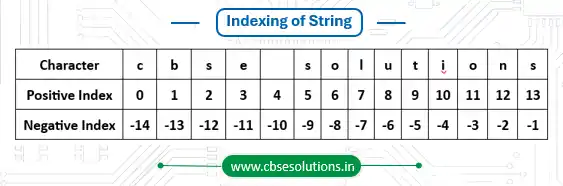
- Positive Indexing: Indexing starts from 0. The first character has index 0 and last character has in-1, where n is the length of the string.
- Index Out of Range: If the index value is outside the valid range, Python gives an error.
- Index Can Be an Expression: The index can also be an expression, but it must evaluate to an integer.
- Negative Indexing: Python also allows negative indexing.
- Negative indexing starts from the right side.The last character has index -1.The first character has index -n.
- len(): Python provides the built-in len() function to find the number of characters in a string.
Example of String Indexing, Length Function and Errors
# Initializing a string
str1 = “Hello World!”
# Accessing characters using positive indexing
print(“First character :”, str1[0])
print(“Seventh character :”, str1[6])
print(“Last character :”, str1[11])
# Index as an expression
print(“Character at index 2 + 4 :”, str1[2 + 4])
# Accessing characters using negative indexing
print(“Last character using negative index :”, str1[-1])
print(“First character using negative index :”, str1[-12])
# Finding length of the string
print(“Length of string :”, len(str1))
# Using length to access characters
n = len(str1)
print(“Last character using length :”, str1[n – 1])
print(“First character using length :”, str1[-n])
# Index out of range
print(str1[15])
# Invalid index type
print(str1[1.5])
Output
First character : H
Seventh character : W
Last character : !
Character at index 2 + 4 : W
Last character using negative index : !
First character using negative index : H
Length of string : 12
Last character using length : !
First character using length : H
IndexError: string index out of range
TypeError: string indices must be integers
Indexing of String “cbsesolutions”
String Operations
A string is a sequence of characters. Python provides several operations that can be performed on strings to manipulate and access data easily.
Some commonly used string operations are:
- Concatenation
- Repetition
- Membership
- Slicing
Concatenation of Strings
- Concatenation means joining two or more strings together.
- In Python, strings can be concatenated using the plus (+) operator.
Example
# First string
str1 = “CBSE “
# Second string
str2 = “Solutions”
# Concatenating strings
result = str1 + str2
print(“Concatenated String :”, result)
# Original strings remain unchanged
print(“str1 =”, str1)
print(“str2 =”, str2)
Output
Concatenated String : CBSE Solutions
str1 = CBSE
str2 = Solutions
Repetition of Strings
Python allows us to repeat a string using the repetition operator (*).
Example
# Assigning a string
str1 = “Python “
# Repeating the string 2 times
print(str1 * 2)
# Original string remains unchanged
print(“str1 =”, str1)
Output
Python Python
str1 = Python
Membership Operators
- Python provides two membership operators: in and not in
- These operators are used to check whether a substring is present in a string or not.
- The in operator returns True if the given substring exists in the string; otherwise, it returns False.
- The not in operator returns True if the given substring is not present in the string; otherwise, it returns False.
Example
str1 = “CBSE Solutions”
# Using in operator
print(“CBSE” in str1)
print(“Sol” in str1)
print(“Python” in str1)
# Using not in operator
print(“Notes” not in str1)
print(“CBSE” not in str1)
Output
True
True
False
True
False
Slicing in Strings
- Slicing is used to access a part of a string or extract a substring.
- In Python, slicing is done using the syntax: string[start : end : step]
- start → Starting index (inclusive)
- end → Ending index (exclusive)
- step → Difference between consecutive characters (optional)
- The substring includes characters from index start to end – 1.
- The starting index is included, but the ending index is excluded.
Example of String Slicing
# Initializing a string
str1 = “CBSE Solutions”
# Slicing from index 0 to 3
print(str1[0:4])
# Slicing from index 5 to 8
print(str1[5:9])
# Ending index greater than string length
print(str1[3:20])
# First index greater than second index
print(str1[8:3])
# Slicing from beginning to index 5
print(str1[:6])
# Slicing from index 5 to end
print(str1[5:])
# Slicing with step size 2
print(str1[0:14:2])
# Slicing with step size 3
print(str1[0:14:3])
# Negative indexing in slicing
print(str1[-9:-1])
# Reversing the string
print(str1[::-1])
Output
CBSE
Solu
E Solutions
CBSE S
Solutions
CS oltos
CESuin
olution
snoituloS ESBC
Traversing a String
- String Traversal means accessing each character of a string one by one.
- In Python, a string can be traversed using: for loop or while loop
String Traversal Using for Loop
str1 = “CBSE Solutions”
for ch in str1:
print(ch, end = “”)
Output
CBSE Solutions
String Traversal Using while Loop
In a while loop, indexing is used to access each character of the string.
Example
str1 = “CBSE Solutions”
index = 0
# len() returns the length of the string
while index < len(str1):
print(str1[index], end = “”)
index += 1
Output
CBSE Solutions
String Methods
| Function / Method | Explanation | Example |
| len() | Returns the total number of characters in a string. | str1 = “CBSE Solutions” print(len(str1)) Output: 14 |
| capitalize() | Converts the first character to uppercase and remaining characters to lowercase. | str1 = “cbse solutions” print(str1.capitalize()) Output: Cbse solutions |
| title() | Converts the first letter of each word to uppercase. | str1 = “cbse solutions” print(str1.title()) Output: Cbse Solutions |
| lower() | Converts all characters to lowercase. | str1 = “CBSE Solutions” print(str1.lower()) Output: cbse solutions |
| upper() | Converts all characters to uppercase. | str1 = “CBSE Solutions” print(str1.upper()) Output: CBSE SOLUTIONS |
| count() | Returns the number of occurrences of a substring. | str1 = “CBSE Solutions” print(str1.count(“o”)) Output: 2 |
| find() | Returns the index of the first occurrence of a substring. Returns -1 if not found. | str1 = “CBSE Solutions” print(str1.find(“S”)) Output: 0 |
| index() | Returns the index of the first occurrence of a substring. Gives error if not found. | str1 = “CBSE Solutions” print(str1.index(“l”)) Output: 7 |
| endswith() | Returns True if the string ends with the given substring. | str1 = “CBSE Solutions” print(str1.endswith(“ions”)) Output: True |
| startswith() | Returns True if the string starts with the given substring. | str1 = “CBSE Solutions” print(str1.startswith(“CBSE”)) Output: True |
| isalnum() | Returns True if all characters are alphabets or digits. | str1 = “CBSE123” print(str1.isalnum()) Output: True |
| isalpha() | Returns True if all characters are alphabets only. | str1 = “CBSE” print(str1.isalpha()) Output: True |
| isdigit() | Returns True if all characters are digits only. | str1 = “2025” print(str1.isdigit()) Output: True |
| islower() | Returns True if all letters are lowercase. | str1 = “cbse solutions” print(str1.islower()) Output: True |
| isupper() | Returns True if all letters are uppercase. | str1 = “CBSE” print(str1.isupper()) Output: True |
| isspace() | Returns True if the string contains only spaces. | str1 = ” ” print(str1.isspace()) Output: True |
| lstrip() | Removes spaces from the left side of the string. | str1 = ” CBSE Solutions” print(str1.lstrip()) Output: CBSE Solutions |
| rstrip() | Removes spaces from the right side of the string. | str1 = “CBSE Solutions ” print(str1.rstrip()) Output: CBSE Solutions |
| strip() | Removes spaces from both sides of the string. | str1 = ” CBSE Solutions ” print(str1.strip()) Output: CBSE Solutions |
| replace() | Replaces a substring with another substring. | str1 = “CBSE Notes” print(str1.replace(“Notes”, “Solutions”)) Output: CBSE Solutions |
| join() | Joins elements of a sequence using a string separator. | str1 = ” ” print(str1.join([“CBSE”, “Solutions”])) Output: CBSE Solutions |
| partition() | Splits the string into three parts using the given separator. | str1 = “CBSE-Solutions” print(str1.partition(“-“)) Output: (‘CBSE’, ‘-‘, ‘Solutions’) |
| split() | Splits the string into a list using a separator. | str1 = “CBSE Solutions” print(str1.split()) Output: [‘CBSE’, ‘Solutions’] |