Flow of Control Notes – Class 11 CS (083) | CBSE Oriented Notes
These Flow of Control Notes of Class 11 CS help students understand concepts easily, boost confidence, and prepare effectively for board exams.
Flow of Control
- The sequence in which program statements are executed is called the flow of control.
- Flow of control determines how a program moves from one statement to another during execution.
- This flow is managed using control structures. Python mainly supports two types of control structures:
- Selection Control Structure – Used for decision-making. It allows the program to choose different paths based on conditions.
Examples: if, if-else, if-elif-else - Repetition Control Structure – Used to execute a set of statements repeatedly until a condition is satisfied.
Examples: for loop, while loop
Selection
A Selection Control Structure is a control structure that allows a program to make decisions and choose different paths of execution based on a condition.
In Python, selection control structures evaluate a condition as True or False and execute statements accordingly.
Python provides the following selection statements:
- if Statement – Executes a block of code only when the condition is true.
- if-else Statement – Executes one block of code if the condition is true and another block if it is false.
- if-elif-else Statement – Used to check multiple conditions one after another and execute the matching block of code.
if Statement
- The if statement is used to execute a block of code only when a specified condition is True.
- If the condition evaluates to False, the statements inside the if block are skipped.
Syntax
if condition:
statement(s)
Example
marks = int(input(“Enter your marks: “))
if marks >= 33:
print(“You have passed the exam”)
if…else Statement
- The if…else statement is used when a program has to make a decision between two possible actions.
- If the condition is True, the statements inside the if block are executed; otherwise, the statements inside the else block are executed.
Syntax
if condition:
statement(s)
else:
statement(s)
Example
temperature = int(input(“Enter the temperature: “))
if temperature > 30:
print(“It is a hot day”)
else:
print(“The weather is pleasant”)
Example
marks = int(input(“Enter your marks: “))
if marks >= 40:
print(“Student is Pass”)
else:
print(“Student is Fail”)
if…elif…else Statement
The if…elif statement is used when multiple conditions need to be checked and a program has to choose one option from several alternatives.
Syntax
if condition1:
statement(s)
elif condition2:
statement(s)
elif condition3:
statement(s)
else:
statement(s)
Example: Check Whether a Number is Positive, Negative, or Zero
number = int(input(“Enter a number: “))
if number > 0:
print(“Number is Positive”)
elif number < 0:
print(“Number is Negative”)
else:
print(“Number is Zero”)
Example: Calculate Total, Percentage, and Grade
hindi = int(input(“Enter marks in Hindi: “))
english = int(input(“Enter marks in English: “))
maths = int(input(“Enter marks in Mathematics: “))
science = int(input(“Enter marks in Science: “))
sst = int(input(“Enter marks in SST: “))
total = hindi + english + maths + science + sst
percentage = total / 5
print(“Total Marks =”, total)
print(“Percentage =”, percentage)
if percentage >= 90:
print(“Grade A”)
elif percentage >= 75:
print(“Grade B”)
elif percentage >= 50:
print(“Grade C”)
elif percentage >= 40:
print(“Grade D”)
else:
print(“Needs Improvement”)
Indentation in Python
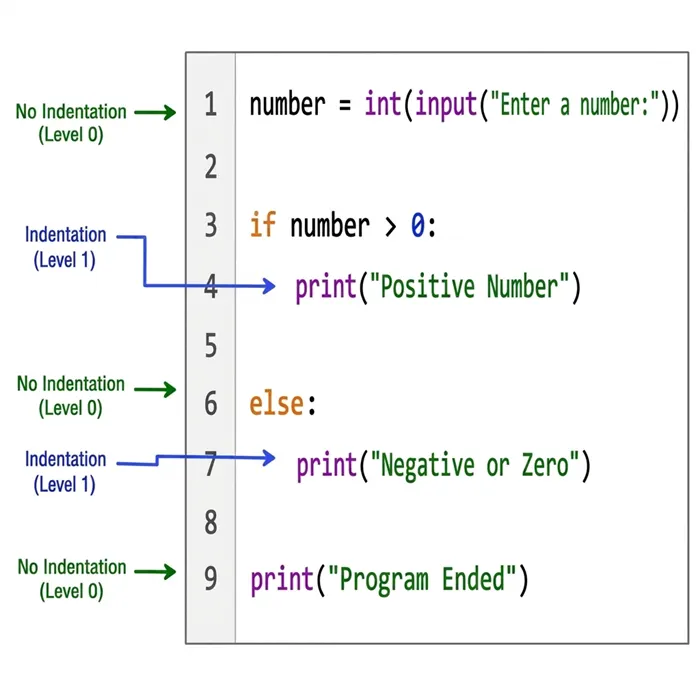
- Python uses indentation to define blocks of code and nested block structures.
- Indentation refers to the spaces or tabs added at the beginning of a statement.
- Statements with the same level of indentation belong to the same block of code.
- Python strictly checks indentation, and incorrect indentation results in a syntax error.
- It is a common practice to use one tab or four spaces for each level of indentation.
Example
Repetition (Looping)
- In programming, there are many situations where a set of statements needs to be executed repeatedly. To solve this problem, Python provides repetition or looping constructs.
- Repetition is the process of executing a block of code multiple times until a given condition is satisfied. This repeated execution is also known as iteration.
- A loop works using a special variable called the loop control variable. The value of this variable changes during execution, and the condition is checked each time before repeating the loop.
- Python mainly provides two looping constructs:
- for loop
- while loop
The for Loop
- The for loop is used to execute a block of statements repeatedly for each item in a sequence or range of values.
- It is mainly used when the number of iterations is known in advance.
- In a for loop, a control variable takes one value at a time from the given sequence or range.
- For every value assigned to the control variable, the statements inside the loop body are executed once.
- The loop continues until all the values in the sequence or range have been processed.
- After all items are exhausted, the loop terminates automatically, and control moves to the statement immediately following the loop.
Syntax
for control_variable in sequence_or_range:
statement(s)
Example
Example: Print Even Numbers
numbers = [1,2,3,4,5,6,7,8,9,10]
for num in numbers:
if num % 2 == 0:
print(num, “is an even Number”)
Output
2 is an even Number
4 is an even Number
6 is an even Number
8 is an even Number
10 is an even Number
The range() Function
- The range() function is a built-in function in Python used to generate a sequence of integers within a specified range.
- It is commonly used with loops, especially the for loop, to control how many times the loop should execute.
Syntax
range(start, stop, step)
Parameters of range()
- start → Specifies the starting value of the sequence.
- stop → Specifies the ending value of the sequence (not included in the output).
- step → Specifies the difference between consecutive values.
Example 1: Using Default Step Value
for number in range(1, 6):
print(number)
Output
1
2
3
4
5
Example 2: Using Step Value
for number in range(2, 11, 2):
print(number)
Output
2
4
6
8
10
Example
list(range(10))
Output:
[0, 1, 2, 3, 4, 5, 6, 7, 8, 9]
Example
list(range(0, 30, 5))
Output:
[0, 5, 10, 15, 20, 25]
list(range(0, -9, -1))
Output:
[0, -1, -2, -3, -4, -5, -6, -7, -8]
Example Program: Multiples of 10
for num in range(5):
if num > 0:
print(num * 10)
Output
10
20
30
40
The while Loop
- The while loop is used to execute a block of statements repeatedly as long as a specified condition remains True.
- If the condition is false at the beginning itself, the statements inside the loop are not executed even once.
- The while loop is useful when
- the number of iterations is not known in advance
- User input or conditions control the execution of the loop
It is commonly used for:
- Menu-driven programs
- Input validation
- Repeating tasks until the user chooses to stop
- Counting and condition-based processing
Syntax
initialization
while condition:
statement(s)
updation
Example
count = 1
while count <= 5:
print(count)
count = count + 1
Output
1
2
3
4
5
Example: Program to Find the Factors of a Whole Number Using while Loop
number = int(input(“Enter a whole number: “))
i = 1
print(“Factors of”, number, “are:”)
while i <= number:
if number % i == 0:
print(i)
i = i + 1
Break and Continue Statement
break Statement
- The break statement is used to immediately terminate a loop when a specified condition is met.
- It changes the normal flow of execution by stopping the current loop and transferring control to the statement immediately following the loop.
Example
for number in range(1, 11):
if number == 5:
break
print(number)
Output
1
2
3
4
Example: Find the sum of all the positive numbers entered by the user. As soon as the user enters a negative number, stop taking in any further input from the user and display the sum.
total = 0
while True:
number = int(input(“Enter a number: “))
if number < 0:
break
total = total + number
print(“Sum of positive numbers =”, total)
continue Statement
- The continue statement is used to skip the remaining statements of the current iteration and move directly to the next iteration of the loop.
- It changes the normal flow of execution without terminating the loop completely.
Example: Print Numbers Except Multiples of 3
for number in range(1, 16):
if number % 3 == 0:
continue
print(number)
Output
1
2
4
5
7
8
10
11
13
14
Nested Loops
- A loop inside another loop is called a nested loop.
- The inner loop runs completely for every single iteration of the outer loop.
- The inner loop executes completely for each iteration of the outer loop.
- After the inner loop finishes, control moves back to the outer loop.
Example: Print Numbers Except Multiples of 3
for number in range(1, 16):
if number % 3 == 0:
continue
print(number)
Output
1
2
4
5
7
8
10
11
13
14