Class 10 ICT Skills Notes | CBSE Employability Skills Guide
Want to score full marks in ICT Skills Class 10?
No worries—you’re in the right place! These Class 10 ICT Skills Notes are carefully crafted as per the CBSE Employability Skills syllabus, with simple explanations and exam-focused content to help you learn all key concepts easily.
🧭 Related Resources
- 🎯Class 10 Employability Skills
- ✅ICT Skills MCQs with Answers
- 📝ICT Skills PYQs with Answers
- ❓ICT Skills Imp Questions
Class 10 ICT Skills Notes | Quick Revision for Board Exams
Session 1: ICT Overview | Basic Computer Operations
- ICT stands for Information and Communication Technology.
- It refers to methods, tools, and concepts for storing, recording, and sending digital information.
- Examples of ICT devices: smartphones, tablets, laptops, computers.
- ICT skills help in communication, running business, and staying connected with others.
Computer System – Hardware and Software
- A computer system has two main parts:
- Hardware – Physical parts we can see and touch (keyboard, CPU, monitor, mouse, etc.).
- Software – Set of instructions that makes the hardware work the way we want.
- Operating System (OS) is the most important software — It starts when the computer is switched on.
- Examples: Windows, Ubuntu, Mac OS (for computers), Android, iOS (for mobiles)
- Other software: browsers, games, office tools, etc.
Starting a computer
- Press the Power button → Operating System loads → Display Desktop screen.
- The system becomes ready to take user instructions.
Shutting Down
- In Ubuntu: Click System → Shut Down.
- In Windows: Click Start → Clock Power button → Shut Down.
- OS closes all applications and safely turns off the computer.
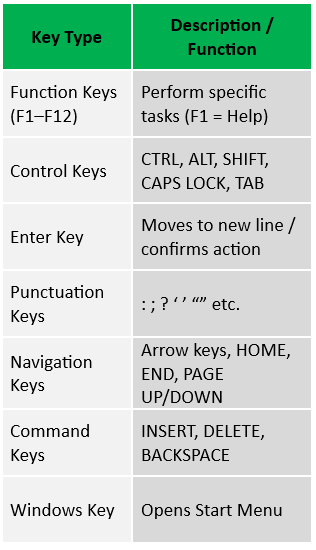
Keyboard and its Keys
Keyboard – An input device used to type text, numbers, commands.
Using a Mouse
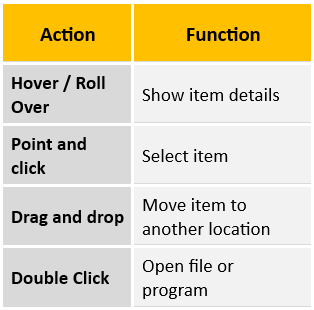
Mouse – Input device to move, select, or open items on screen.
Mouse actions:
Class 10 ICT Skills Notes | CBSE Employability Skills Notes
Session 2: Performing Basic File Operations
Files and Folders
- Files: All information stored in a computer is kept in files. (text, image, sound, etc.).
- Folders: Folders are locations used to store and organize multiple files.
- File Name Extension: Each file is given file name and has a file name extension that identifies the file type. (e.g., .txt, .doc, .jpg, .mp3).
- File name and File Name Extension are separated by a period or ‘dot’.
Creating a File (in Ubuntu)
- Open the Text Editor (type “editor” in search box) → Type your text.
- Click Save → choose location → name the file → Save.
Creating a Folder
- Open File Explorer → choose location (e.g., Desktop).
- Right-click → New Folder → type name (e.g., “Demo”).
Class 10 ICT Skills Notes | Employability Skills Class 10
Session 3: Computer Care and Maintenance
Tips for Device Care
- Keep Device Clean –wipes screen with soft cloth, clean keyboard with soft brush.
- Be careful with food and drinks – avoid eating and keeping glass of water, coffee near computer.
- Handle device Carefully – Avoid dropping or banging; use covers/cases to move devices.
- Keep computer cool – Ensure cooling fan works; avoid blocking ventilation.
- Avoid Overcharging of battery – Unplug once battery is full.
- Plug in device carefully – Do not force USBs/headphones.
- Do not run too many programs at a time – Close unused apps to prevent lag/crash.
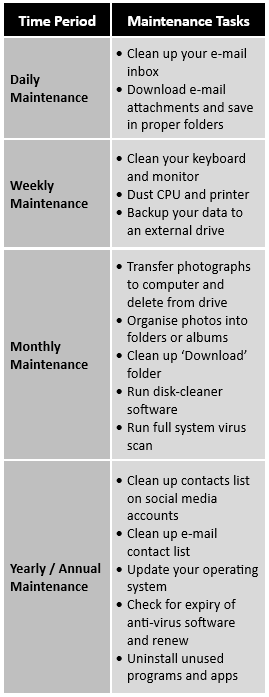
Maintenance Schedule
Backup Your Data
- Backing up means saving copies of important files on another device or cloud.
- It keeps information safe if the system crashes, human mistakes or disasters.
Virus Protection
- Install antivirus software to detect and clean viruses.
- Regularly scan system to remove harmful programs.
Increase Computer Performance
- Keep cleaning unnecessary/temporary files using disk cleaner software.
Remove SPAM
- SPAM are unwanted or advertisement emails.
- Never respond to spam emails.
- Set filters and SPAM folder to prevent them.
Class 10 ICT Skills Notes | Quick Revision for Board Exams
Session 4: Computer Security and Privacy
Reasons for Security Break
- We are not careful in giving out personal information over the Internet.
- Unauthorized access to our computer (not logging out).
Threats to Computer
- Theft: Stealing information or hardware. These may be of three types-
- Physical: Device stolen.
- Identity: Hacker steals your personal information.
- Software Piracy: Using or distributing unlicensed software.
- Viruses – Computer programs that can damage the data and software or steal information.
Major types of viruses are:- Worms: Self-replicate and spread to all files once attack a computer.
- Trojan Horse: pretend to be useful but destroy data once installed.
- Online Predators: Trap users into unsafe and inappropriate relationships.
- Internet Scams: Fake offers or lotteries to steal money or data.
Protecting Your Data
- Use Strong Passwords: Combine letters (upper/lower), numbers & special characters.
- Install Antivirus & Firewall: Block, detect, and clean harmful files.
- Encrypt Data: Convert data into unreadable form to prevent misuse. Example: BitLocker in Windows.
- Use Secure Websites: Always use https:// and check for 🔒 lock icon before sharing details.
🔗Related Class 10 ICT Skills Resources
- ✅ICT Skills MCQs with Answers
- 📝ICT Skills PYQs with Answers
- ❓ICT Skills Imp Questions
🔗Explore Other Class 10 Employability Skills Notes
🔗Explore Other Class 10 Employability Skills MCQs
Class 10 ICT Skills – FAQ
Are Class 10 ICT Skills notes important for CBSE exams?
Yes, ICT Skills, Employability Skills class 10 ka one of the important topic hai aur CBSE board exams me isse every year questions pooche jaate hain.
Are these Class 10 ICT Skills notes based on the latest CBSE syllabus?
Yes, ye notes latest CBSE syllabus and updated exam pattern ke according prepared kiye gaye hain.
Do these Class 10 ICT Skills notes cover all exam-important topics?
Yes, is notes me sabhi ICT skills ke each and every topic ko to-the-point cover kiya gaya hai.
Are Class 10 ICT Skills notes enough for exam preparation?
Yes, Ye notes aapko ICT skills of class 10 ki complete understanding dete hai, lekin best results ke liye aapko iske PYQs aur MCQs ko bhi revise karna chahiye. Aapko class 10 ICT skills ke sabhi study material ki links meri isi website me mil jayenge.
Class 10 ICT Skills me kya kya topics hai?
Class 10 ICT Skills me as per CBSE latest curriculum hum Basic Computer Operation, File Operations, Computer Care and Maintenance, aur Computer Securtiy and Privacy padhte hai.
Frequently Asked Questions on Employability Skills
What are Employability Skills in Class 10 CBSE?
Employability Skills woh soft skills hoti hain jo kisi employee ko communication, self-management, technology aur workplace ke different aspects mein more skilled aur effective banati hain, jisse woh apne kaam ko better way mein perform kar sake.
Are Employability Skills important for the CBSE Class 10 board exam?
Haan, Employability Skills CBSE Class 10 board exam ka important part hain. Students ko inke concepts, MCQs, aur important questions ko properly prepare karna chahiye. Ye easily prepare kiye ja sakte hai.
Which subjects are included in Class 10 Employability Skills?
Class 10 Employability Skills mein Communication Skills, Self-Management Skills, ICT Skills, Entrepreneurial Skills aur Green Skills jaise important skill topics cover kiye jaate hain.
How many marks are there for Employability Skills in Class 10?
Haan, CBSE Class 10 board exam mein Employability Skills se 10 marks (50 mein se) ke questions pooche jaate hain.
Are MCQs and PYQs enough to prepare for Class 10 Employability Skills?
Sirf MCQs aur PYQs se preparation karna enough nahi hai. Concepts, definitions aur important topics ko notes se prepare karna bhi jaroori hai. in sabki links apko isi post ke top me mil jayegi.