Python Functions Notes – Class 12 CS (083) | Complete CBSE Exam Guide

In this Python Function Notes, You’ll learn everything from defining and calling functions to understanding arguments, parameters, return values, and variable scope.
Functions are the absolute backbone of clean Python programming. They help us organize code into reusable blocks, making programs easier to write, understand, and maintain. In CBSE Class 12 Computer Science (Code 083), mastering this chapter is crucial for securing top marks in your board exams.
In this comprehensive Notes, each topic is explained step by step with clear syntax and practical examples. Whether you’re preparing for board exams, practicals, or quick revision, these notes will help you build a strong understanding of Functions in Python.
What is Function?
- Function is named set of code written to carry out a specific task.
- It can be used repeatedly at different places within a program.
- Once defined, a function can be called multiple times without rewriting the code.
- Functions can be called from different parts of the program.
- A function can also be called inside another function.
Advantages of function
- Increases code reusability – The same function can be used multiple times.
- Reduces program complexity – Breaks the program into smaller, manageable parts.
- Improves readability – Makes the code easier to read and understand.
- Reduces chances of errors – Less repeated code means fewer mistakes.
Types of function
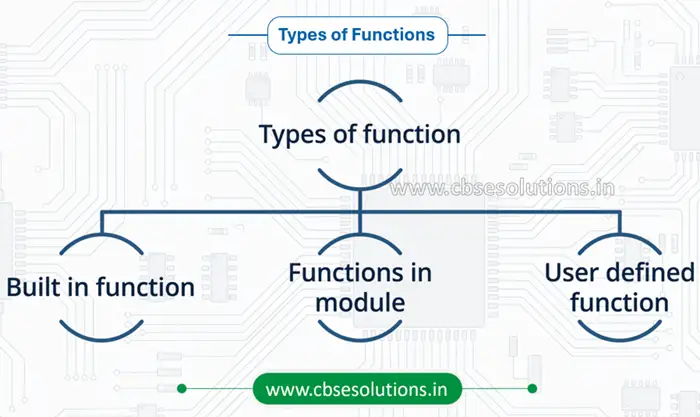
User defined function
A user-defined function is a function created by the programmer to perform a specific task as needed.
Creating User-Defined Functions in Python
To create a user-defined function in Python, we follow two main steps:
- Function Definition (Defining the function)
- Function Call (Calling the function)
Function Definition (Defining the function)
- In this step, we write the function using the def keyword.
- We give the function a name and define what it should do.
- We can also include parameters (inputs) if needed.
Syntax:
def <functionname> ([parameters]):
statements
—-,,——–
return <value>
Points to Remember while Creating Functions in Python
- def keyword is used to define (start) a function.
- The function header always ends with a colon (:).
- The function name should be unique and follow identifier naming rules.
- Parameters (inside brackets) are optional.
- If used, parameters are separated by commas (,).
- A function may or may not return a value.
Function Call (Calling/Invoking the function)
- In this step, we use the function by writing its name.
- We pass arguments (values) if the function requires them.
- The function then executes the defined code.
Syntax:
<function_name>(Argument(s))
Points to Remember while Calling Functions (Python)
- Here arguments are value(s) passed during function call
- Function definition executes its body only when the function is called or invoked
Example: Create a user defined function ‘area’ to calculate and display area of rectangle.
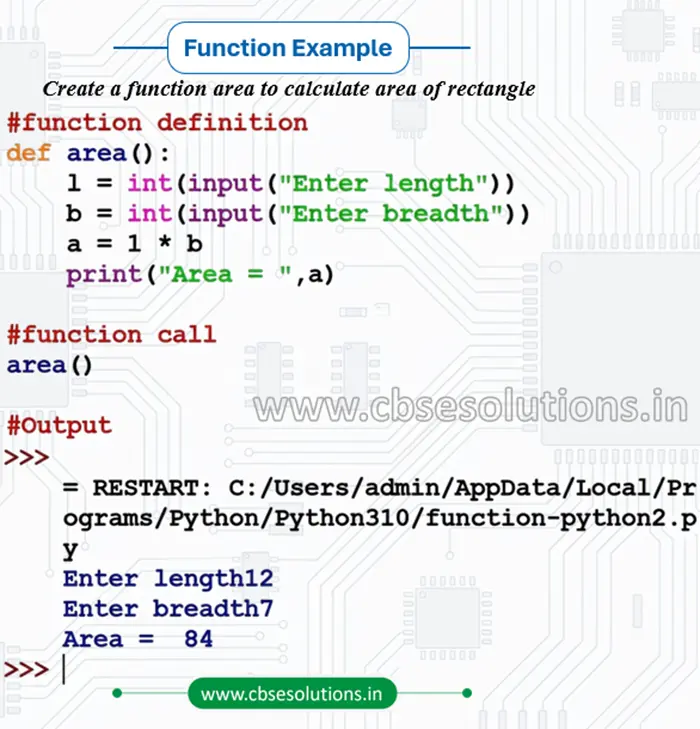
Function Anatomy (Terminologies)
- def – keyword used to define a function
- Function header – first line; starts with def and ends with :
- Parameters – variables inside parentheses used to receive values
- Function body – indented block of code that performs the task
- Return statement – used to send a value back from the function (optional)
- Indentation – spaces at the beginning that define the function body
Arguments and Parameters
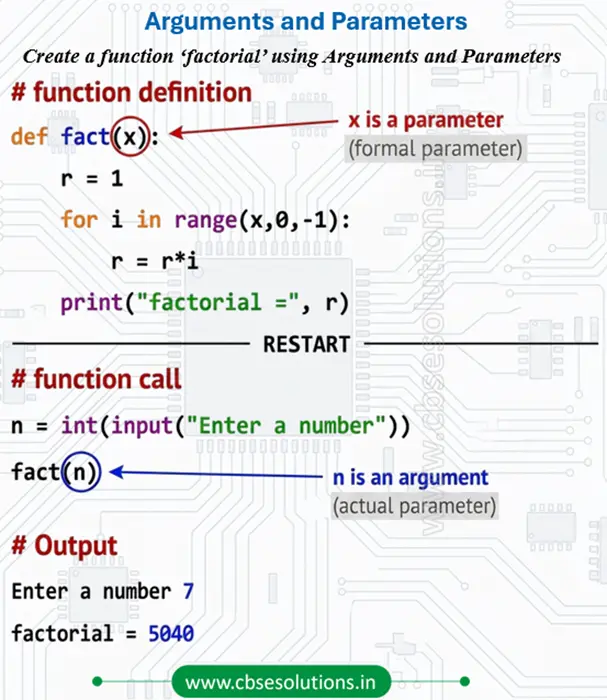
- Argument: An argument is the actual value passed to the function when the function is called.
- Parameter: A parameter is a variable written in the function definition (function header) that receives the value passed to the function.
- The no of arguments in calling and called function should be same.
Difference between Arguments and Parameters
| Argument | Parameter |
| Value passed through function call | Value received in function definition |
| Can be literals, variables, or expressions | Must be variable names to hold values |
| Also called Actual Parameters | Also called Formal Parameters |
| Appears in function call statement | Appears in function header/definition |
Example: Write a function to find factorial of a number, where number is passed as an argument.
Passing Parameters
There are three ways of passing parameters in Python
- Positional arguments
- Default arguments
- Keyword (or named) arguments
Positional Arguments
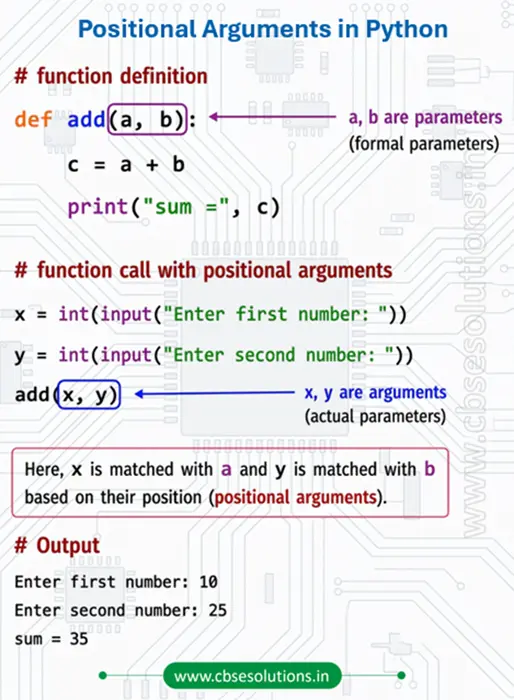
- positional arguments are the arguments passed to a function based on their position or order.
- Positional arguments are also called as required arguments or mandatory arguments
- in such function call
- all the arguments are required for all parameters
- The values of arguments are matched with parameters, position(order) wise.
Example
Default parameter
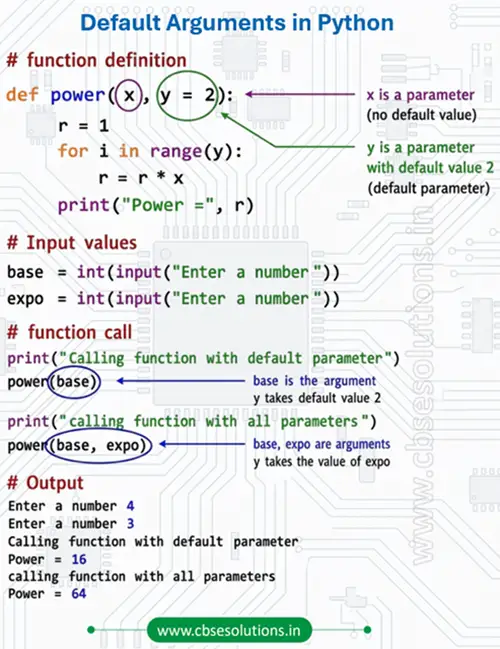
- Python allows assigning a default value to a parameter. A default value is a pre-defined value that is automatically used when no corresponding argument is passed during the function call.
- The parameter with a default value is called a default parameter.
- Default parameters must always be placed at the end (trailing parameters) in the function header.
Example:: Write a function power to find x to the power y. if y is not inputted square of x should be calculated.
Note:
- A function argument can also be an expression, such as:
mixedFraction(num + 5, deno + 5) - In such cases, the expression is evaluated first before the function is called.
- After evaluation, the resulting valid values are passed to the corresponding parameters of the function.
Keyword Argument
- Keyword arguments are also called named arguments
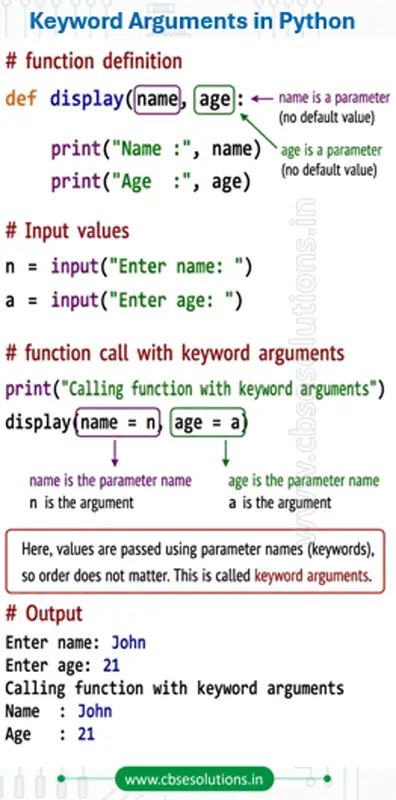
- Keyword arguments are arguments that use parameter names to assign values rather than order.
- It is not necessary to follow the order of formal arguments in function definition, while passing keyword arguments
Example:
Function returning a value
- A function may return a value when called.
- Python uses ‘return’ keyword to return the value(s) from the function.
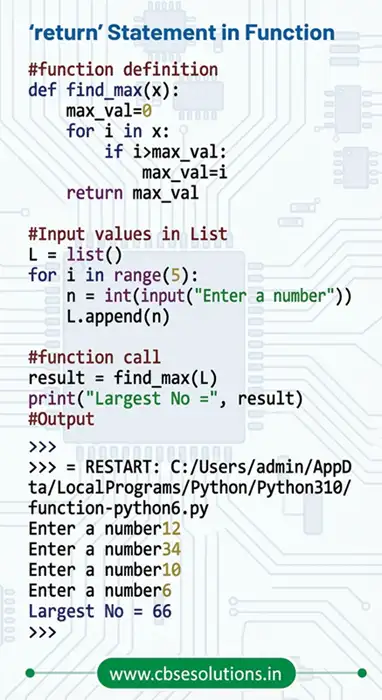
Example: Write a function to find and return largest among ten numbers stored in a list.
Flow of execution
- Flow of execution refers to the order in which statements are executed during the running of a program.
- Program execution begins with the first statement of the __main__ segment (top-level statements).
- The statements are executed one by one in the order they appear, from top to bottom.
- When Python encounters a function definition, it reads and stores the function header and function body, but it does not execute the function body immediately.
- The statements inside the function body are executed only when the function is called.
- After the function call is completed, control returns back to the next statement after the function call.
- If one function calls another function, the control moves to the called function first and returns after its execution is completed.
Example
Scope of variable
- Scope of variable refers to accessibility scope of a variable within a program or part of a program.
- A variable can have either local or global scope.
- There are two types of variables as per scope:
- Global variable
- Local variable
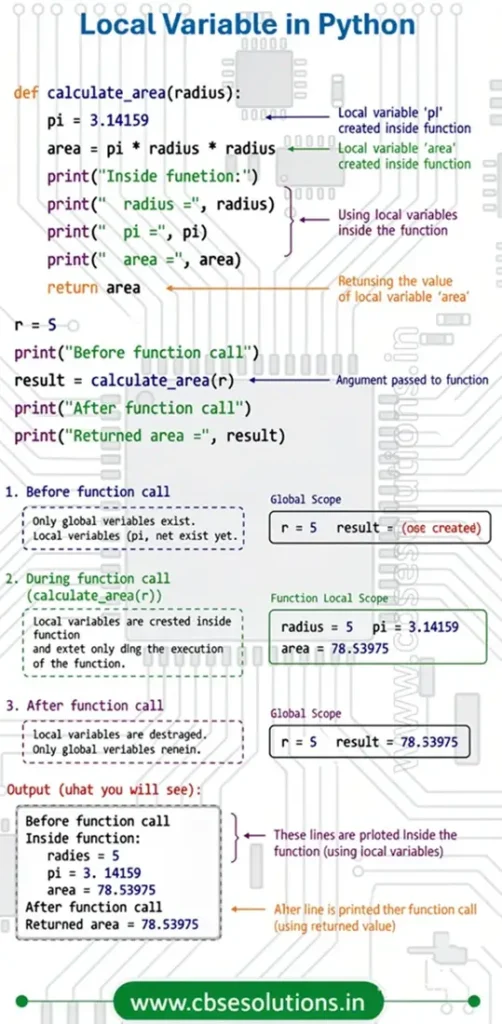
Local variable
- A variable that is defined inside any function or block is called local variable.
- It can be accessed only in the function or a block where it is defined.
- It exists only till the function executes.
Example: Program to define and access Local variable
Global variable
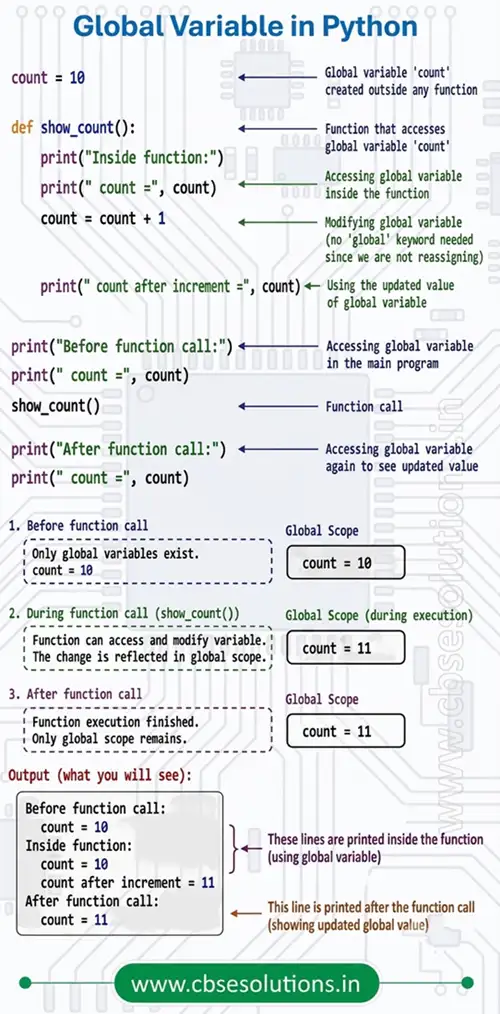
- A variable defined outside any function or block is known as a global variable.
- It can be accessed inside any function defined after it.
- Any change made to a global variable is permanent and affects all functions where it is used.
- If you want to modify a global variable inside a function, you must use the global keyword before the variable name in that function.
Example: Program to define and access Global variable outside of function
Built in function
| Function | Description | Example (with Output) |
input() | Used to accept inputs from the user. It reads a line from input, converts it to a string, and returns it. | name = input("Enter name: ")print("Hello, " + name)Output: Enter name: AliceHello, Alice |
print() | Used to display outputs to the standard output device (screen). Converts objects to strings before printing. | print("Hello, World!")print("Score:", 95)Output: Hello, World!Score: 95 |
abs(number) | Returns the absolute value of a given number. The argument can be an integer, a floating-point number, or a complex number. | print(abs(-5))print(abs(-3.14))Output: 53.14 |
max() | Returns the largest item in an iterable (sequence) or the largest of two or more arguments. | print(max([1, 5, 3]))print(max(10, 20, 30))Output: 530 |
min() | Returns the smallest item in an iterable (sequence) or the smallest of two or more arguments. | print(min([1, 5, 3]))print(min(10, 20, 30))Output: 110 |
pow(base, exp) | Calculates and returns the base raised to the power of the exponent (i.e., baseexponent). | print(pow(2, 3))print(pow(5, 2))Output: 825 |
sum() | Sums the start value and the items of an iterable (sequence) from left to right and returns the total. | numbers = [1, 2, 3, 4]print(sum(numbers))print(sum(numbers, 10))Output: 1020 |
len() | Returns the length (the number of items) of an object. The argument may be a sequence (string, list, tuple, etc.) or a dictionary. | print(len("Python"))my_dict = {"a": 1, "b": 2}print(len(my_dict))Output: 62 |
range(start, stop, step) | Returns a sequence of numbers, starting from 0 by default, increments by 1 (by default), and stops before a specified number. | print(list(range(5)))print(list(range(2, 10, 2)))Output: [0, 1, 2, 3, 4][2, 4, 6, 8] |
type(value) | Returns the data type of the given value/object. | print(type(10))print(type("Hello"))Output: <class 'int'><class 'str'> |