Java Notes – Class 12 IT (802) | One Shot Revision
Scoring full marks in Java Programming is easier than you think — here’s how!
These Class 12 IT (802) Java Notes (Unit-3: Java Programming) are designed by experienced teachers following the latest CBSE syllabus. The notes are written in simple and clear language, making it easy for you to understand and remember each concept.
This Java Notes is not only suitable for theory but also for practical learning, as they include all concepts with examples and multiple practice programs, helping you strengthen your coding skills and become more confident in Java programming. Perfect for both exam preparation and real-life practical use.
Start revising smartly today and make Java Programming your strongest section in Class 12 IT-802! 😊
What is Java?
- Java is ‘Object Oriented’ high level programming language.
- Java is widely recognized for building diverse computer applications. (list is given below).
What are Applications of java?
- Database applications
- Desktop applications
- Mobile applications
- Web based applications
- Games etc.
Features of Java
- Simple – Easy to use learn and use
- Platform Independent – Run on any system using JVM
- Robust – Handle errors and manage memory efficiently
- Portable – Move and use java code easily across systems.
- Distributed – supports network-based programming
- Secure – offers various security features to protect application
- Object Oriented – purely object-oriented language
How Java program is run? | Compilation and Execution of Java program
Java program follows two steps execution process:
Step1: Compilation – (Source code -> Bytecode)
- Program is written using java in .java file (source code).
- Java compiler (javac) translates .java file (source code) into intermediate code in .class file (Bytecode). This Bytecode is also called class file.
- This .class file (Bytecode) is platform independent.
Step-2: Execution – (Bytecode -> Machine code)
- The Java Virtual Machine (JVM) loads the .class file (Bytecode)
- JVM translate Bytecode into machine code specific to operating system.
- The machine code is than run on computer
What is JVM?
- JVM stands for Java Virtual Machine which works as java interpreter. It translates the byte code into machine code and then executes it.
- JVM has both Interpreter and Compiler (Just In Time compiler). JVM initially interprets (line by line) bytecode, but it can also compile frequently used part of bytecode to execute program faster.
What is byte code?
- Byte code is a highly optimized intermediate code produced when a java program is compiled by java compiler.
- Byte code is also called java class file which is run by JVM.
- Bytecode is neither machine nor human readable.
- Bytecode makes program platform independent and portable.
What is Java IDE?
- Java Integrated Development Environment is software development kit equipped with
- Text (code) editor
- Compiler
- Debugger
- Form designer etc.
- It helps in writing code, compiling and executing java programs easily.
- Some popular Java IDEs are: NetBeans, Eclipse, JDeveloper etc.
What is NetBeans?
Java NetBeans IDE is open-source IDE used for writing java code, compiling and executing java programs conveniently.
Components of NetBeans IDE
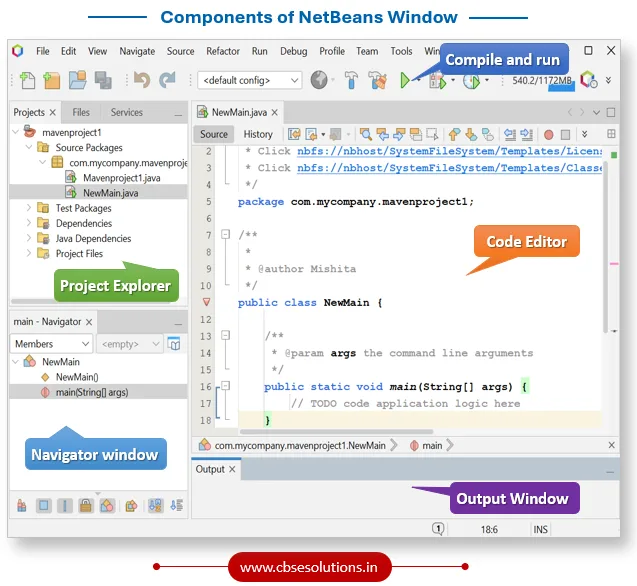
How to create and run java programs in NetBeans?
- Open NetBeans IDE
- Click File -> New Project
- Click Java -> Java Application -> Next
- Enter project name (Select your project location if needed) -> Finish
- Write your program inside main() method in the code editor
- Save your program
- Run your program by clicking Run button (Green triangle) OR press Shift + F6
What is comment? How it can be written in Java program?
- Comment is explanatory notes written in code to explain what code is doing.
- It is not executed when program runs.
- It makes code easier to read and understand what the code is doing.
You can write comments in a Java program in the following two ways:
- Single Line Comment – Beginning a comment line with two consecutive forward slashes (//)
- Multiline Comment – Writing the comment between the symbols /* and */
Java me Output Kaise Dikhaye | System.out.println explained
We use System.out.println() to display output in Java.
Syntax:
System.out.println(“–Your Text Here–”);
Example:
Public class Demo
{
Public static void main(String s[]) {
System.out.println(“Welcome to Java”);
}
}
Kya hai System.out.println()
System – Java predefined class
out – Java Object represents Output stream (helps in output)
println() – Java method that print output and moves to next line
Variables
- Variable is named storage location in memory that can hold a value.
- We can change, and use value using variable during program execution.
How to declare variables in Java
<Data type> <variable name>;
Example:
int x;
float degree;
int a,b,c;
char ac_no;
Rules for naming variable
- Variable names can begin with either an alphabetic character, an underscore (_), or a dollar sign ($).
- Variable names must be one word. Spaces are not allowed in variable names. Underscores are allowed.
- There are some reserved words in Java that cannot be used as variable names, for example – int
- Java is a case-sensitive language. Variable names written in capital letters differ from variable names with the same spelling but written in small letters.
- Variable name should be meaningful.
Data types
- Data type determines the type of data to be stored in a variable.
- Data type tells the compiler, how much memory to reserve when storing a variable of that type.
Types of Data Types
Primitive Data Types (Built in data types)
| Data Type | Type of values | Size |
| byte | Integer | 8-bit |
| short | Integer | 16-bit |
| int | Integer | 32-bit |
| long | Integer | 64-bit |
| float | Floating point | 32-bit |
| double | Floating point | 64-bit |
| char | Character | 16-bit |
| Boolean | True or False | 1-bit |
Non-primitive data types (Reference types)
| Data Type | Type of values | Size |
| String | Text | Depends on content |
| Array | collection of similar data | Depends on data |
| Object | Collection of member variables/methods | Depends on members |
Java me variable kaise banaye aur use karen?
public class VariableDemo {
public static void main(String[] args) {
String name = “Sanjay”;
int age = 20;
float marks = 89.5;
System.out.println(“Name: ” + name);
System.out.println(“Age: ” + age);
System.out.println(“Marks: ” + marks);
}
}
String Variables
- String variables are used to store sequence of characters like name, word or sentence.
- String should start with ‘S’
- String values are always written in double quotes “”
Example:
public class StringDemo {
public static void main(String[] args) {
String name = “Sanjay”;
System.out.println(“Name: ” + name);
}
}
Java me Input kaise kare? | Scanner class explained
To take user input we use the prebuilt Scanner class. This class is available in the java.util package. Step by step process is given below:
- import Scanner class in our program as:
Import java.util.Scanner - Create object of Scanner class as:
Scanner user_input = new Scanner(System.in) - Invoke next() method of Scanner class that returns input taken from input stream as String object as:
String name = user_input.next()
Operators
Operators are special symbols that performs certain specific operations on variables or values. Java provides several types of operators that are listed below:
Arithmetic operators
| Operator | Description | Example (a = 40, b=30) | Result |
| + | Addition | a + b | 70 |
| – | Subtraction | a – b | -10 |
| * | Multiplication | a * b | 1200 |
| / | Division | a / b | 1 |
| % | Modulus (remainder) | a % b | 10 |
Relational operators
| Operator | Description | Example (a = 40, b=30) | Result |
| == | Equal to | a == b | False |
| != | Not equal to | a != b | True |
| > | Greater than | a > b | True |
| < | Less than | a < b | False |
| >= | Greater than or equal to | a >= b | True |
| <= | Less than or equal to | a <= b | False |
Logical operators
| Operator | Description | Example (a = 40, b=30) | Result |
| && | Logical AND | a>30 && b<20 | False |
| || | Logical OR | a>30 || b<20 | True |
| ! | Logical NOT | !(a > b) | False |
Assignment operators
| Operator | Description | Example (a = 5) | Result (println(a)) |
| = | Assign value | a = 5 | 5 |
| += | Add and assign | a += 2 means a = a + 2 | 7 |
| -= | Subtract and assign | a -= 2 | 3 |
| *= | Multiply and assign | a *= 2 | 10 |
| /= | Divide and assign | a /= 2 | 2 |
| %= | Modulus and assign | a %= 2 | 1 |
Unary operators
| Operator | Description | Example (a=5) | Result |
| ++ | Increment | a++ or ++a | 6 |
| — | Decrement | a– or –a | 4 |
Control flow
A program is considered as finite set of instructions that are executed in a sequence. But sometimes the program may require executing some instructions conditionally or repeatedly. In such situations java provides:
- Selection structures
- Repetition structures
Selection structure
Selection in program refers to Conditionals which means performing operations (sequence of instructions) depending on True or False value of given conditions. Structure of Conditional in a program can be as follow:
Java provides two statements for executing block of code conditionally:
- If else statement
- Switch statement
if else statement
The if statement in Java lets us execute a block of code depending upon whether an expression evaluates to true or false. The structure of the Java if statement is as below:
if (expression)
{
Statements;
—-
}
else
{
Statements;
—-
}
if else with logical operators
Sometimes, you may want to execute a block of code based on the evaluation of two or more conditional expressions. For this, you can combine expressions using the logical && or || operators.
Example:
Java program to check leap year
Multiple if statements
- Multiple if refers to using more than one if statement together in a program.
- It is basically used to execute more than two block of statements on the evaluation of different conditions.
Example:
Java program to display appropriate grade of a student
Switch statement
- The switch statement is used to execute a block of code matching one value out of many possible values.
- It is basically used to implement choices from which user can select anyone.
Switch(expression)
{
case constant_1:
{
statements;
break;
}
case constant_2:
{
statements;
break;
}
…
…
default:
{
Statements;
Break;
}
Example:
Repetition Structure
- Repetition in program refers to performing operations (Set of steps) repeatedly for a given number of times (till the given condition is true).
- Repetition is also known as Iteration or Loop. Repetitions in program can be as follows:
Java provides three statements for looping:
- while
- do..while
- for
while statement
- it is basically used when no of repetitions are not confirmed.
- It evaluates the test before executing the body of a loop.
Syntax:
while (condition)
{
Statements;
…
Update statement;
}
Example:
Java program to display “Welcome” 10 times
do..while statement
- it is basically used when no of repetitions are not confirmed.
- It evaluates the test after executing the body of a loop.
- It executes the statements at least once even when given condition is not true.
Syntax:
do
{
Statements;
…
Update statement;
} while(condition);
Example:
Java program to display even numbers between 0 and 100
Difference between while and do while loop
| while | do while |
| It is an entry-controlled loop | It is an exit-controlled loop |
| Condition is checked before loop body executes | Condition is checked after loop body executes |
| It may not run even once if condition is false | It runs at least once even if condition is false |
Difference between while and for loop
| while | For |
| Best to use when no of iterations is unknown | Best to use when no of iteration is known |
| Initialization is done outside of loop | Initialization is done inside of loop |
for loop
- it is one of the most widely and commonly used loop.
- It is basically used when no of repetitions are confirmed.
Syntax:
for (initialization; condition; updation)
{
Statements;
…
}
Example:
Java program to display odd numbers between 0 and 100.
Array
- It occupies contiguous memory space when declared
- Each space is called Array Elements which can store individual value.
- Each Array Element is uniquely identified by a number called Array Index which begins from 0.
- The [] brackets after the data type tells the Java compiler that variable is an array that can hold more than one value.
- Array hold values of the same type, name and size.
Syntax:
Data type [] Arrayname;
Arrayname = new data type[size];
Or
Data type[] Arrayname = new data type[size];
Example:
Java program to input and output in array
Common Coding Errors: Arrays (Short Summary)
An off-by-one error occurs when a loop runs from 0 to n instead of 0 to n-1, accessing an invalid array index. In Java, valid indexes are from 0 to size − 1, and this mistake causes ArrayIndexOutOfBoundsException and program crash.
Example:
int[] data = new int[6];
for (int i = 0; i <= 6; i++) {
System.out.println(data[i]);
}
Error Output:
Exception in thread “main”
java.lang.ArrayIndexOutOfBoundsException: 6
Java Result: 1
Array Manipulation using java.util.Arrays | Array Prebuilt Methods
To make array operations easier, Java provides a prebuilt utility class called Arrays in the java.util package. This class provides ready to use methods to make array manipulation easier, simple, faster and less error prone.
Here is summary table of Array Methods from java.util.Arrays
| Method | Description | Example | Output |
| Arrays.toString(arr) | Converts array to a readable string format | Arrays.toString(new int[]{1, 2, 3}) | [1, 2, 3] |
| Arrays.sort(arr) | Sorts the array in ascending order | Arrays.sort(arr) | Sorted array |
| Arrays.binarySearch(arr, x) | Searches for x in sorted array, returns index or negative if not found | Arrays.binarySearch(arr, 20) | index of element or -value |
String Manipulation
String manipulation means performing various operations on the string — such as Accessing, Modifying, Concatenating, Splitting, Searching, Comparing or Converting case. Manually handling string operations takes more time, repetitive, and prone to errors.
To make string operations easier, Java provides prebuilt string methods that simplify tasks, make them faster, and reduce errors.
Here is summary table of String Methods:
| Method | Description | Example | Output |
| length() | Returns length of the string | “Java”.length() | 4 |
| charAt(index) | Returns character at given index | “Java”.charAt(2) | ‘v’ |
| substring(start, end) | Returns part of string | “Hello”.substring(1, 4) | “ell” |
| concat(str) | Concatenates two strings | “Java”.concat(“123”) | “Java123” |
| equals(str) | Checks exact match | “java”.equals(“Java”) | false |
| equalsIgnoreCase(str) | Compares strings ignoring case | “java”.equalsIgnoreCase(“Java”) | true |
| toUpperCase() | Converts string to uppercase | “java”.toUpperCase() | “JAVA” |
| toLowerCase() | Converts string to lowercase | “JAVA”.toLowerCase() | “java” |
| trim() | Removes leading/trailing spaces | ” Java “.trim() | “Java” |
| replace(a, b) | Replaces characters | “Java”.replace(‘a’, ‘@’) | “J@v@” |
| split(” “) | Splits string into array based on delimiter | “a b c”.split(” “) | [a, b, c] |
| indexOf(char) | Returns index of first occurrence | “Java”.indexOf(‘v’) | 2 |
| contains(str) | Checks if string contains given sequence | “Java123”.contains(“123”) | true |
| startsWith(str) | Checks if string starts with given string | “Java”.startsWith(“Ja”) | true |
| endsWith(str) | Checks if string ends with given string | “Hello.java”.endsWith(“.java”) | true |
Example
Java Methods | Functions in Java Programming
A method or function in Java is a block of statements grouped together to perform a specific task. It helps you organize your code, avoid repetition, and improve readability of program.
Types of java methods
- Predefined methods – these are built-in methods like ‘println()’
- User-defined methods – created by user to perform specific task.
Java Method Syntax with Example | Method Declaration in Java
Return_type method_name (list of parameters separated by comma)
{
Statements;
….
Return statements; //optional
}
Components:
- return_type → The type of value the method returns (e.g., int, double, String)
- method_name → Name of the method
- parameter_list → Input values passed to the method (optional)
- method body → Contains statements
- return statement → Sends value back to the caller (optional in void)
Example:
Java OOP concepts | Object oriented programming
“Object Oriented Programming is a programming paradigm adopted by java to develop software projects. It is a style or approach of programming to write, structure and organize code.”
In OOP:
- A program is a collection of objects
- These objects interact with each other to solve problems
- Every object is an instance of a class
- A class is a blueprint or template used to create objects
Programming paradigm can be thought of like a rulebook that tells how to solve problems using a programming language.
Core Components of Object-Oriented Programming (OOP) | Java Programming
The major components of Object-Oriented Programming are as follows:
- Class
- Object
- Data Members & Methods
- Access Specifiers and Visibility Mode
What is class in OOP | Java Programming
- Class is physical or logical entity that defines certain attributes (data/variables), behavior(methods).
- It is like a blueprint or template for creating objects.
- To use attributes of a class its object must be declared.
What is object in OOP | Java Programming
- Object is instance of a class that holds actual values and can perform actions defined by its class.
- To use attributes and invoke method of class must be associated with its corresponding object.
- From a class multiple objects can be declared and all objects can have the same type of data members.
What is Data Members and Methods | Java Programming
- Data Members are attributes that represent state of an object.
- These are the variables declared inside a class
- Each object created from the class gets its own copy of these data members.
Members Methods
- Member Methods are the functions that represents behavior of an object.
- These are functions defined inside a class.
- Member Methods are invoked on an object to perform the action associated with that method.
- Methods can use or modify the data members.
Designing a class
Designing a class involves creating a blueprint that defines what an object should know (fields/variables) and what it should do (methods). In Java, a class is defined using the class keyword, followed by its name, and it includes variables (also called fields) to store data and methods to define behaviors or actions the class can perform.
Syntax:
class ClassName {
//fields (also called variables or attributes. You can add as many as required)
DataType field1;
DataType field2;
//Constructors (optional, used to initialize objects)
ClassName(DataType param1, DataType param2) {
this.field1 = param1;
this.field2 = param2;
}
//Methods (define behavior. You can add as many as required )
ReturnType method_name (list of parameters separated by comma) {
// code for Method
return value; //optional, depends on return type of method
}
}
Creating Class Object
Once a class is defined, you can create an object (an actual instance of the class) using the new keyword. With this object, you can access the class’s variables and methods in during program execution.
ClassName objectName = new ClassName();
Example
Constructor
- Constructor is a special method which is used to initialize the data members of the class.
- The constructor has the same name as that of class.
- The constructor has no return type and may or may not have parameter list.
- It is invoked automatically whenever new object of a class is created.
Syntax:
class ClassName {
// Constructor
ClassName(list of parameters) {
// initialization code
}
}
Example:
Access Modifier in Java
Access Modifiers in java are keywords that specify the visibility or accessibility scope of data members of class.
Java offers four Access Modifiers:
- private
- public
- protected
private access modifier
- Members defied as private of a class cannot be accessed from outside of that class.
- Data member should be kept as private to avoid vulnerable to security issues.
- Private is the key access modifier used to implement encapsulation.
public access modifier
- Members defined as public of a class can be accessed from anywhere in the program (inside or outside the package)
- Member methods are generally kept as public to make them available to access.
Protected access modifiers
- Protected members ae accessible within the same package and in subclasses, even if those subclasses are in different packages.
- Protected members are commonly used when working with inheritance.
- Protected members lie between public and private as they restrict access from unrelated classes but allow it within same package and to subclasses.
Example:
// File: ModifierDemo.java
package myjava;
public class ModifierDemo {
public int publicVal = 10;
private int privateVal = 20;
protected int protectedVal = 30;
public void showModifier() {
System.out.println(“Public Variable: ” + publicVal);
System.out.println(“Private Variable: ” + privateVal);
System.out.println(“Protected Variable: ” + protectedVal);
}
}
// TestModifier.java
package myjava;
public class TestModifier {
public static void main(String[] args) {
ModifierDemo obj = new ModifierDemo();
System.out.println(“Public: ” + obj.publicVal); // ✅ Accessible
//System.out.println(“Private: ” + obj.privateVal); // ❌ Not accessible
System.out.println(“Protected: ” + obj.protectedVal); // ✅ Accessible (same package)
}
Getter and Setter Methods in Java
- Getter: A method used to read/access the value of a private field.
- Setter: A method used to set/update the value of a private field.
Example
package myjava;
public class GetterSetter {
private String name;
private int age;
public void getvalue(){
System.out.println(“Name = “+name+”\nAge = “+age);
}
public void setvalue(String s, int n) {
name = s;
age = n;
}
}
Now, other classes can’t directly access name and age, but they can use:
GetterSetter GS = new GetterSetter();
GS.setvalue(“Sanjay”,20);
GS.getvalue();
Exception Handling
What is exception?
an error situation that is unexpected in the program execution and causes it to terminate unexpectedly is called an exception.
What is Exception Handling?
Exception handling is a mechanism to identify exceptions and perform action to handle them in such a way that program is able to continue executing or terminate gracefully.
Why Exception Handling
- Prevent program crash
- Handle unexpected situations
- Program continues or exits gracefully
How exception handling is performed in Java? | Exception Handling Mechanism
Java provides following keywords to handle an exception:
- try
- catch
- finally
try block
- The try block in Java is used to write the code that may cause an error during program execution.
- If an error (exception) happens inside the try block, the program control moves to the catch block, where the error is handled.
catch block
- The catch block in Java is used to handle errors that occur in the try block.
- It catches the exception and allows the program to respond to the error, such as showing an error message or taking corrective action.
finally Block in java
- The finally block in Java is used to write code that always runs, whether an exception occurs or not.
- It is usually used for important cleanup tasks like closing files or releasing resources.
Syntax of try…catch…finally
try {
// Code that may throw an exception
}
catch (ExceptionType argument1) {
// Code to handle the exception
}
catch (ExceptionType argument2) {
// Code to handle the exception
}
finally {
//Code that will always execute
}
Example
Assertions
- Assertion in java is a debugging statement used to test assumptions made in java program.
- It is a useful mechanism for effectively identifying/detecting and correcting logical errors in a program.
Types of assert statements
1. Simple assert
assert expression;
- Checks if expression is true
- If false → throws AssertionError
2. Assert with message
assert expression1 : expression2;
- If expression1 is false
- Java shows expression2 as error message
Example
assert age >= 18 : “Age not Valid”;
Enabling Assertions
By default, assertions are disabled in Java.
🔹 Enable using command line: java -ea AssertionDemo
Enable in NetBeans:
- Right click project
- Go to Properties
- Click Run
- In VM Options, type: -ea
Example:
Threads in Java
- A thread is a small part of a program that can run independently.
- A Java program can have two or more threads running concurrently.
How to create Threads
Threads can be created in two ways:
- Extending the Thread Class
- Implementing the runnable interface
Extending the Thread Class
- Extend the Thread class from the java.lang package and override its run() method.
- Create an object of this class and call the start() method to launch the thread.
- The run() method acts as the entry point for the thread’s execution.
Example:
Output:
Implement the Runnable Interface
- Create a class that implements the Runnable interface and override the run() method.
- Instantiate this class and pass its object to the Thread class constructor.
- Invoke the start() method on the Thread object to launch the new thread.
- The run() method contains the code that will execute in the newly created thread.
Example
Output
Controlling Thread Execution in Java – Using setPriority() and sleep() Methods
SetPriority() Method
When multiple threads run, their execution order isn’t fixed. The setPriority() method can be used to specify which should run first. The priority levels can range from 1 to 10.
Syntax
threadObj.setPriority(int priority);
sleep() Method
The sleep() method causes the thread to suspend execution by the specified number of milliseconds parameter.
Syntax:
Thread.sleep(milliseconds);
Wrapper Class
A wrapper class in Java is a built-in class in java.lang that converts a primitive data type (like int, char, or double) into an object, allowing the primitive value to be treated like an object.
Why use Wrapper Class in Java?
- To use primitives where only objects are allowed like in collections or generics
- To use different object methods like paseInt(), compareTo() which primitive alone doesn’t.
- To represent null values for a primitive type.
- To perform typecasting between different primitives or object data types.
- To enable autoboxing/unboxing which automatically convert between primitive types and their wrapper objects.”
Wrapper Classes for All Primitive Types
| Primitive Type | Wrapper Class |
| byte | Byte |
| short | Short |
| int | Integer |
| long | Long |
| float | Float |
| double | Double |
| char | Character |
| boolean | Boolean |
Example: Integer Wrapper Class
public class Main {
    public static void main(String[] args) {

        // Primitive type
        int a = 50;

        // Wrapper class object
        Integer b = new Integer(50);

        // Using wrapper method to get value
        int c = b.intValue();

        System.out.println("Primitive int a = " + a);
        System.out.println("Wrapper Integer b = " + b);
        System.out.println("Value from wrapper b = " + c);
    }
}
📌 Output:
Primitive int a = 50
Wrapper Integer b = 50
Value from wrapper b = 50
Example: Null Value with Wrapper Class