Class 10 ICT Skills Notes | CBSE Employability Skills Guide
Want to score full marks in ICT Skills Class 10?
No worries—you’re in the right place! These Class 10 ICT Skills Notes are carefully crafted as per the CBSE Employability Skills syllabus, with simple explanations and exam-focused content to help you learn all key concepts easily.
Class 10 ICT Skills Notes | Quick Revision for Board Exams
Session 1: ICT Overview | Basic Computer Operations
- ICT stands for Information and Communication Technology.
- It refers to methods, tools, and concepts for storing, recording, and sending digital information.
- Examples of ICT devices: smartphones, tablets, laptops, computers.
- ICT skills help in communication, running business, and staying connected with others.
Computer System – Hardware and Software
- A computer system has two main parts:
- Hardware – Physical parts we can see and touch (keyboard, CPU, monitor, mouse, etc.).
- Software – Set of instructions that makes the hardware work the way we want.
- Operating System (OS) is the most important software — It starts when the computer is switched on.
- Examples: Windows, Ubuntu, Mac OS (for computers), Android, iOS (for mobiles)
- Other software: browsers, games, office tools, etc.
Starting a computer
- Press the Power button → Operating System loads → Display Desktop screen.
- The system becomes ready to take user instructions.
Shutting Down
- In Ubuntu: Click System → Shut Down.
- In Windows: Click Start → Clock Power button → Shut Down.
- OS closes all applications and safely turns off the computer.
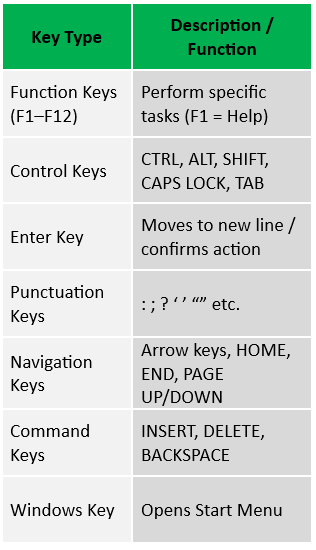
Keyboard and its Keys
Keyboard – An input device used to type text, numbers, commands.
Using a Mouse
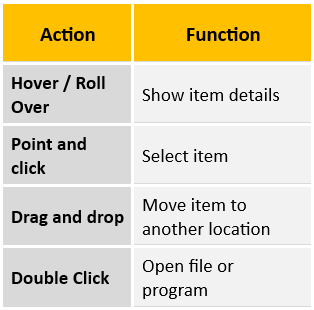
Mouse – Input device to move, select, or open items on screen.
Mouse actions:
Class 10 ICT Skills Notes | CBSE Employability Skills Notes
Session 2: Performing Basic File Operations
Files and Folders
- Files: All information stored in a computer is kept in files. (text, image, sound, etc.).
- Folders: Folders are locations used to store and organize multiple files.
- File Name Extension: Each file is given file name and has a file name extension that identifies the file type. (e.g., .txt, .doc, .jpg, .mp3).
- File name and File Name Extension are separated by a period or ‘dot’.
Creating a File (in Ubuntu)
- Open the Text Editor (type “editor” in search box) → Type your text.
- Click Save → choose location → name the file → Save.
Creating a Folder
- Open File Explorer → choose location (e.g., Desktop).
- Right-click → New Folder → type name (e.g., “Demo”).
Class 10 ICT Skills Notes | Employability Skills Class 10
Session 3: Computer Care and Maintenance
Tips for Device Care
- Keep Device Clean –wipes screen with soft cloth, clean keyboard with soft brush.
- Be careful with food and drinks – avoid eating and keeping glass of water, coffee near computer.
- Handle device Carefully – Avoid dropping or banging; use covers/cases to move devices.
- Keep computer cool – Ensure cooling fan works; avoid blocking ventilation.
- Avoid Overcharging of battery – Unplug once battery is full.
- Plug in device carefully – Do not force USBs/headphones.
- Do not run too many programs at a time – Close unused apps to prevent lag/crash.
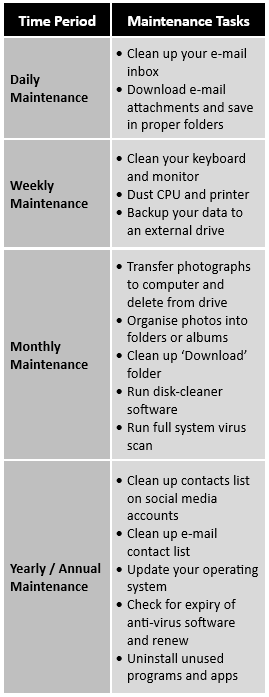
Maintenance Schedule
Backup Your Data
- Backing up means saving copies of important files on another device or cloud.
- It keeps information safe if the system crashes, human mistakes or disasters.
Virus Protection
- Install antivirus software to detect and clean viruses.
- Regularly scan system to remove harmful programs.
Increase Computer Performance
- Keep cleaning unnecessary/temporary files using disk cleaner software.
Remove SPAM
- SPAM are unwanted or advertisement emails.
- Never respond to spam emails.
- Set filters and SPAM folder to prevent them.
Class 10 ICT Skills Notes | Quick Revision for Board Exams
Session 4: Computer Security and Privacy
Reasons for Security Break
- We are not careful in giving out personal information over the Internet.
- Unauthorized access to our computer (not logging out).
Threats to Computer
- Theft: Stealing information or hardware. These may be of three types-
- Physical: Device stolen.
- Identity: Hacker steals your personal information.
- Software Piracy: Using or distributing unlicensed software.
- Viruses – Computer programs that can damage the data and software or steal information.
Major types of viruses are:- Worms: Self-replicate and spread to all files once attack a computer.
- Trojan Horse: pretend to be useful but destroy data once installed.
- Online Predators: Trap users into unsafe and inappropriate relationships.
- Internet Scams: Fake offers or lotteries to steal money or data.
Protecting Your Data
- Use Strong Passwords: Combine letters (upper/lower), numbers & special characters.
- Install Antivirus & Firewall: Block, detect, and clean harmful files.
- Encrypt Data: Convert data into unreadable form to prevent misuse. Example: BitLocker in Windows.
- Use Secure Websites: Always use https:// and check for 🔒 lock icon before sharing details.