Emerging Trends Notes Class 12 – Web Application (803)
Emerging Trends Notes Class 12 explains IoT, IIoT, Operating System, Cloud Computing, Edge Computing, Artificial Intelligence (AI), Machine Learning (ML), Digital Marketing, and Social Media Etiquette in easy-to-understand pointwise format for for quick revision and exam preparation.
Internet of Things (IoT)
- Internet of Things (IoT) refers to a network of internet-connected devices that perform services and automate processes to support our daily life.
- IoT includes physical objects embedded with electronics, software, sensors, and network connectivity.
- These smart devices can collect, share, and exchange data with other devices over the internet.
- Cloud computing plays an important role in the success of IoT by providing easily accessible storage and computing resources.
History of IoT Devices
- 1982: First internet-connected vending machine.
- 1990: Internet-connected toaster was demonstrated.
- 1999: The term Internet of Things (IoT) was coined by Kevin Ashton.
- 2000: LG Smart Fridge introduced smart home connectivity.
- 2004: Development of smartwatches began.
- 2007: Launch of the smartphone era with the iPhone.
- 2009: IoT technology started being used for connected car testing.
- 2011: Smart TVs became popular with internet connectivity.
- 2013: Google Glass introduced wearable smart technology.
- 2014: Amazon Echo brought voice-controlled smart assistants into homes.
- 2015: Tesla Autopilot demonstrated advanced IoT-based autonomous driving features.
Advantages of IoT
- Improves efficiency by automating routine tasks.
- Provides greater convenience through connected smart devices.
- Enables real-time collection and analysis of data.
- Supports better and faster decision-making.
- Reduces operational costs and saves time.
Disadvantages of IoT
- Increases security risks such as hacking and data breaches.
- Raises privacy concerns due to the collection of personal data.
- Creates dependence on technology, making users vulnerable to system failures.
- Some IoT devices have limited battery life.
- Increased automation may lead to job displacement in certain sectors.
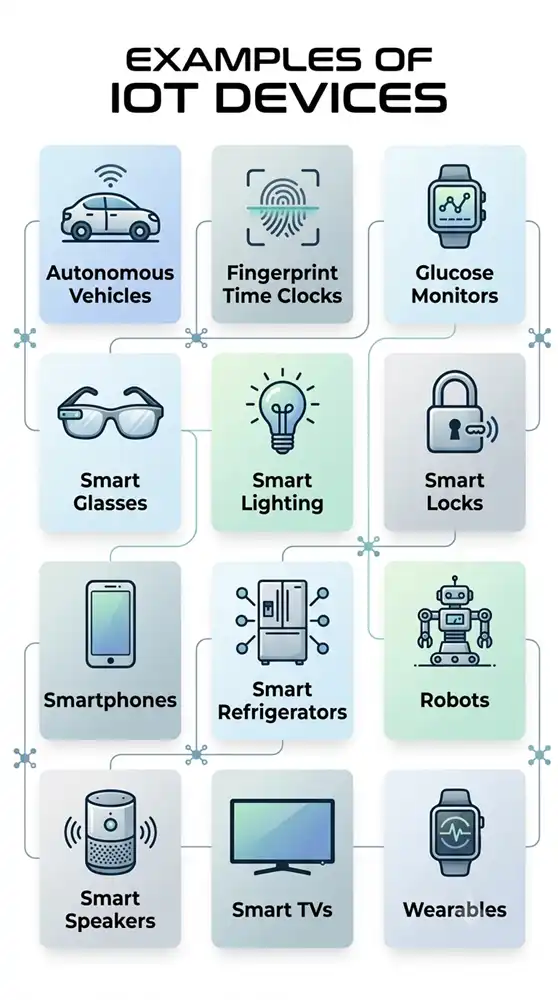
Example of IoT
Industrial Internet of Things (IIoT)
- Industrial Internet of Things (IIoT) is the application of IoT technology in industrial environments such as factories, manufacturing plants, and production units.
- IIoT integrates smart sensors, software, machines, and internet connectivity to collect and exchange industrial data.
- The collected data is analysed to support real-time monitoring, decision-making, and predictive analytics.
Difference between IoT and IIoT
| IoT (Internet of Things) | IIoT (Industrial Internet of Things) |
| IoT is a network of internet-connected devices that collect and exchange data. | IIoT is a subset of IoT that is used specifically in industrial environments. |
| It is mainly used in consumer applications such as smart homes, wearable devices, connected cars, and smart cities. | It is mainly used in industries such as manufacturing, transportation, energy, and logistics. |
| Its primary goal is to improve convenience, automation, and user experience. | Its primary goal is to improve efficiency, productivity, safety, and industrial operations. |
Applications of Industrial Internet of Things (IIoT)
- Smart Manufacturing and Factories – Uses connected machines and sensors to automate production, monitor equipment, improve product quality, and reduce downtime.
- Energy and Utilities – Monitors power generation, transmission, and distribution systems to improve efficiency, reduce energy wastage, and detect faults.
- Transportation and Logistics – Tracks vehicles and goods in real time, optimizes routes, improves fleet management, and enhances supply chain efficiency.
- Healthcare – Connects medical devices to monitor patients, supports remote healthcare services, improves hospital operations, and enables timely medical care.
Operating System (OS)
- An Operating System (OS) is system software that acts as an interface between the user and the computer system.
- It manages the computer’s hardware and software resources and enables users to run applications easily.
- An operating system performs essential tasks such as:
- File management
- Memory management
- Process management
- Input and output (I/O) management
- Controlling peripheral devices such as printers and disk drives
Examples of Operating Systems
- Windows – GUI-based operating system widely used on personal computers (PCs).
- GNU/Linux – Open-source operating system used on personal computers, workstations, and servers.
- macOS – Apple’s operating system used on MacBook, iMac, and other Macintosh computers.
- Android – Google’s operating system for smartphones, tablets, smartwatches, and other smart devices.
- iOS – Apple’s operating system used on iPhone, iPad, and iPod Touch.
Important Functions of an Operating System
Memory Management
- Manages the computer’s primary memory (RAM) efficiently.
- Allocates memory to programs when required.
- Deallocates memory when a program finishes or is terminated.
- Optimizes memory usage to improve system performance.
Processor (CPU) Management
- Manages all running processes and programs.
- Starts, stops, and controls the execution of processes.
- Allocates CPU time to different processes.
- Performs CPU scheduling to decide which process will use the processor and when.
Device Management
- Manages input and output devices such as keyboard, mouse, printer, and display.
- Provides the required device drivers for communication between hardware and the computer.
- Ensures devices work efficiently with the operating system.
File Management
- Organizes and manages files and folders in the storage device.
- Supports creating, deleting, copying, moving, renaming, and modifying files and directories.
- Maintains an organized file system for easy access.
Advantages of Operating System
User-Friendly Interface
- Provides an easy-to-use interface for interacting with the computer.
- Makes operating the system simple, even for beginners.
- The Graphical User Interface (GUI) improves user experience by using icons, menus, and windows.
Resource Sharing
- Efficiently manages and shares system resources among multiple programs.
- Allocates and deallocates resources such as CPU, memory, and peripheral devices as needed.
- Enables devices like printers, speakers, and plotters to be shared among different users or processes.
Data Protection
- Protects data from unauthorized access and modification.
- Uses access control mechanisms to secure user information.
- Separates and safeguards the data of different users on the same system.
Multitasking
- Allows multiple programs to run simultaneously.
- Efficiently shares system resources among running applications.
- Uses techniques such as virtual memory and CPU scheduling to support smooth multitasking.
Types of Operating Systems
Real-Time Operating System (RTOS)
- A Real-Time Operating System (RTOS) responds to events within fixed and predictable time limits.
- It is designed for applications where quick and accurate responses are critical.
- Common applications include:
- Air traffic control systems
- Industrial process control systems
- Autonomous (self-driving) vehicles
Single-User Operating System
- Designed to support one user at a time.
- Suitable for personal computers and laptops.
- Examples:
- Microsoft Windows
- Apple macOS
Multi-User Operating System
- Allows multiple users to access and use the same computer system simultaneously.
- Efficiently manages resources among all connected users.
- Examples:
- Linux
- Unix
Mobile Operating System
- Designed specifically for smartphones, tablets, and other mobile devices.
- Optimized to be lightweight, energy-efficient, and suitable for devices with limited hardware resources.
- Examples:
- Android OS
- iOS (iPhone OS)
- BlackBerry OS
- Symbian OS
- Windows Mobile OS
Difference between System Software and Application Software
| System Software | Application Software |
| Acts as an interface between the hardware and application software. | Designed to help users perform specific tasks. |
| Manages and controls the overall functioning of the computer system. | Has minimal involvement in the internal functioning of the computer. |
| Examples: Windows, Linux, macOS, Android. | Examples: Microsoft Word, Google Chrome, VLC Media Player, Adobe Photoshop. |
Cloud Computing
- Cloud computing refers to the delivery of computing services over the Internet (Cloud).
- The term Cloud Computing gained popularity in 2006 when Eric Schmidt introduced it at an industry conference.
- Cloud services include:
- Servers
- Storage
- Databases
- Networking
- Software
- Analytics
- Artificial Intelligence (AI) services
- Users can access these resources anytime through the internet as per their requirements.
- Cloud computing offers several benefits, including:
- On-demand availability of resources
- Faster innovation and deployment
- Flexible resource allocation
- Easy scalability to meet changing needs
- Reduced need for direct hardware management
Cloud Smart Storage Providers
Google Drive
- Launched on 24 April 2012.
- Allows users to store, sync, and share files over the internet.
- Provides 15 GB of free cloud storage.
Dropbox
- Introduced in 2007 by two MIT students.
- Enables users to securely store and access files from anywhere using an internet connection.
Microsoft OneDrive
- First launched in August 2007.
- Allows users to store, sync, and share files across multiple devices.
- Provides 5 GB of free storage, with larger paid storage plans available.
iCloud
- Launched by Apple Inc. on 12 October 2011.
- Allows users to store documents, photos, music, and other data on remote servers.
- Enables users to share files and helps locate or manage lost or stolen Apple devices.
Benefits of Cloud Computing
Faster Time to Market
- Enables quick development, testing, and deployment of new applications.
- Eliminates delays caused by hardware limitations and infrastructure setup.
Scalability and Flexibility
- Resources and storage can be increased or decreased based on demand.
- Eliminates the need to invest in expensive physical infrastructure.
Cost Savings
- Users pay only for the cloud resources they actually use.
- Reduces hardware, maintenance, and infrastructure costs.
Better Collaboration
- Allows users to access and share data from anywhere using an internet connection.
- Supports collaboration across multiple devices and locations.
Advanced Security
- Cloud providers offer security features, automatic updates, and centralized management.
- Helps improve data protection and system security.
Limitations of Cloud Computing
Internet Dependency
- Cloud services require a stable internet connection.
- Without internet access, stored data and cloud services may not be available.
Vendor Lock-in
- Switching from one cloud provider to another can be difficult.
- Differences in platforms and services may complicate data and application migration.
Security Risks
- Although cloud providers implement strong security measures, data may still be at risk if security is compromised.
- Cyberattacks or data breaches can expose sensitive information.
Edge Computing
- Edge Computing is a computing approach in which data is processed near the device or location where it is generated, instead of sending it to a centralized cloud or data center.
- It performs real-time data processing and analysis, enabling faster decision-making.
- Unlike cloud computing, which processes data in remote data centers, edge computing processes data locally on or near the device.
Edge computing involves capturing, storing, processing, and analyzing data close to the client to reduce delays and improve performance.
Examples of Edge Computing
- Wearable devices
- Smart traffic management systems
- Smart utility grids
Difference between Edge Computing and Cloud Computing
| Edge Computing | Cloud Computing |
| Processes data near the source where it is generated. | Processes data in remote cloud servers or data centers. |
| Ideal for real-time data processing and instant responses. | Best suited for processing large volumes of non-time-sensitive data. |
Artificial Intelligence (AI)
- Artificial Intelligence (AI) is the ability of a machine to perform tasks that normally require human intelligence.
- AI enables machines to learn, reason, solve problems, and make decisions.
- Unlike human intelligence, AI does not involve consciousness or emotions.
- AI is used to develop systems that can mimic important human cognitive abilities such as learning and problem-solving.
Common Applications of Artificial Intelligence (AI)
- Google Maps – Uses AI to suggest the fastest routes, predict traffic conditions, and estimate travel time.
- Facial Detection and Recognition – Identifies and verifies faces for security, device unlocking, and photo organization.
- Autocorrection and Text Editors – Detect spelling and grammar errors and suggest corrections while typing.
- Search-Based Recommendations – Recommends products, videos, articles, or other content based on a user’s search history and preferences.
Machine Learning (ML)
- Machine Learning (ML) is a branch of Artificial Intelligence (AI) that enables computers to learn from data and improve their performance without being explicitly programmed.
- ML algorithms analyze large amounts of data to identify patterns and make accurate predictions or decisions.
- Machine Learning powers many everyday applications such as:
- Personalized online advertisements
- Product recommendations on shopping websites
- Movie and TV show recommendations on streaming platforms
Applications of Machine Learning (ML)
- Self-driving Cars – Enable vehicles to detect objects, make driving decisions, and navigate safely with minimal human intervention.
- Speech Recognition – Convert spoken language into text and support voice assistants, voice typing, and voice-controlled applications.
- Web Search – Improve search engine results by understanding user queries and displaying the most relevant information.
- Human Genome Analysis – Analyze genetic data to support disease detection, medical research, and personalized healthcare.
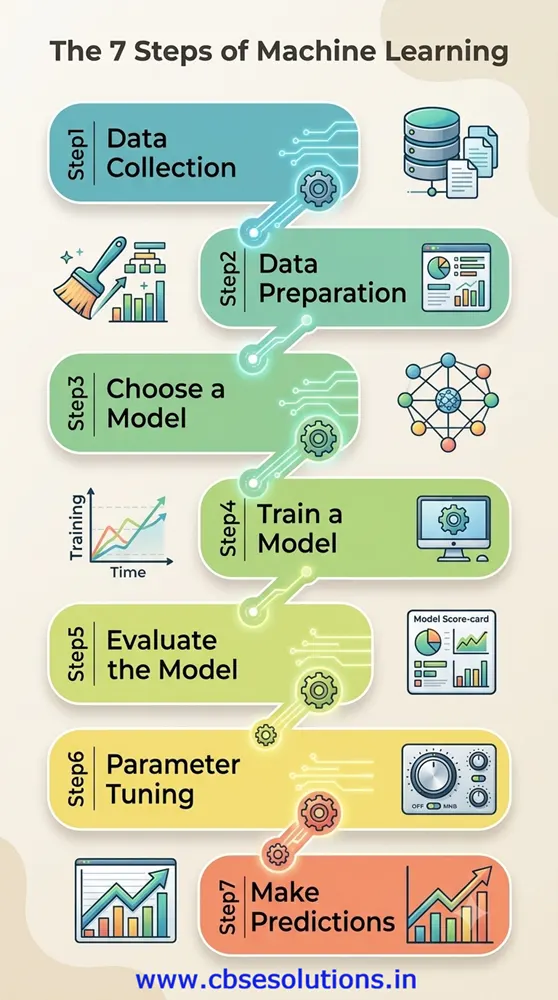
The 7 basic steps in Machine Learning are:
Difference between Artificial Intelligence (AI) and Machine Learning (ML)
| Artificial Intelligence (AI) | Machine Learning (ML) |
| AI enables machines to simulate human intelligence and behavior. | ML is a branch of AI that enables machines to learn from data without being explicitly programmed. |
| Focuses on developing systems that can solve complex problems and make intelligent decisions. | Focuses on enabling machines to learn patterns from data and make accurate predictions or decisions. |
| Examples: Siri, chatbots, expert systems, intelligent robots, online game playing. | Examples: Google search algorithms, recommendation systems, Facebook tagging suggestions, spam detection. |
| AI focuses on reasoning, self-correction, and learning to mimic human intelligence. | ML mainly focuses on learning from data and improving its performance when introduced to new data (self-improvement). |
Digital Marketing
- Digital Marketing is the promotion of products, services, or brands using digital channels and the internet.
- It is also known as online marketing.
- It helps businesses connect with potential customers through various online platforms.
- Common digital marketing channels include:
- Search engines
- Websites
- Social media
- Mobile apps
- Text messaging
- Online advertisements
Benefits of Digital Marketing
Wider Customer Reach
- Helps businesses reach customers across different locations and time zones with minimal effort.
- Enables global marketing through the internet.
Cost-Effective Marketing
- Costs less than traditional marketing methods such as TV, radio, and newspapers.
- Social media accounts and email marketing can be used at low or no cost.
- Online content remains accessible as long as it is available on the internet.
Better Analytics and Insights
- Provides detailed data about marketing performance.
- Helps businesses understand customer behavior and improve marketing strategies.
Better Customer Engagement
- Allows businesses to interact with customers throughout the buying process.
- Makes it easier to send personalized messages, offers, and greetings for special occasions.
Career Opportunities in Digital Marketing
- Digital Marketing Intern
- Photographer
- Social Media Specialist
- Graphic Designer
- Copywriter
- Search Engine Optimization (SEO) Specialist
- Marketing Analyst
- E-commerce Manager
Social Media Etiquette
- Social media etiquette refers to the guidelines for behaving responsibly and respectfully on social media platforms.
- It helps users maintain a positive online reputation and promotes respectful communication.
- Good social media etiquette includes respecting others, protecting privacy, and following intellectual property rights.
Social Media Etiquette for Students
1. Protect Your Privacy
- Never share personal information such as passwords, phone numbers, home address, or email address.
- Disable location sharing when posting online.
- Review and adjust privacy settings on social media accounts.
- Use a strong and unique password for each account.
- Enable two-factor authentication (2FA) whenever available.
2. Do Not Connect with Strangers
- Accept friend or follow requests only from people you know personally.
- Avoid interacting with unknown individuals online.
3. Respect Others’ Privacy
- Ask for permission before sharing someone else’s photos or videos.
- Never post another person’s personal information without their consent.
4. Be Careful About What You Share
- Avoid sharing confidential or sensitive information such as your full name, address, school details, phone number, or date of birth.
- Remember that anything posted online can remain permanently accessible.
5. Avoid Cyberbullying
- Do not harass, threaten, or insult others on social media.
- Be respectful in your comments and messages.
- Cyberbullying is a punishable offense under cyber laws.
6. Avoid Spamming
- Do not send repeated messages or unnecessary posts.
- Give others enough time to respond.
7. Think Before You Post
- Carefully review your words, photos, and videos before sharing them.
- Avoid posting or sharing content that is offensive, inappropriate, or disrespectful.
Spread of Rumors on Social Media
- Rumors often spread very quickly on social media, making them difficult to control.
- By the time the authenticity of a rumor is verified, it may have already caused significant harm.
- False rumors can create conflicts, misunderstandings, and social divisions among communities.
- The spread of rumors can lead to serious consequences such as:
- Depression and emotional distress
- Hostility and enmity among people
- Communal tension and violence
- Riots and disruption of social harmony
Note: Always verify information from reliable sources before sharing it on social media.