Python Revision Tour Notes – Class 12 CS (083) | One-Shot Revision
Want to score high in Class 12 Computer Science? You’ve just found the perfect revision resource!
Super easy and precise Python Revision Tour notes for Class 12 CS covering every CBSE topic with examples, easy explanations, and quick revision support.
These Python Revision Tour Notes for Class 12 Computer Science (083) are carefully prepared to help students revise the entire Python syllabus quickly and effectively. Every topic is covered in a clean and focused, to-the-point format using simple and easy-to-understand language, making learning effortless for every student.
To strengthen conceptual understanding, each topic is supported with relevant examples and explanations. Whether you’re revising before exams, clearing doubts, or brushing up on important concepts, these notes serve as a complete revision companion. Fully aligned with the latest CBSE syllabus.
Don’t miss this valuable revision resource—otherwise you are throwing away easy marks!
What is Python?
- Python is a General-Purpose high-level Programming language used for developing application Softwares.
- Created by Guido Van Rossum in 1991
- Used in various fields:
- AI and Machine Learning
- Web development
- Game Development
- Scientific computing
- GUI Programs
Features of Python
- Free and Open Source – Python is available free of cost, and anyone can download, use, and modify it.
- Interpreted – Python code is executed line by line by the interpreter, making debugging easier.
- Platform Independent – Python programs can run on different operating systems like Windows, Linux, and Mac without major changes.
- Rich Library of Functions – Python provides many built-in modules and functions for tasks like math, file handling, and web development.
- Dynamic – In Python, there is no need to declare the data type of a variable before using it.
- General Purpose – Python can be used for web development, data science, AI, automation, and many other applications.
- Easy to Code and Use – Python has simple syntax, which makes it beginner-friendly and easy to learn
Working with Python
- To write and run python programs we need Python Interpreter.
- Python Interpreter is also called Python Shell.
- Python Interpreter has built in editor called Python IDLE.
- Python IDLE refers to Integrated Development Learning Environment.
Execution Mode in Python
We can use Python Interpreter in two ways:
- Interactive mode
- Script mode
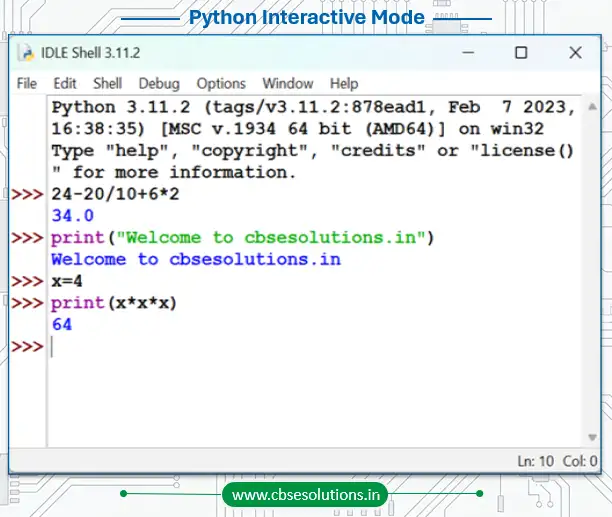
Interactive Mode in Python
- Executes individual statements instantly, one line at a time.
- Convenient for testing small code snippets or single-line commands.
- Statements are not saved automatically for future use.
Script Mode in Python
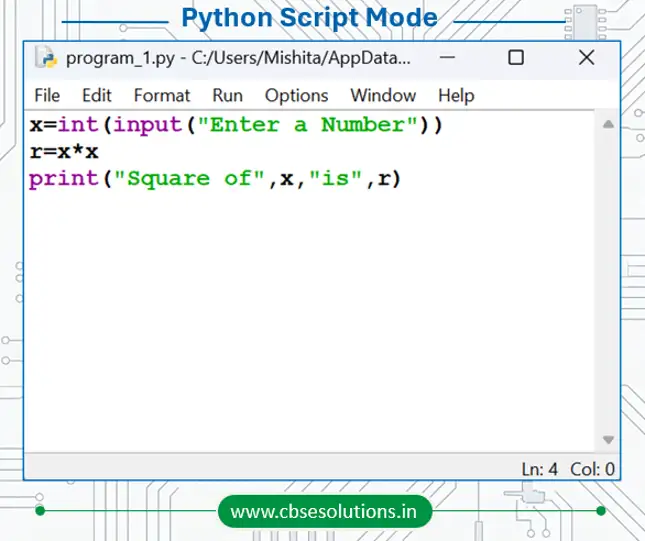
- Allows us to write and execute multiple instructions together.
- Programs can be saved for future use and edited later.
- Python scripts are stored in files with the .py extension.
How to Execute or Run a Python Program
- Open Python IDLE.
- Click on File and select New File to open Script Mode.
- Type the source code and save the file.
- Click on the Run menu and select Run Module to execute the program.
Python Character Set
- A character set is the collection of valid characters that can be used in a programming language.
- Python supports both ASCII and Unicode characters.
- It includes:
- Alphabets – All uppercase letters (A–Z) and lowercase letters (a–z).
- Digits – Numbers from 0 to 9.
- Special Symbols – Symbols like +, -, *, /, @, #, $, %, &, etc.
- White Spaces – Blank space, tab space, newline, and carriage return.
- Other Characters – All other ASCII and Unicode characters supported by Python.
Python Tokens
- Smallest individual unit in a program is called Token.
- Tokens are also called as lexical unit.
- All statements and instructions in a program are built with tokens.
- Python has following tokens:
- Keywords
- Identifiers
- Literals
- Operators
- Punctuators
Python Keywords
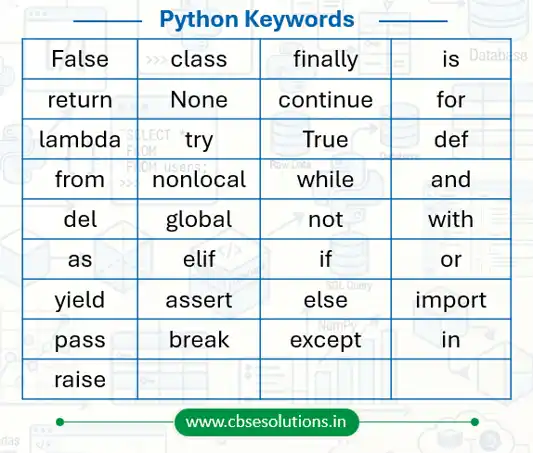
- Keywords are predefined words that have a special meaning for the Python interpreter.
- These are reserved words and cannot be used as variable names.
- Python keywords are case sensitive, so uppercase and lowercase letters are treated differently.
Python Identifiers
- Identifiers are the names given to variables, functions, classes, lists, methods, etc., for identification.
- Python is a case-sensitive language, so Name and name are treated differently.
Rules for Naming Identifiers
- An identifier must start with a capital letter (A–Z), a small letter (a–z), or an underscore (_).
- It can contain digits, but it cannot start with a digit.
- An identifier cannot be a keyword.
- We cannot use special symbols like !, @, #, $, % etc. in identifiers
- It can be of any length but we should keep it simple, short and meaningful.
Examples
- Valid identifiers: my_name, __init__, Acno10
- Invalid identifiers: @all, my.var, True, 30Rs
Python Literals
- Literals are fixed values stored in memory and used directly in a program.
- These values are often assigned to variables using identifiers.
Types of Literals in Python
String Literals
- String literals are text values written inside single quotes (‘ ‘), double quotes (” “), or triple quotes (”’ ”’ / “”” “””).
- String may also contain non-graphic characters such as backspace, tabs.
- These non-graphic characters can be represented by using escape sequence.
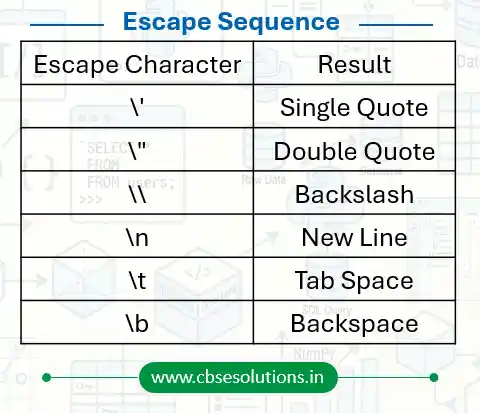
Escape Characters
- Escape characters are used to insert special characters inside a string.
- They are written using a backslash (\) followed by another character.
- Escape sequence is represented by backslash (\) followed by special character.
- Escape sequence is used to represent those special characters which have special purpose or meaning while using such as backslash, comma or quotation mark
Numeric Literals
- Numeric literals are numbers written in different forms.
- Integer Literal
- It includes positive numbers, negative numbers, and zero without decimal points.
- It also includes binary, decimal, octal, and hexadecimal numbers.
- Float Literal
- It includes positive and negative real numbers with decimal points.
- Examples: 99.62, 0.35E-7
- Complex Literal
- It includes numbers in the form of a + bi, where a is the real part and b is the imaginary part.
Boolean Literal
- Boolean literals have only two values: True and False.
Special (None) Literal
- None is a special literal used to show no value or absence of value.
Collection Literal
- Collection literals include list, tuple, dictionary, and set used to store multiple values together.
Operators
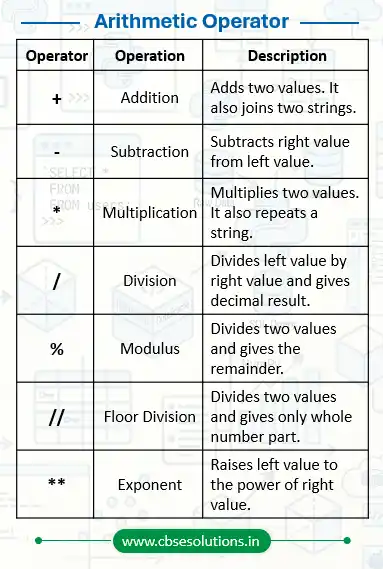
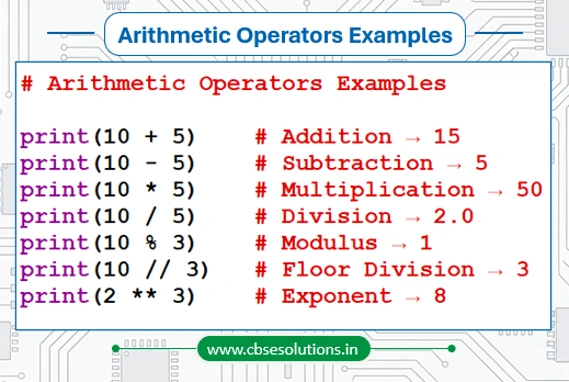
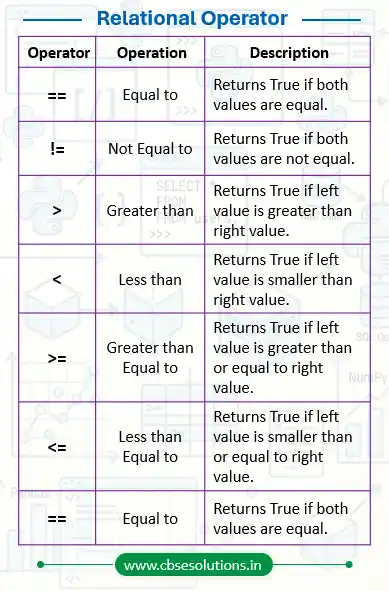
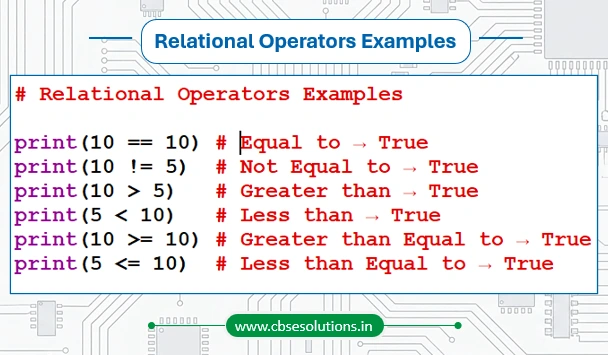
These are special symbols used to perform specific operation on values. Different types of operators supported in python are given below:
- Arithmetic operator
- Relational operator
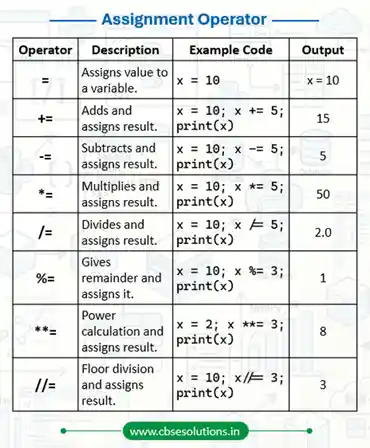
- Assignment operator
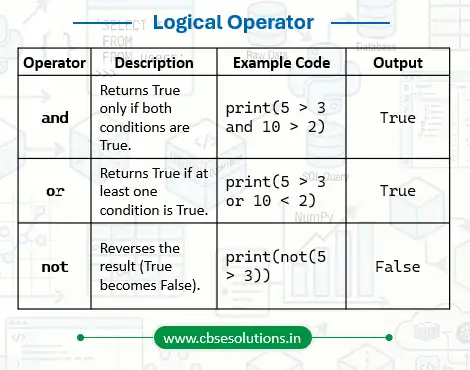
- Logical operator
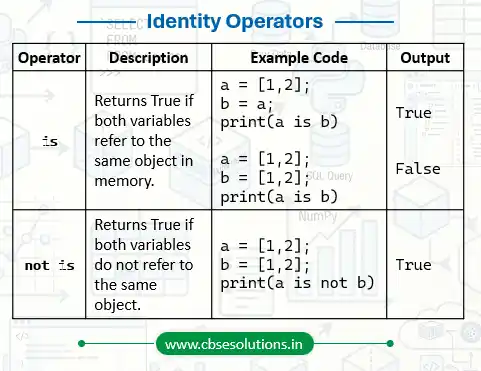
- Identity operator
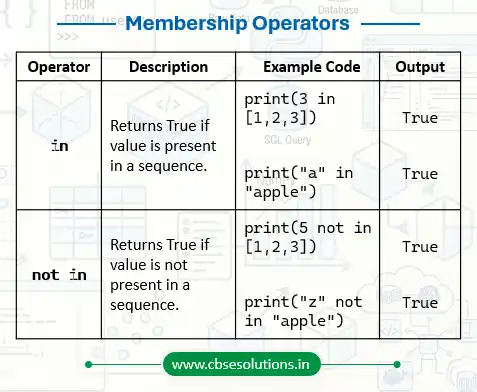
- Membership operator
Arithmetic Operator
Example
Relational Operator
Example
Assignment Operator
Logical Operator
Identity Operator
Membership Operator
Operator Precedence
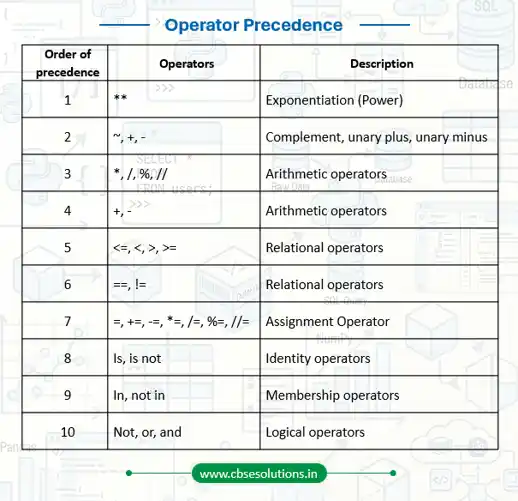
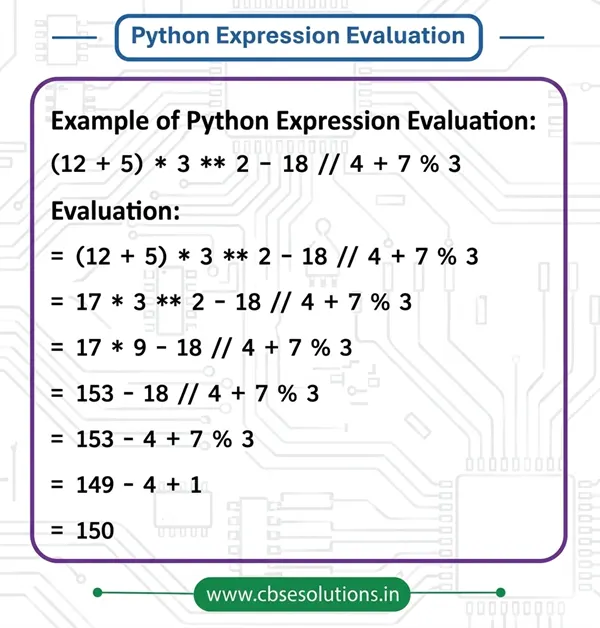
- Parenthesis can be used to override the precedence of operators. The expression within () is evaluated first.
- For operators with equal precedence, the expression is evaluated from left to right.
Variables
- It can be referred as an object or element that occupies memory space which can contain a value.
- Value of variable can be numeric, alphanumeric or combination of both.
- In python assignment statement is used to create variable and assign values to it.
Data types
These are keywords which determine the type of data stored in a variable. Following table show data types used in python:
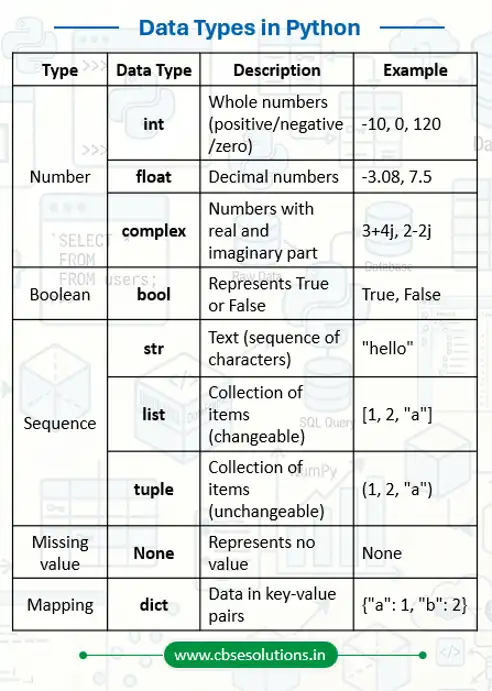
Components of Python Program
As you can see that the above sample program contains various components like:
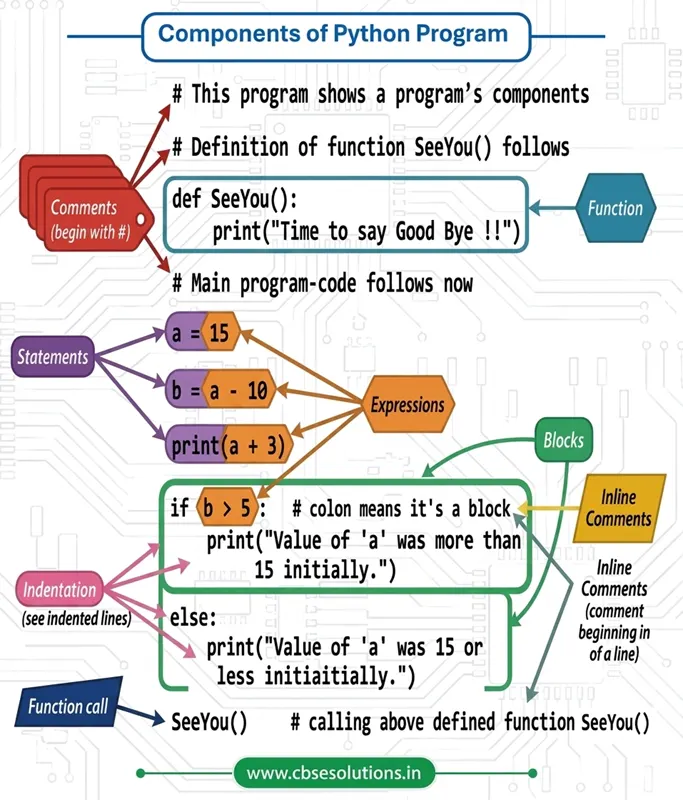
- Expressions
- Statements
- Comments
- Functions
- Blocks (or Suites)
Expressions
- An expression is combination of different variables, operators and constant which is always evaluated to a value.
- A value or a standalone variable is also considered as an expression.
Statement
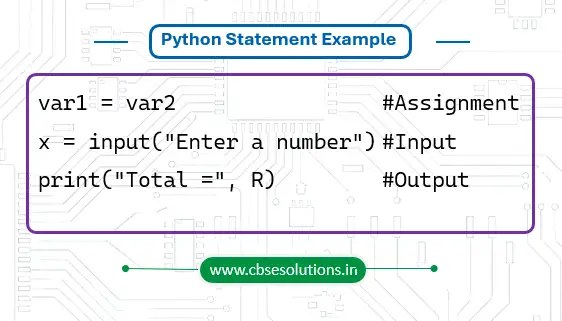
- A statement is a single instruction written in a program that the Python interpreter can execute.
- It tells the computer to perform a specific task such as assigning a value, taking input, or displaying output.
Examples
Indentation in Python
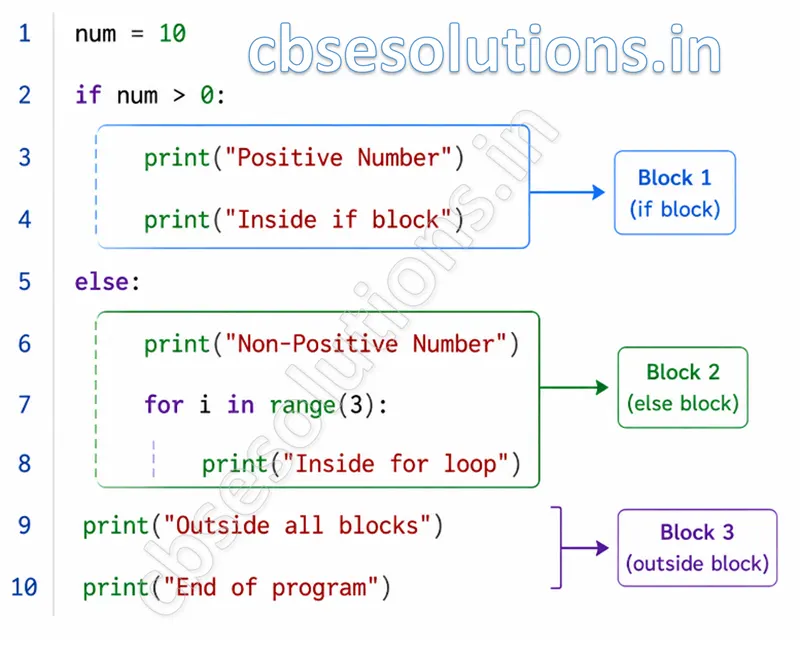
- Indentation means leaving spaces at the beginning of a line of code.
- It is used to show which statements belong to the same block of code.
- Python uses indentation in structures like if, for, while, functions, and classes.
- Wrong indentation causes errors and the program will not run properly.
Python Comments
- Comments are statements in Python that are ignored by the interpreter.
- They are used to explain the code and make the program easier to understand.
- Single-line comments start with the # symbol.
- Multi-line comments are written using triple quotes (”’ ”’ or “”” “””).
- Multi-line comments are used when the explanation is longer than one line.
Functions
- Function is named sections of code created to perform a specific task.
- It can be used again and again by calling their name (function call).
Blocks (or Suites)
- A block (or suite) is a group of statements written together inside another statement, such as a loop, condition, or function.
- All statements that belong to the same block must have the same indentation level.
Simple Input and Output in Python
Python provides built-in functions like input() and print() for taking input from the user and displaying output on the screen.
Input Function
- The input() function is used to take input from the user.
- It allows the user to enter data during program execution.
Syntax:
input([prompt])
- prompt is an optional message shown to the user before taking input.
Example:
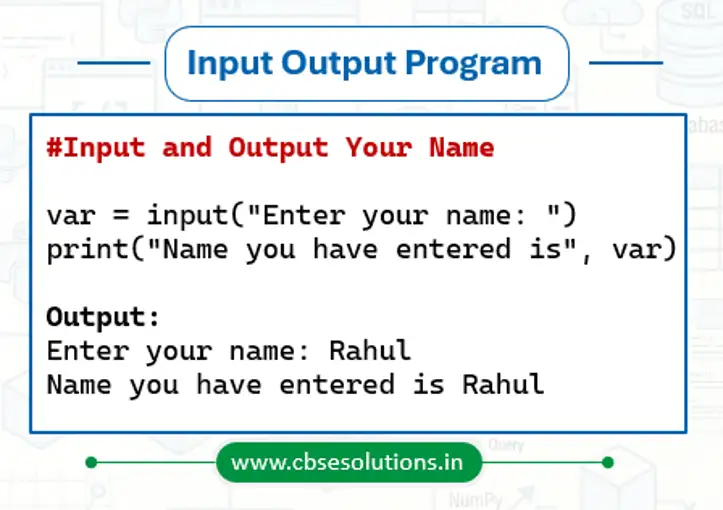
name = input(“Enter your name: “)
print(“Name you have entered is”, name)
Print Function
- The print() function is used to display output on the screen.
- It can print text, variables, or the result of expressions.
Syntax:
print([message/value])
Example:
print(“Welcome to Python”)
Examples Program of Input and Output in Python
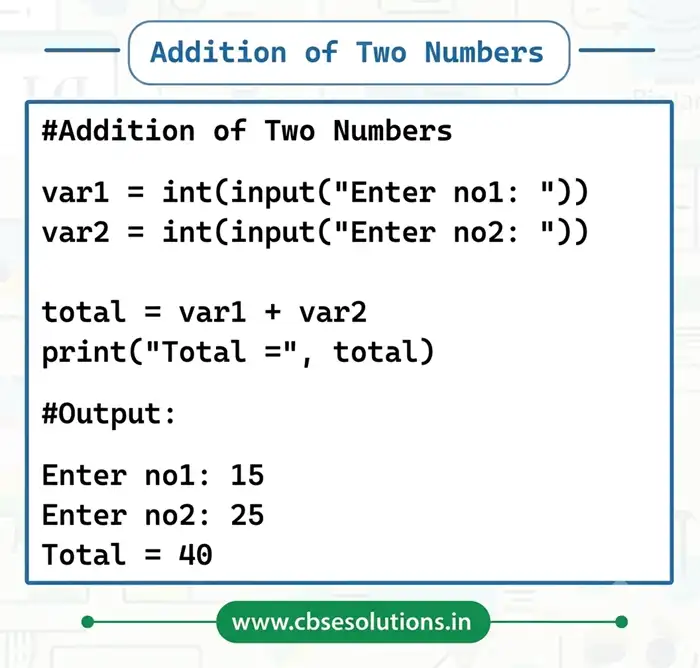
Python Program for Addition of Two Numbers
Type Conversion
- Type conversion refers to converting one type of data to another type.
- Type conversion can happen in two ways:
- Explicit conversion
- Implicit conversion
Explicit Conversion
- Explicit conversion also refers to type casting.
- In explicit conversion, data type conversion is forced by programmer in program
Syntax:
(new_data_type) = (expression)
Explicit type conversion function in Python
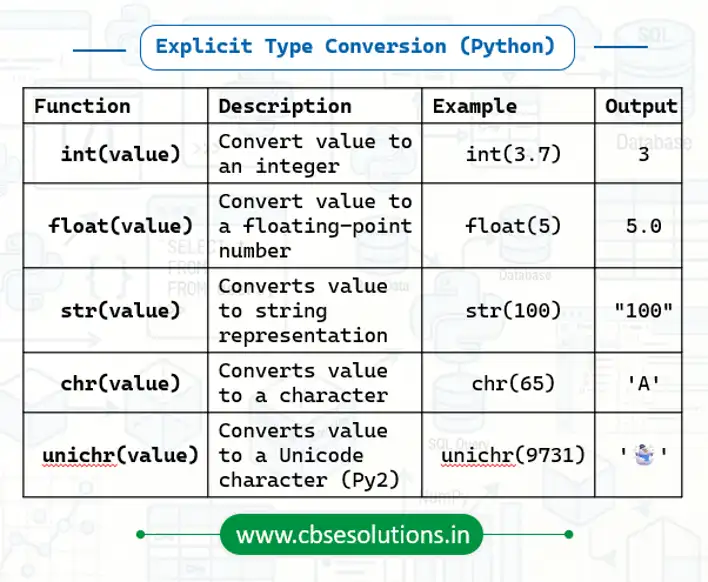
Explicit Type Conversion from Float to Integer (Example)

Implicit conversion
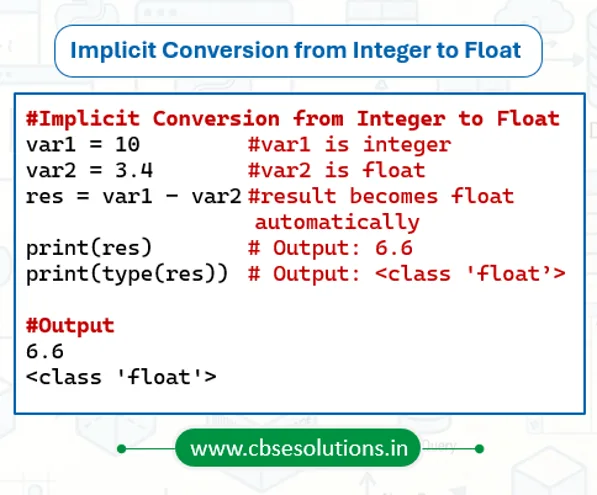
- Implicit type conversion means Python automatically converts one data type into another without using any special function
- This usually happens when operations are performed between different data types.
Program to Show Implicit Conversion from Integer to Float
Flow of Control in Python
Flow of control refers to order of execution of the statements in a program. Flow of program can be implemented using control structures. Python supports three types of control structures:
- Sequence
- Selection (Decision Making)
- Iteration (Looping)
Sequence
In sequential flow, statements are executed one after another in the same order in which they are written.
Example:
a = 10
b = 20
c = a + b
print(c)
Output:
30
Here, the program executes step by step from top to bottom.
Selection
- Selection allows the program to make decisions and execute different blocks of code based on conditions.
- Selection or decision making in Python is implement by using if, elif, and else statement.
- Python uses relational operators (>, <, ==, !=, etc.) and logical operators (and, or, not) to check conditions.
Important Note:
- A block starts after the : (colon)
- The statements inside the block must be properly indented
if Block
The if statement is used when we want to execute a block only if the condition is true.
Syntax:
if condition:
statements
Example:
num = 10
if num > 5:
print(“Number is greater than 5”)
if-else Block
The else block is executed when the condition becomes false.
Syntax:
if condition:
statements
else:
statements
Example:
num = 4
if num % 2 == 0:
print(“Even Number”)
else:
print(“Odd Number”)
if-elif-else Block
The elif (else if) block is used when multiple conditions need to be checked.
Syntax:
if condition1:
statements
elif condition2:
statements
else:
statements
Example:
marks = 85
if marks >= 90:
print(“Grade A+”)
elif marks >= 75:
print(“Grade A”)
else:
print(“Grade B”)
Nested if Block
An if statement inside another if statement is called Nested if.
Example: Checking Positive, Negative, and Even Number
num = int(input(“Enter a number: “))
if num > 0:
if num % 2 == 0:
print(“Positive Even Number”)
else:
print(“Positive Odd Number”)
else:
if num < 0:
print(“Negative Number”)
else:
print(“Zero”)
Iteration (Loops)
Loops are used to execute a block of code repeatedly.
Python provides:
- for loop
- while loop
for Loop
The for loop is used when the number of iterations is known. It can also be used to iterate over:
- List
- Tuple
- String
- Dictionary
- Other iterable objects
Syntax:
for variable in sequence:
statements
Example:
for i in range(1, 6):
print(i)
Output:
1
2
3
4
5
Python while Loop
The while loop is used when the number of iterations is not known in advance. It keeps running as long as the condition remains true.
Syntax:
while condition:
statements
Example:
i = 1
while i <= 5:
print(i)
i += 1
range() Function in Python
The range() function returns a sequence of numbers.
By default:
- Starts from 0
- Increments by 1
- Stops before the specified number
Syntax:
range(start, stop, step)
Important Points:
- start can be positive or negative
- stop can be positive or negative
- step can be positive or negative
- The stop value is never included
Examples of range() function in Python
| range() Example | Output Sequence |
| range(10) | 0 1 2 3 4 5 6 7 8 9 |
| range(1,11) | 1 2 3 4 5 6 7 8 9 10 |
| range(1,11,2) | 1 3 5 7 9 |
| range(10,0,-1) | 10 9 8 7 6 5 4 3 2 1 |
break Statement
The break statement immediately stops the loop and exits from it.
Example:
for i in range(1, 10):
if i == 5:
break
print(i)
Output:
1
2
3
4
The loop stops when i becomes 5.
continue Statement
The continue statement skips the current iteration and moves to the next iteration.
Example:
for i in range(1, 6):
if i == 3:
continue
print(i)
Output:
1
2
4
5
The number 3 is skipped.
Strings
- A Python string is a sequence of characters written inside single quotes (‘ ‘), double quotes (” “), or triple quotes (”’ ”’ or “”” “””).
- Python strings are immutable, which means once a string is created, its content cannot be changed. Any modification results in the creation of a new string, while the original string remains the same.
- Strings are ordered, which means the characters are stored in a fixed sequence and their order is always maintained.
- Strings are iterable, so each character can be accessed one after another using loops like the for loop.
- Characters in a string are indexable, which means each character has a specific position called an index. Indexing starts from 0 for the first character.
Examples:
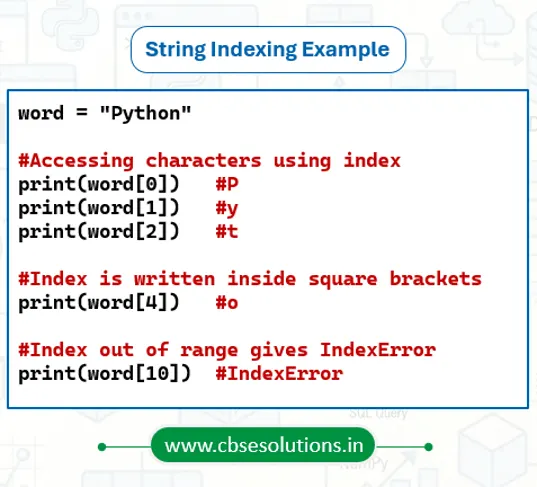
Accessing characters in a string (INDEX)
- Each character of a string can be accessed by using an index.
- An index is a unique position number given to every character in a string for identification.
- Indexing always starts from
0and the index value is written inside square brackets[ ]. - The index value can be zero, a positive integer, or a negative integer.
- If an index value is given outside the valid range of the string, Python shows an IndexError.
Examples:
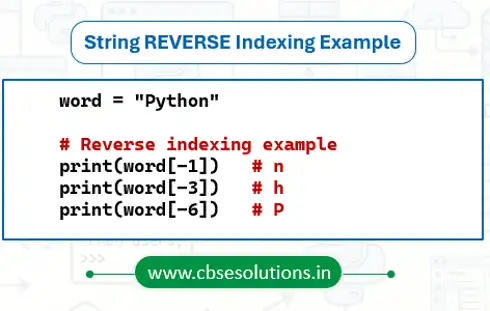
Reverse Indexing
- Python also supports reverse indexing for strings.
- Reverse indexing is used when we want to access the characters of a string from right to left.
- In reverse indexing, the last character of the string has index -1, the second last has index -2, and so on.
- The leftmost character has the index -n, where n is the length of the string.
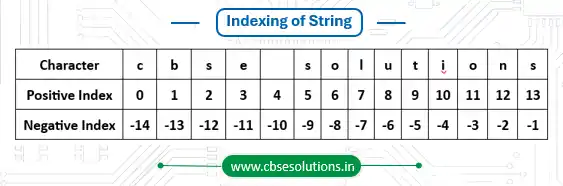
Example:
Is string immutable?
Yes, string is immutable data type. The content of string once assigned cannot be altered than. Trying to alter string content may lead an error.
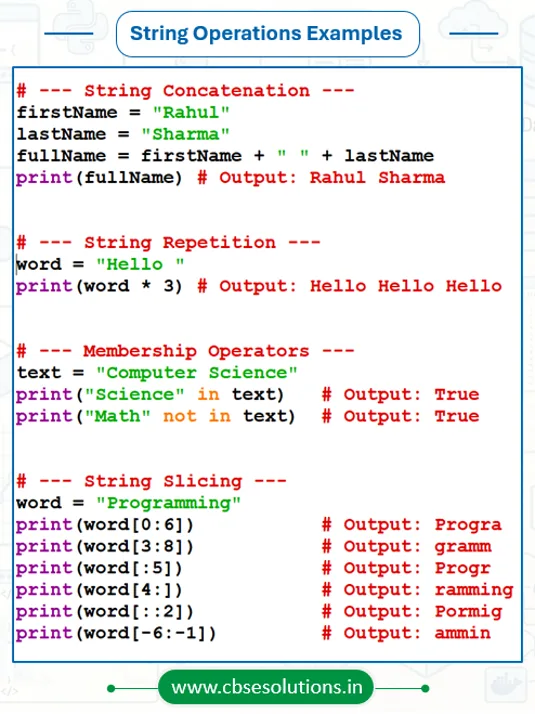
String operations
String supports following operations:
- Concatenation
- Repetition
- Membership
- Slicing
Concatenation
- Concatenation means joining two or more strings to create a new string.
- The plus operator (+) is used as the concatenation operator.
- It combines the strings without changing the original strings.
Repetition
- Repetition means repeating the same string multiple times.
- The asterisk operator (*) is used as the repetition operator.
- A string is multiplied by a number to repeat it that many times.
Membership
- Membership operation is used to check whether a character or substring is present inside another string or not.
- Python uses in and not in as membership operators.
- in returns True if the given character or substring exists in the string.
- not in returns True if the given character or substring does not exist in the string.
Slicing
- Slicing means extracting a specific part or substring from an existing string.
- The substring obtained after slicing contains continuous characters.
- Slicing is done using the syntax: string[start_index : end_index : step_value]
- The end index is not included in the result.
- Negative indexing can also be used while slicing.
Traversing a String
- Traversing a string means accessing each character of the string one by one in sequence.
- It helps in performing operations on every character of the string.
- for loop or while loop is commonly used for string traversal.
Example of String Operations
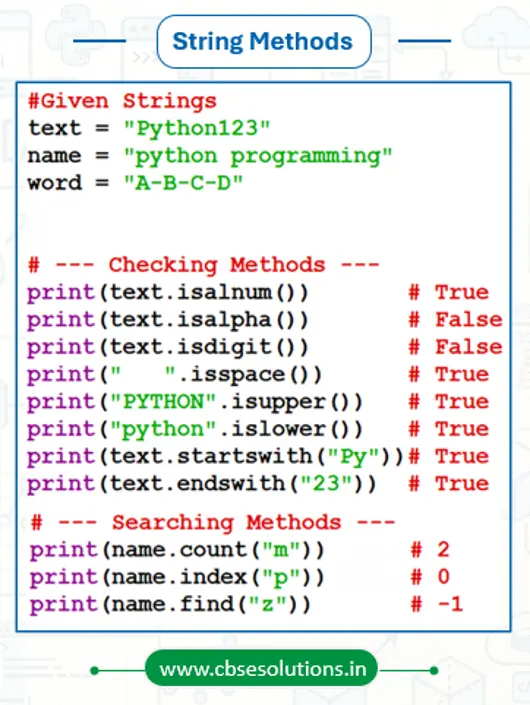
String Methods in Python
- isalnum() → Returns True if the string contains only alphabets and digits.
- isalpha() → Returns True if all characters in the string are alphabets.
- isdigit() → Returns True if all characters in the string are digits.
- isspace() → Returns True if all characters in the string are spaces.
- isupper() → Returns True if all letters in the string are uppercase.
- islower() → Returns True if all letters in the string are lowercase.
- startswith(substr) → Returns True if the string starts with the given substring.
- endswith(substr) → Returns True if the string ends with the given substring.
- count(substr) → Counts the number of times a substring appears in a string.
- index(substr) → Returns the index of the first occurrence of a substring in a string. If the substring is not found, it gives a ValueError.
- find(substr) → Returns the index of the first occurrence of a substring in a string. If the substring is not found, it returns -1.
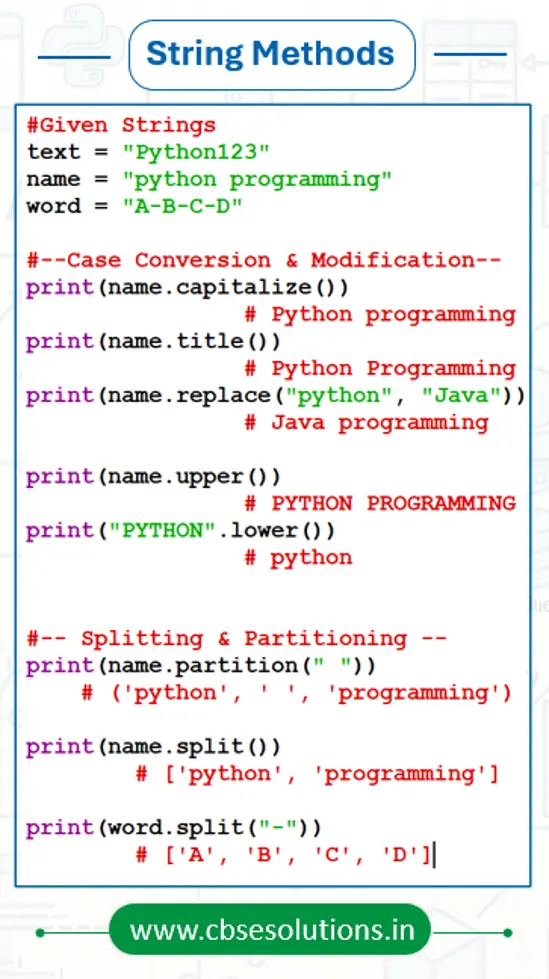
- capitalize() → Converts the first character of the string into uppercase and the remaining characters into lowercase.
- title() → Converts the first letter of each word into uppercase and the remaining letters into lowercase.
- replace(old, new) → Replaces the old substring with the new substring and returns a new string.
- upper() → Converts all lowercase letters of a string into uppercase.
- lower() → Converts all uppercase letters of a string into lowercase.
- partition(substr) → Splits the string into three parts where the given substring becomes the middle part and returns a tuple.
- split() → Splits the string into a list of words by removing spaces and new lines.
- split(substr) → Splits the string into a list wherever the given substring appears.
Examples of String Methods
List
- Ordered Collection – Lists store elements in a fixed order, and the order remains the same as the elements are inserted.
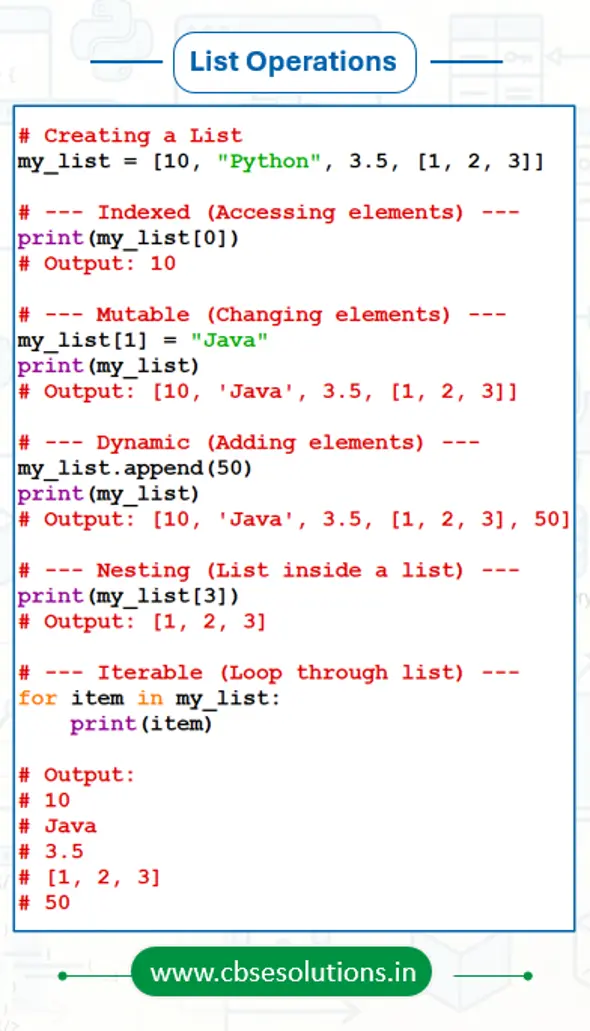
- Mutable – Lists can be changed after creation. We can add, remove, or update elements whenever needed.
- Heterogeneous – A list can contain different types of data such as integers, strings, floats, and even other lists in the same list.
- Dynamic – The size of a list is not fixed. It can grow by adding new elements or shrink by removing elements.
- Indexed – Each element in a list has a unique index number starting from 0, which helps in accessing elements easily.
- Nesting – A list can contain another list as its element, which is called a nested list.
- Built-in Methods – Python provides many built-in methods for lists such as sorting, reversing, searching, inserting, and deleting elements.
- Iterable – Lists can be traversed easily using loops like the for loop or while loop.
- Slicing Supported – Lists support slicing, which allows us to extract a part of the list by using a range of indexes.
Examples
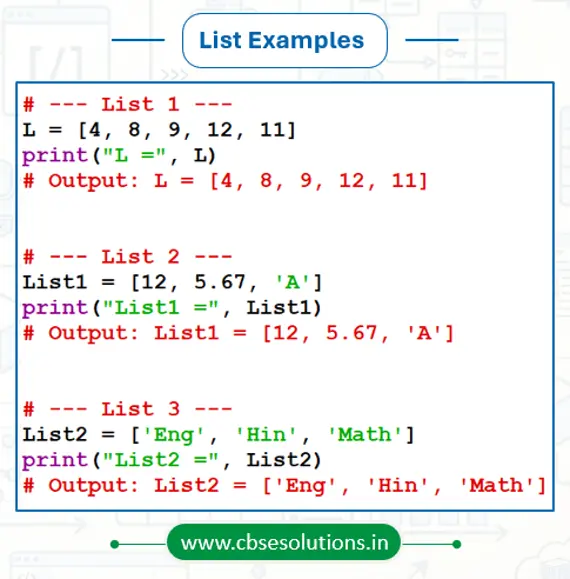
List Operations
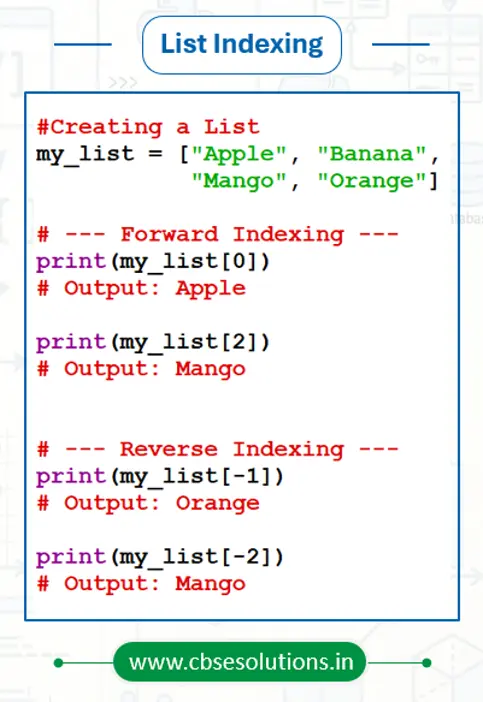
Accessing elements in a List
- Each element of a list can be accessed by using its index value.
- An index is a unique position number given to every item in the list for identification.
- Indexing always starts from 0, which means the first element is at index 0, the second at index 1, and so on.
- The index value is always written inside square brackets [ ].
Example:
List is Mutable?
- Yes list is mutable.
- Content of the list can be changed after it has been created.
List Operations
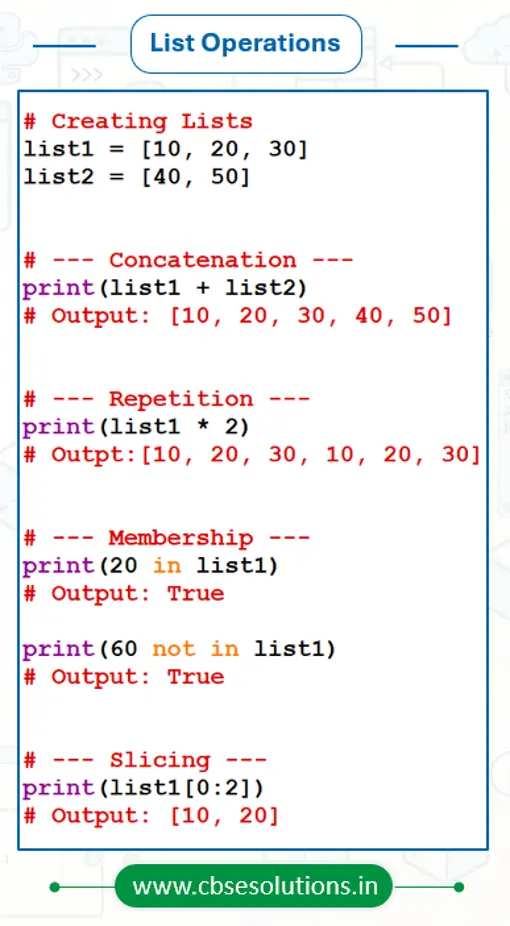
Python lists support the following operations:
- Concatenation – Concatenation means joining two or more lists to create a new list. The plus operator (+) is used for concatenation.
- Repetition – Repetition means repeating the elements of a list multiple times. The asterisk operator (*) is used for repetition.
- Membership – Membership operation is used to check whether an element exists in a list or not. Python uses in and not in as membership operators.
- Slicing – Slicing is used to extract a specific part or sublist from an existing list using index range. The syntax is list[start : stop : step], where the stop index is not included.
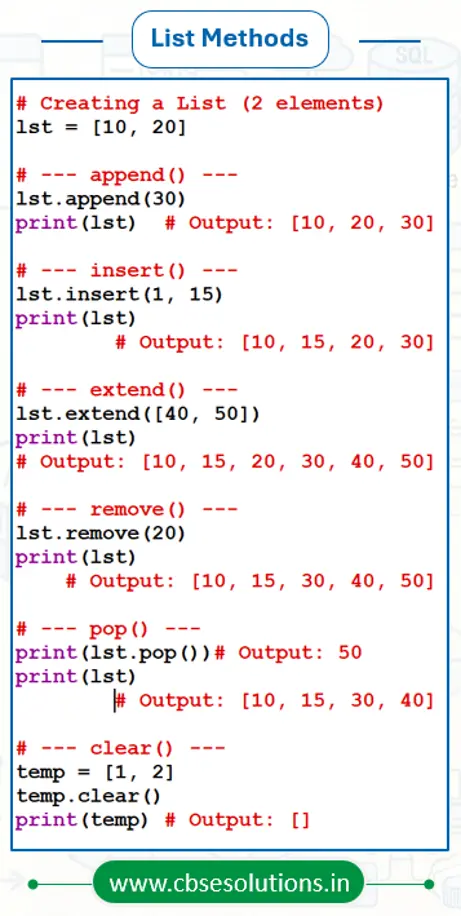
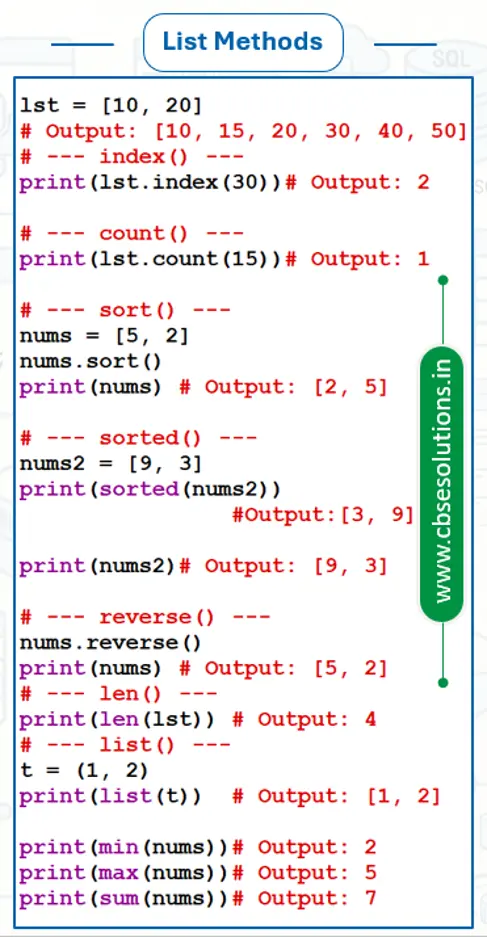
List Methods
Python provides many built-in methods and functions to perform different operations on lists easily. Some commonly used list methods are:
- append() – Adds a new element at the end of the list.
- insert() – Inserts an element at a specific position in the list.
- extend() – Adds multiple elements of another list to the end of the current list.
- remove() – Removes the first occurrence of the specified element from the list.
- pop() – Removes and returns the element at the given index. If no index is given, it removes the last element.
- clear() – Removes all elements from the list and makes it empty.
- index() – Returns the index position of the first occurrence of an element.
- count() – Counts how many times a specific element appears in the list.
- sort() – Arranges the elements of the list in ascending order.
- sorted() – Returns a new sorted list without changing the original list.
- reverse() – Reverses the order of elements in the list.
- len() – Returns the total number of elements present in the list.
- list() – Creates a new list or converts another data type into a list.
- min() – Returns the smallest element from the list.
- max() – Returns the largest element from the list.
- sum() – Returns the sum of all numeric elements in the list.
Tuple
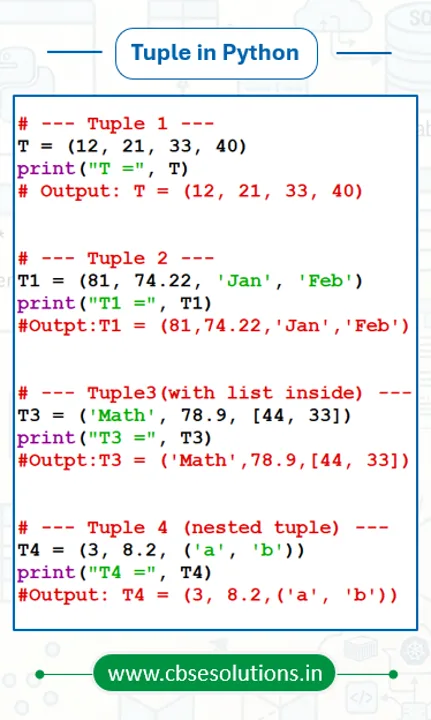
- Tuple is built in sequence data type in python.
- Stores multiple values
- Tuple item can be of different data types
- All the items are comma separated and enclosed in parenthesis ‘()’.
- Individual item in a Tuple can be accessed using index which begins from 0.
- In case of single item present in tuple, it should also be followed by a comma.
- A sequence without parenthesis is treated as tuple by default.
Examples
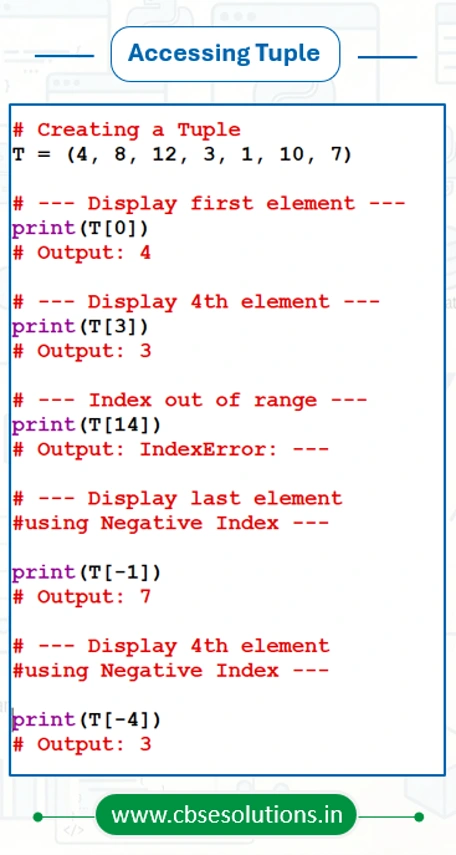
Accessing elements in a Tuple
- Individual item in a Tuple can be accessed using indexes.
- Indexes are unique numbers assigned to each item in a Tuple to identify them
- Index always begins from 0 and written in square brackets “[]”.
Example:
Tuple is Immutable?
- Yes Tuple is Immutable.
- Content of the Tuple cannot be changed after it has been created.
Tuple operations
Tuple supports following operations:
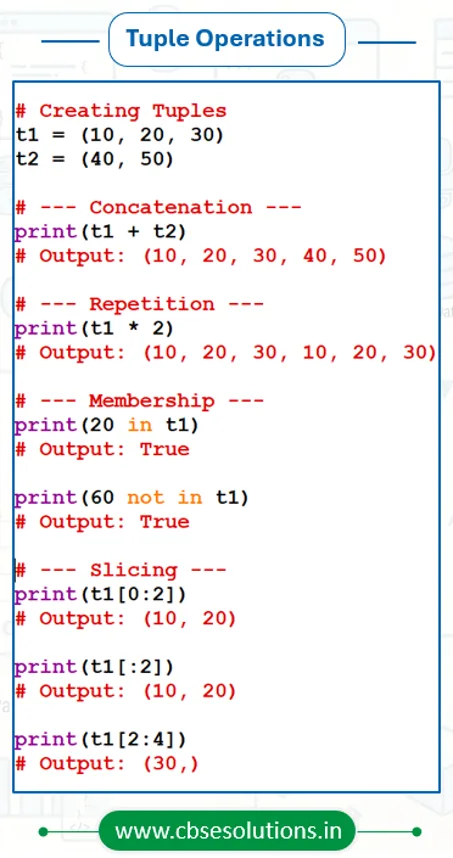
- Concatenation
- Repetition
- Membership
- Slicing
Concatenation
- Concatenation refers to joining two Tuple.
- Plus (‘+’) is used as concatenation operator.
- Concatenation operator can also be used for extending an existing tuple.
Repetition
- Repetition as it name implies used to repeat elements of a Tuple at specified no of times.
- Asterisk (‘*’) is used as repetition operator.
Membership
- Membership operation refers to checking an item exists in Tuple or not.
- Python uses ‘in’ and ‘not in’ as membership operator.
- ‘in’ returns true if the item specified present in the Tuple.
- ‘not in’ returns true if the item specified present in the Tuple.
Slicing
- Extracting a subset of items from given Tuple is called slicing
- Subset occurred after slicing contains contiguous items.
- Slicing is done using index range like Tuple[start_index : end_index : step_value]
- End index is always excluded in resultant subset of Tuple.
- Negative index can also be used for slicing.
Traversing a Tuple
- Traversing a Tuple refers to accessing each item a given Tuple sequentially.
- for or while loop can be used for traversing a Tuple.
Tuple Methods and Built-in Functions
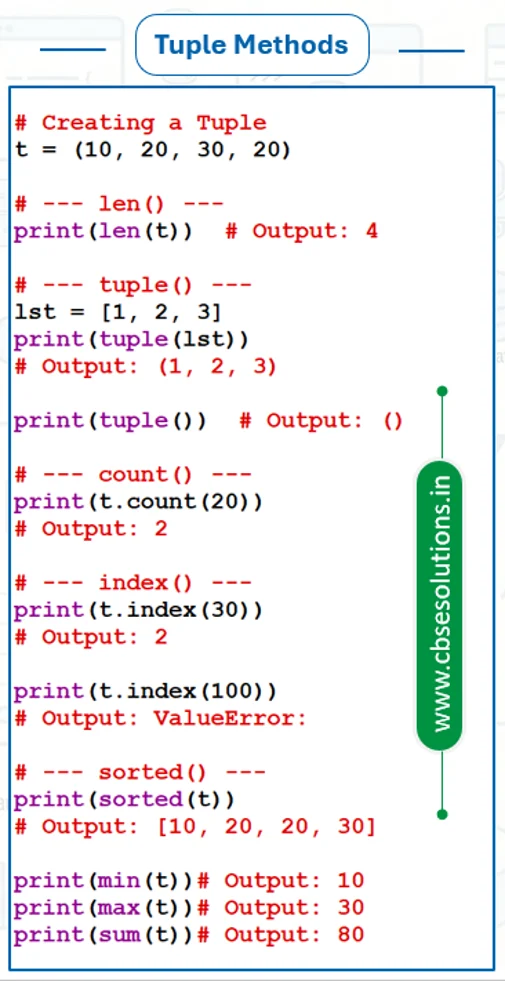
- len() – Counts and returns the total number of elements in a tuple.
- tuple() – Creates an empty tuple or converts given items into a tuple.
- count() – Counts and returns how many times a particular item appears in a tuple.
- index() – Returns the index of the first occurrence of an item in the tuple. If the item is not found, Python shows a ValueError.
- sorted() – Takes a tuple as a parameter and returns a new sorted list containing the same elements in ascending order.
- min() – Returns the smallest element in the given tuple.
- max() – Returns the largest element in the given tuple.
- sum() – Returns the sum of all numeric elements present in the tuple.
Dictionary
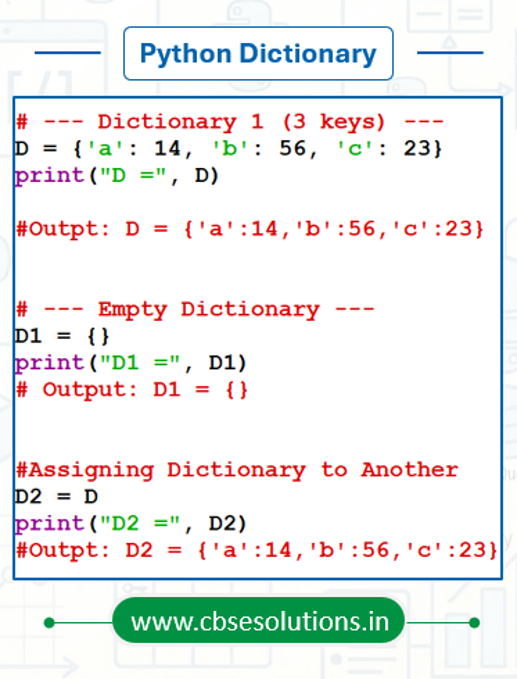
- Dictionaries are unordered collections of items and come under the mapping data type in Python.
- Data in a dictionary is stored in the form of key : value pairs, where each pair is called an item.
- In each item, the key and value are separated by a colon (:), and different items are separated by commas (,).
- All the items of a dictionary are enclosed within curly brackets { }.
- The keys in a dictionary must be unique and should be of immutable data types such as string, number, or tuple.
- The values can be repeated and can be of any data type such as string, number, list, tuple, etc.
Creating a Dictionary
Accessing Items in a Dictionary
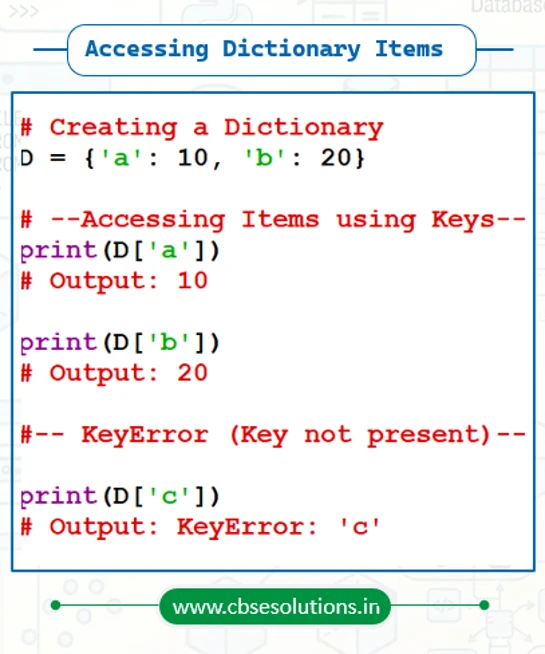
- Items of a dictionary are accessed by using their keys.
- Each key acts like an index and is used to get its corresponding value from the dictionary.
- Keys are written inside square brackets [ ] after the dictionary name.
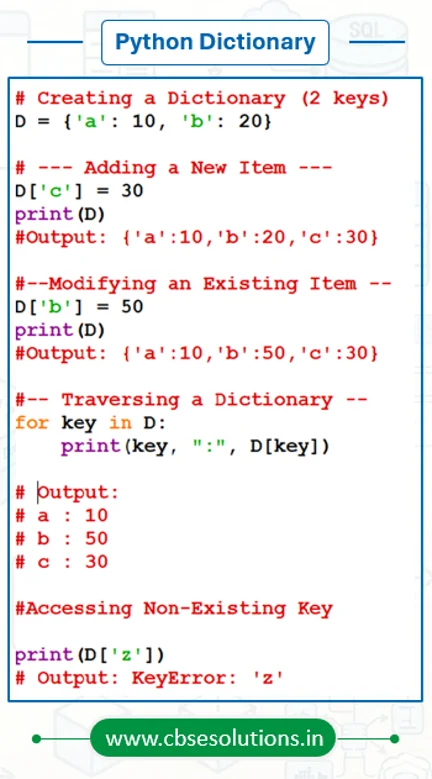
- If the given key is not present in the dictionary, Python shows a KeyError
Dictionary is Mutable?
Yes, Dictionary is Mutable as its content can be changed after it has been created.
Dictionary Operations
- Adding a new item in Dictionary
- Modifying an existing Item in Dictionary
- Traversing a dictionary
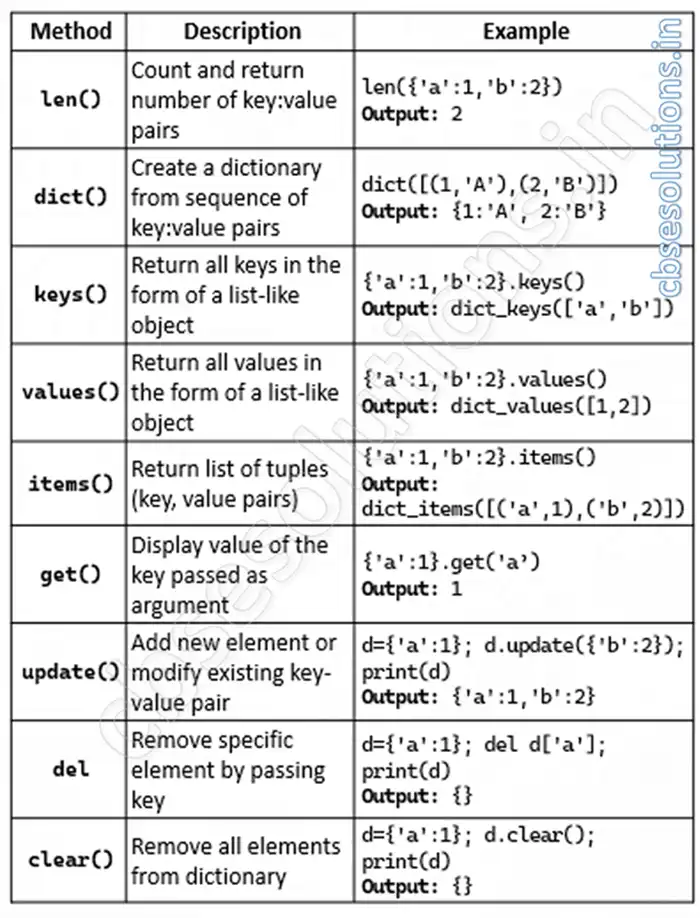
Dictionary Methods